

Short answer: MCP, short for Model Context Protocol, is a shared, open standard that lets an AI app use your business tools through one common kind of connection, instead of a custom integration for every pairing. A tool’s maker, or your own engineers, run an MCP server that lists what the AI may do, and your AI app connects to it with your sign-in. For a business team, that list and the permissions you grant matter more than the protocol itself.
What is MCP, and who controls it?
MCP is a shared set of rules for how an AI app discovers and calls the tools another system offers. Anthropic introduced it in November 2024. In December 2025 it was donated to the Agentic AI Foundation, which sits under the Linux Foundation and which Anthropic set up with Block and OpenAI. By then, over 10,000 public MCP servers were in active use (Anthropic, 2025).
No single vendor owns it now, and most major AI apps support it. As of September 2026, the current specification is dated July 28, 2026.
The USB-C analogy, and where it breaks
The official MCP site compares MCP to a USB-C port: one standard plug, so any AI app that speaks MCP can use any MCP server. That part holds; the analogy breaks in three places that matter to a buyer.
The plug says nothing about what’s behind it. Two MCP servers for the same app can offer different tools. A server can do only what its maker chose to expose.
The AI decides which tool to use. A cable doesn’t choose anything. With MCP, the AI reads each tool’s description and picks one, so a vague or misleading description steers it wrong.
Permissions live outside the plug. What the AI may actually do depends on the scopes you granted when you signed in, and on whether your AI app asks before it writes.
The first gap is easy to hit. A product’s web app might let you drag items into a new order while its MCP server has no reorder tool, so through the AI the only way to change the order is to delete and recreate. Compare the server’s tool list with what you do on screen before you plan work around it.
MCP server vs connector: who runs what
An MCP server is the program that exposes a tool’s features to AI apps; a connector is your AI app’s authorized link to it, with your sign-in and scopes attached. The diagram below follows one request.
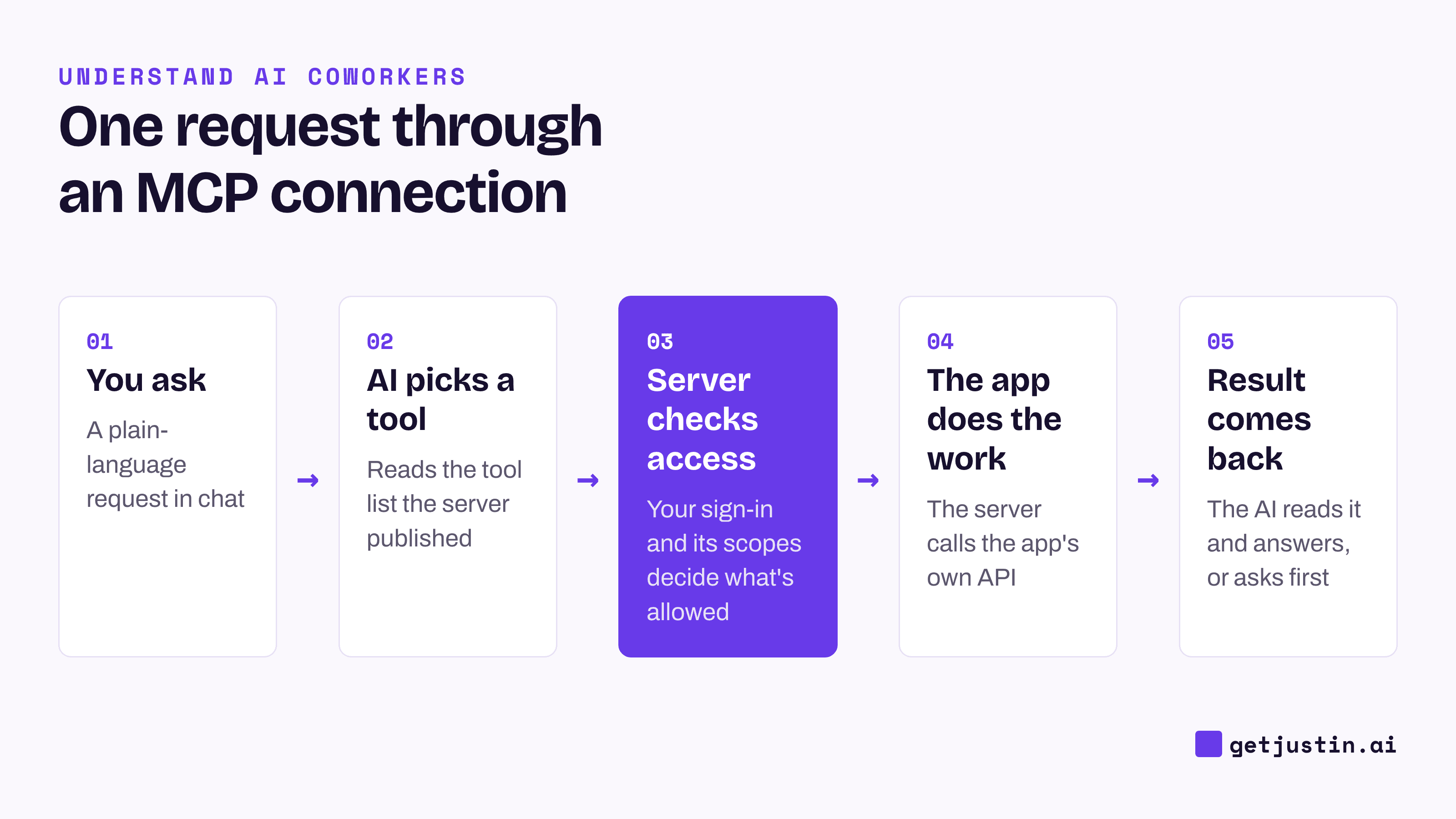
Figure: The server decides what is possible; your sign-in decides what is allowed.
Term | What it means | Who usually runs it |
|---|---|---|
MCP server | The program that lists a tool’s actions and data for AI apps | The tool’s maker, or your engineers for an internal system |
Host | The AI app you type into | The AI vendor |
Connector | The host’s saved, authorized link to a server or app | You, when you sign in |
Tool | One action a server offers, such as “search contacts” | Defined by the server |
Scope | The permissions your sign-in grants, such as read-only | Set when you authorize |
Remote vs local | Runs on the maker’s servers, or as a program on your computer | Remote: the maker. Local: you |
Many AI products call every integration a “connector”, whether MCP or a direct API sits underneath. For a buyer, the questions are the same either way.
MCP vs API: why engineers care
An API is the menu of operations an app offers to other programs. Before MCP, every AI app needed its own custom code for every tool’s API. With MCP, each tool builds one server and each AI app builds one client, and any pair can then work together.
For a business team, access to a new tool no longer waits for your AI vendor to build that one integration. And an MCP server usually calls the app’s API underneath, so it never grants more than the API allows, and often less.
What changes for a business team
You can ask for access instead of an integration. If a tool publishes an MCP server, connecting it is usually a sign-in, not a project.
Internal systems become reachable. Engineers can build one MCP server for an in-house database or admin tool, once, and the whole team’s AI can use it.
Failures get quieter. A server can show as connected and still not load during an unattended run; the guide to how AI coworkers work covers that failure.
Permissions cause the most confusing failures. On our CS team, a CSM’s first run of a reminders skill failed, and she reported the connector as broken. It wasn’t: the permission to create tasks had never been granted on her connection, and reconnecting can’t fix a permission nobody granted. The skill now checks each permission before it starts and names the missing one.
Security questions to ask before connecting an MCP server
Answer seven questions before anyone connects a server. The checklist below is the version to copy.
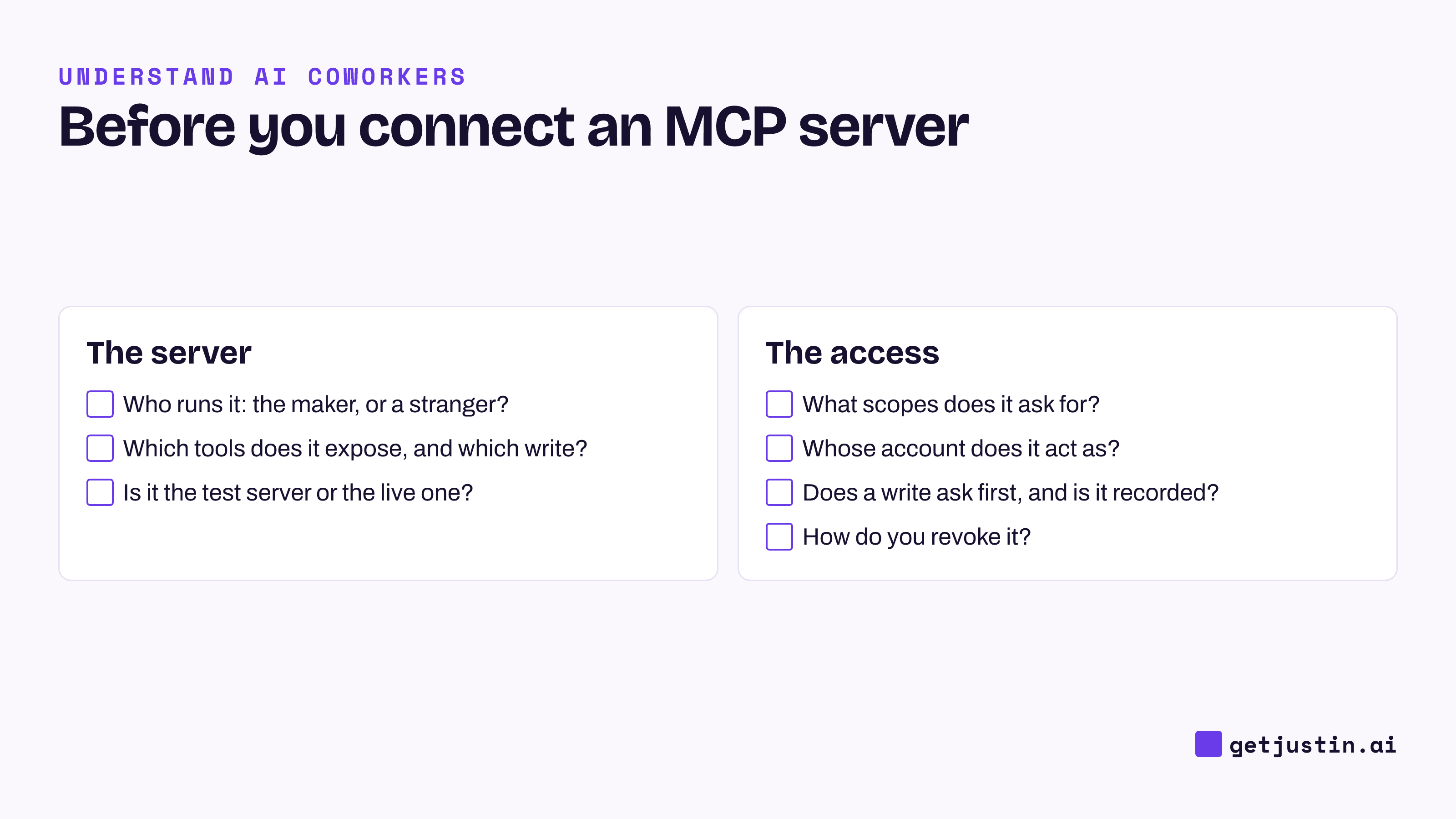
Figure: Seven questions to answer before anyone on the team connects a new MCP server.
Who runs it? Prefer a remote server from the tool’s own maker. A local server is a program on your computer with your permissions, so install one only from a trusted source.
What tools does it expose, and which ones write? Read the tool list, not the marketing page.
Is it the test server or the live one? Some products run a test and a live MCP server that look identical from the AI’s side, with the same tool names. Confirm which one is connected before running anything that matters.
What scopes does it ask for? The MCP security guidance recommends starting with the minimum and adding more only when needed.
Whose account does it act as? Know whether it acts as you, a shared account or a service account.
Does anything ask before a write, and is it recorded? The approval step comes from your AI app, not from MCP itself, so name the writes that need a person in your AI usage policy for agents.
How do you revoke it? Revoking should stop new requests immediately.
FAQ
What is an MCP server?
An MCP server is a program that exposes a tool’s actions and data to AI apps in the standard MCP format. It lists the tools on offer, such as “search deals”, and runs them when the AI calls. Most business tools that support MCP run their own server, so you connect by signing in.
Do I need to code to use MCP?
No. Using an existing MCP server usually means adding it in your AI app and signing in to the tool. Building a new server for an internal system is engineering work, usually done once for the whole team.
Is MCP safe for company data?
MCP itself is a protocol; safety depends on the server, the scopes you grant and whether your AI app asks before writing. Connect servers run by the tool’s maker, grant the smallest scopes that work, and keep writes behind an approval.
Which business tools have MCP servers?
Many CRM, billing, analytics, docs and support tools now publish one. The guide to the best MCP servers for business teams covers the ones worth connecting first and a first question to try on each.
Doing this with Justin
Justin, the AI coworker for Slack, connects to thousands of apps through Pipedream, and to your own systems through a custom MCP server reachable over HTTPS: add it once with “+ Add custom MCP”, and the whole team can use it. Nothing is connected until someone on the team authorizes it. Each integration has an Accounts view and a Tools view that show exactly what Justin can call. Reading within the scopes you approved doesn’t need approval; it asks in the channel before it writes to your connected tools, and you can approve once or for that kind of action. You can revoke any connector at app.getjustin.ai/connectors or by asking Justin.
Related reading
How AI coworkers work: the model, what it knows, what it can do, and who’s in charge
An AI usage policy for agents that take action (template)