
Short answer: The best MCP servers for business teams are the ones run by the makers of the tools you already live in: your CRM, billing, analytics, docs and support desk. As of September 2026, HubSpot, Stripe, Atlassian and Intercom run hosted servers you connect with a sign-in, while Google’s official Google Analytics server is read-only and installed on a computer. Start with one server, read-only, and a question you already know the answer to.
Most “best MCP server” lists lead with developer tools: code repositories, browser automation, databases. This one covers the tools a marketing, sales, finance or support team runs its week on. If MCP itself is new to you, start with MCP explained for business teams.
How we picked
Four tests decided the list, in this order:
The tool’s maker runs the server. A community server can be excellent, but someone you have no contract with holds your sign-in.
You connect with a sign-in. A hosted (remote) server needs no installation; a local one is a program someone has to install and keep running.
Read and write are clearly separated. You can tell from the tool list which actions change data.
It answers a question a team asks every week.
We did not benchmark these servers. The details below are as of September 2026, and a server’s tool list can change in a month. Check it again before you rely on one.
Per-app MCP servers vs an MCP gateway
Every server on this list is a per-app server: the tool’s maker runs it, and you connect each one with its own sign-in. An MCP gateway is a different layer. It sits between your AI app and many servers, so the AI makes one connection while the gateway usually handles sign-ins, access rules and a log of calls in one place.
Per-app servers suit a team starting with two or three tools, because each connection is one sign-in and access stays inside the tool’s own permissions. A gateway suits a company that wants IT to govern many connections centrally, and it adds a product someone has to buy, set up and run. Either way, ask the same two questions of every tool behind it: who runs the server, and what can it change?
The shortlist at a glance
The table below is the whole list; the sections after it add a first question for each server.
Tool | Area | Who runs the server | Can it change data? | How you connect |
|---|---|---|---|---|
HubSpot | CRM | HubSpot, hosted | Yes, CRM records; marketing and content data read-only | Sign in |
Salesforce | CRM | Salesforce, hosted | Depends on your org’s setup | An admin sets it up |
Stripe | Billing | Stripe, hosted | Yes; Stripe asks a person to confirm refunds and payouts | Sign in |
Google Analytics | Analytics | Google, runs on a computer | No, read-only | Someone installs it |
Atlassian (Jira, Confluence) | Projects, docs | Atlassian, hosted | Yes, within your permissions | Sign in |
Notion | Docs | Notion, hosted | Yes, pages and databases | Sign in |
Intercom | Support | Intercom, hosted | Some: help-center articles | Sign in |
The matrix below turns the table into an order of work.
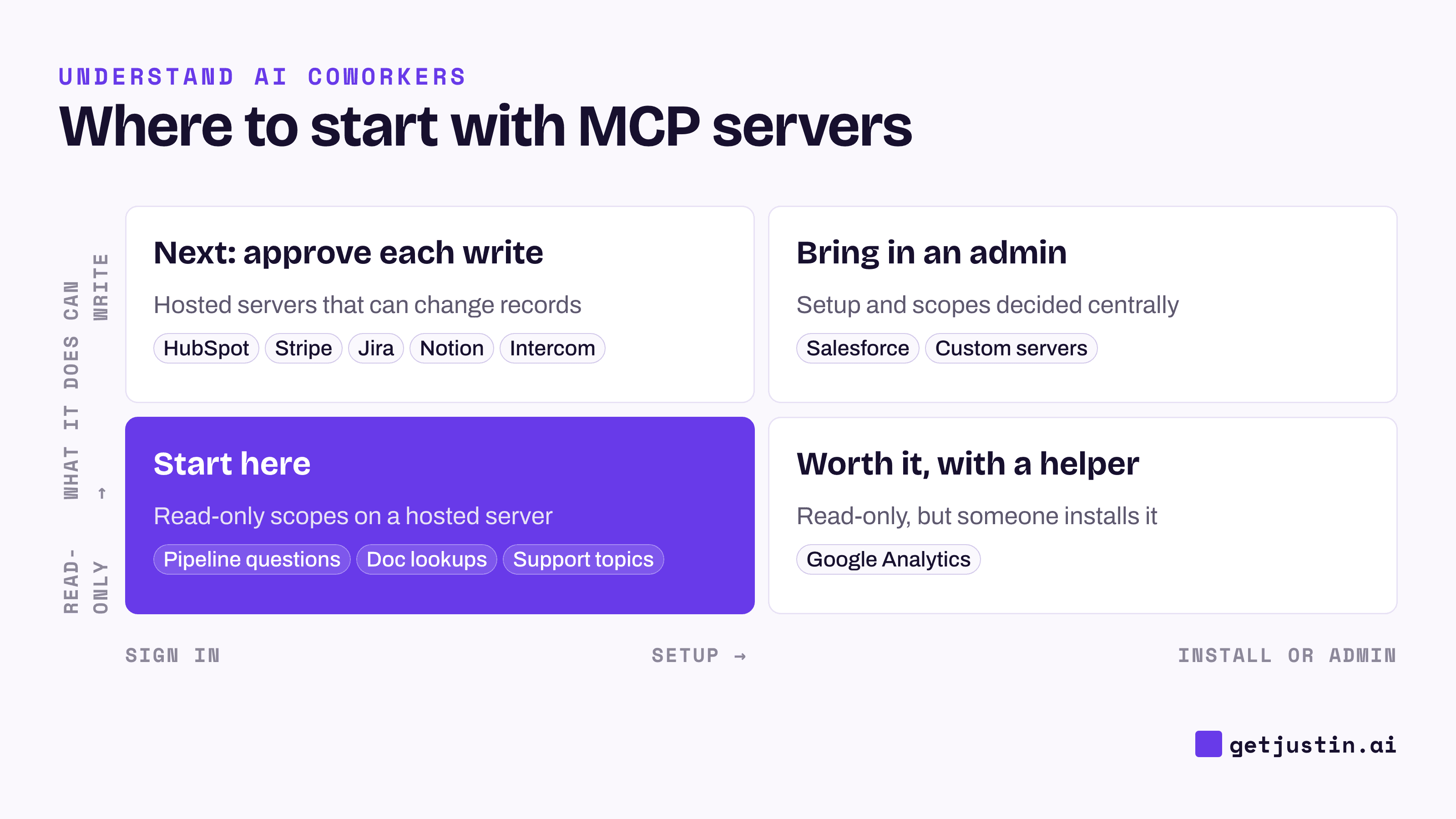
Figure: Start top-left with read-only questions on hosted servers; everything else needs an approval or a helper.
Revenue and CRM: HubSpot and Salesforce
HubSpot runs a remote MCP server that can read and write CRM records such as contacts, companies, deals and tickets, while marketing and content data stay read-only. What the AI may touch is set by the scopes of the app you authorize.
Read the tool list before you promise a workflow. A CRM server that can create and update records may still have no tool for adding a property or a dropdown option, and then a request to build new fields ends as a setup sheet a person runs in the CRM’s settings.
First question: “Which open deals over $20,000 have had no logged activity in 14 days?” (Example threshold.)
Salesforce offers hosted MCP servers, generally available since April 2026. Expect an admin to switch them on and decide what they expose, so involve yours early.
First question: “List opportunities closing this month that have no next step.”
Finance and billing: Stripe
Stripe runs a remote server you connect with OAuth, and it is the most careful one on this list. Stripe itself asks a person to confirm certain writes, such as refunds and outbound payments, before they happen. Admins can turn MCP access on or off for the whole team, separately for live mode and sandboxes, and revoke any session from the dashboard.
One date to note: from October 31, 2026, Stripe’s server stops accepting full-access secret keys, so connect with OAuth or Stripe’s agent keys.
First question: “List invoices more than 30 days past due, with customer and amount.”
Accounting tools are less settled. Check whether your accounting software’s maker offers a hosted server for your region before trusting a community one with the books.
Marketing and analytics: Google Analytics and your ad platforms
Google Analytics has an official server that is read-only: it can pull reports but cannot change your configuration. It installs from GitHub onto a computer, so it suits one analyst’s desktop AI app more than a shared team setup.
First question: “What were last week’s sessions and conversions by channel, compared with the week before?”
Whatever the source, ask the server for the platform’s own reported metric rather than letting the AI rebuild it. On our CS team, a recomputed cost per new customer once landed about ten times apart from the dashboard’s; how AI memory works at work tells that story.
For ad platforms, keep any MCP server read-only until you have confirmed who built it. A server that can edit campaigns can also spend money.
Docs, projects and knowledge: Atlassian and Notion
Atlassian runs a cloud-hosted Rovo MCP server for Jira and Confluence. It signs in with OAuth and works within the permissions you already have, so the AI sees only the projects and spaces you can see.
First question: “Which issues in this sprint have no assignee?”
Notion runs a hosted server that can read and write pages and databases once you sign in. Because docs are where team knowledge lives, connect it read-only first and see whether answers cite the right page.
First question: “Find our current pricing FAQ and tell me when it was last edited.”
Support: Intercom, and what to do about Zendesk
Intercom runs an official remote server that can search conversations, contacts and help-center articles, and can create or update articles.
First question: “What were the five most common topics in last week’s closed conversations?”
Zendesk is the gap. In our check we found marketplace and community servers, but none built by Zendesk. That doesn’t rule them out; it means asking who runs the server and where your sign-in goes, as the checklist in the MCP guide suggests.
When your tool isn’t on the list: ask for a custom server
For an internal system, such as a data warehouse or an admin panel, engineers can build a custom MCP server once and the whole team can use it. Four requests make it usable by people who don’t code:
Read-only tools first. Add writes one at a time, each with a named owner.
Tools named in business words. “Find account by name” beats a table name.
Clearly labeled test and live servers. From the AI’s side, the two can look identical.
Errors that name the fix. “Missing permission: create tasks” instead of “failed”.
Also run every new server once by hand before scheduling anything on it. A server that shows as connected can still fail to load in an unattended run, as the guide to how AI coworkers work describes.
The example below shows the pattern to aim for with any server on this list: read freely, then ask before writing.
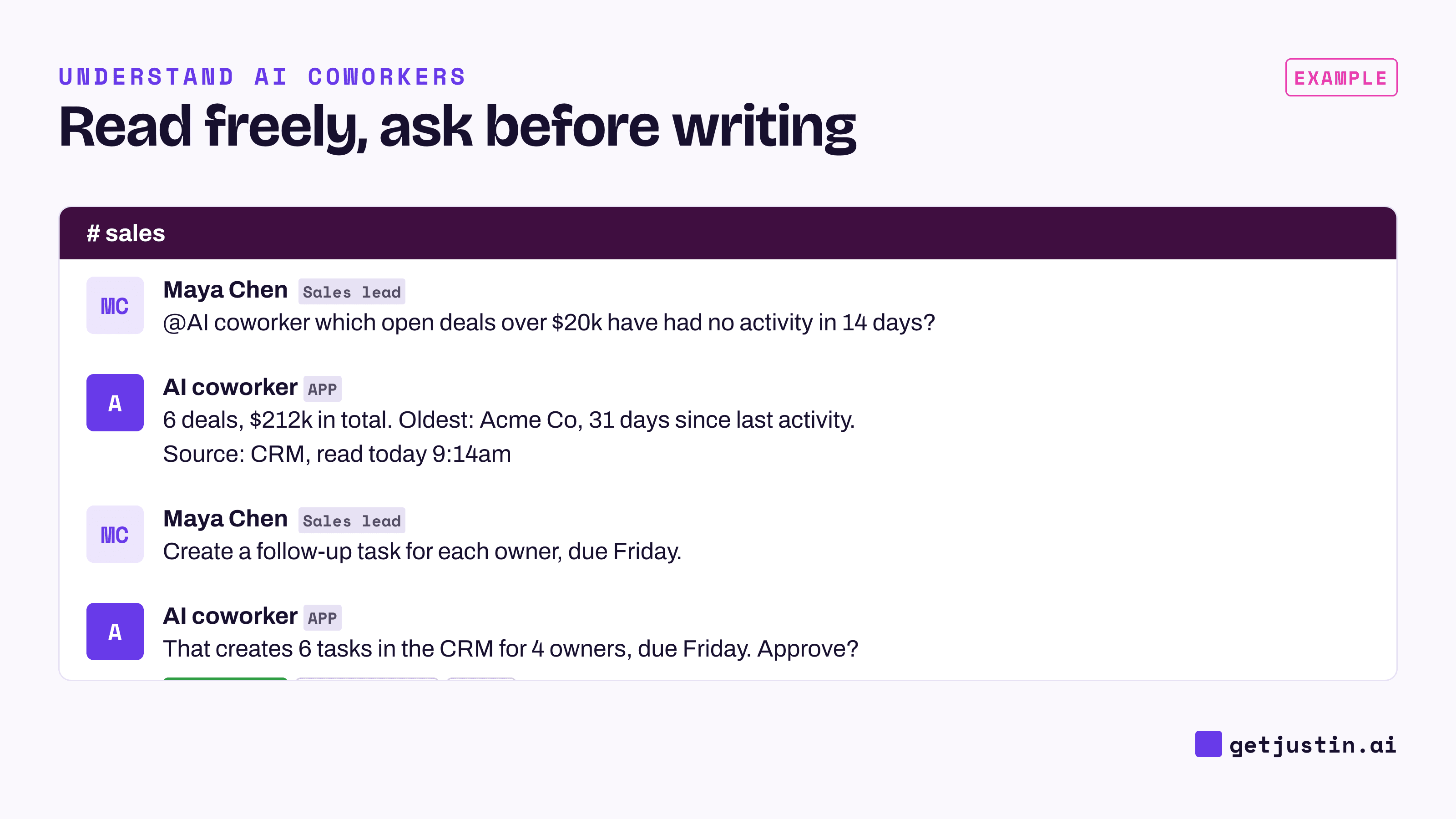
Figure: Reading needs no approval; creating six tasks in the CRM does.
FAQ
What is the difference between an official and a community MCP server?
An official MCP server is built and run by the tool’s maker, such as HubSpot or Stripe. A community server is built by someone else, often as open-source code you install. Community servers can work well, but your sign-in and data pass through software the maker doesn’t support.
What are the best MCP servers for marketing?
Start with your analytics and CRM: Google Analytics’ official server is read-only, and HubSpot’s server reads marketing data without changing it. Add ad platforms only once you know who built the server, and keep them read-only. Ask for the platform’s own reported metrics rather than numbers the AI recomputes.
What are the best MCP servers for sales?
Your CRM’s own server comes first: HubSpot runs a hosted one, and Salesforce offers hosted servers that an admin sets up. Begin with read-only questions about pipeline and activity. Allow writes such as tasks or notes only with an approval step.
How many MCP servers should a team connect at first?
One. Connect the tool the team asks about most, read-only, and test it with a question whose answer you already know. Add the next server only when the first one gives complete, sourced answers.
Doing this with Justin
Justin, the AI coworker for Slack, reaches the tools on this list through its connector catalog of thousands of apps, including HubSpot, Salesforce, Stripe, Google Analytics, Meta Ads, Google Ads, Jira, Notion, Intercom and Zendesk. Zendesk comes through that catalog, not a Zendesk-built MCP server, as of September 2026. For internal systems, add a custom MCP server reachable over HTTPS once and the whole team can use it. Nothing is connected until someone authorizes it, and each integration’s Tools view shows exactly what Justin can call. Reading doesn’t need approval; it asks in the channel before it writes to your connected tools. Start with one connector and one of the first questions above.