

Short answer: Use rule-based automation such as Zapier, n8n or Make when the steps never change and the result must be identical on every run. Use an AI agent when the next step depends on reading something first, such as an email, a thread or a messy spreadsheet. Most teams need both: rules move the data, the agent reads and drafts, and a person approves anything that writes.
All three automation tools now sell agent features too (Zapier Agents, n8n’s AI Agent node, Make’s AI Agents), so the real choice is per step, not per vendor. Below, an AI coworker means an AI agent a team shares in its chat channel; how AI coworkers work covers the parts.
The one-question test: must the result be identical every time?
Ask the question of each step, not each workflow: given the same input, would two careful people do exactly the same thing? If yes, it is a rule, and it belongs in a Zap, an n8n workflow or a Make scenario. If the honest answer is “it depends on what the email says”, the step needs reading, which is what a language model is for.
The same question is the first gate in the order our CS ops lead uses to sort all AI work, set out in the comparison of AI agents, chatbots and copilots.
The matrix below adds a second question: does the step start from clean fields, or from something a person would have to read?
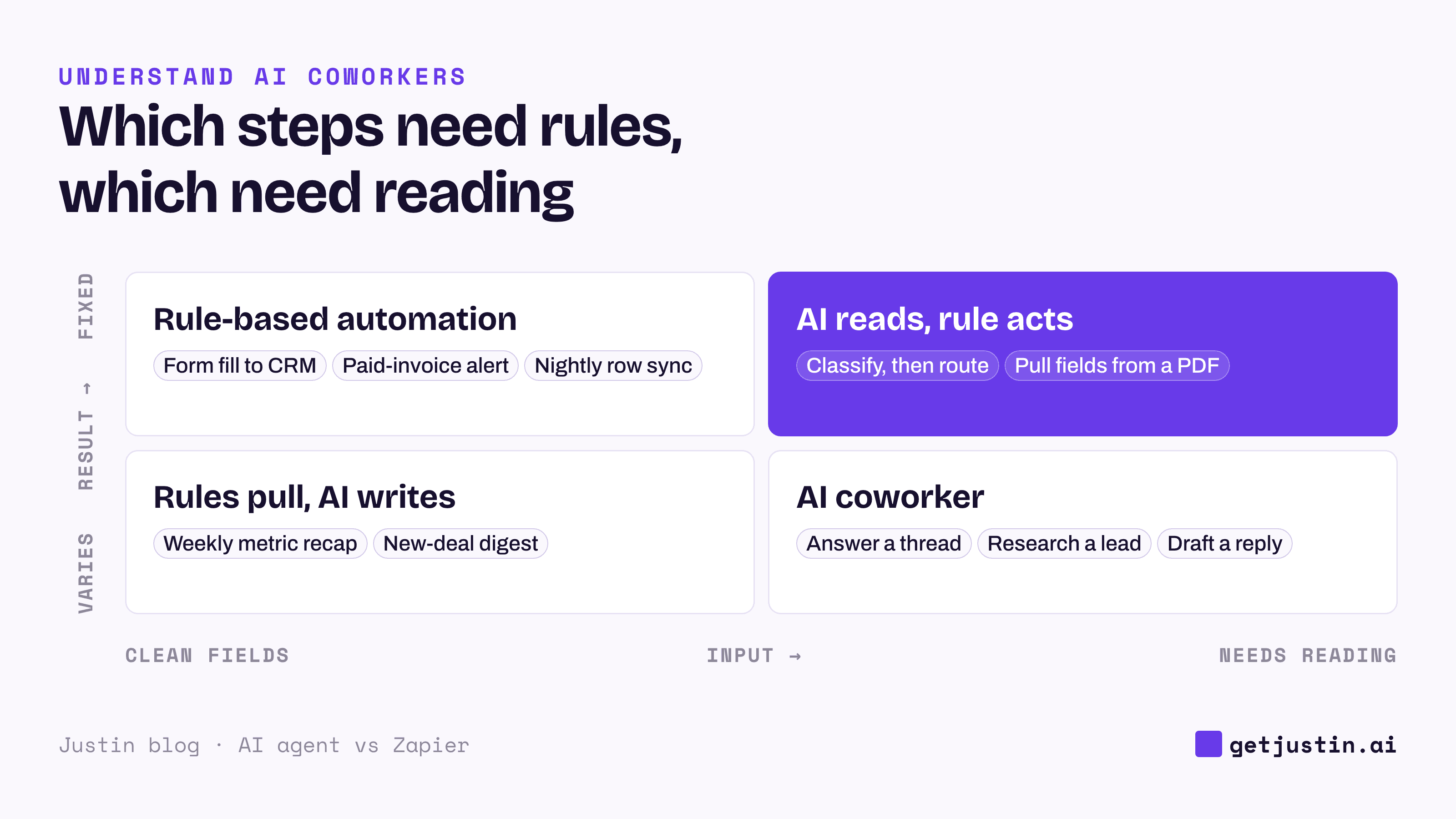
Figure: Rules own the fixed, clean-input steps; anything that starts with reading needs the model, often with a rule right after it.
What Zapier, n8n and Make do best
Rule-based automation wins on anything that must happen the same way every time, at volume, with a clear record: the steps run in the order you drew, the run history shows which one failed, and the price per run is known in advance.
The strongest case for rules is that a model does not reliably follow standing instructions. Our CS ops lead wanted every run of the team’s AI skills logged to a table, but a line in each skill’s instructions asking the model to log it was followed, in the setup notes’ words, “only about half the time.” The ops lead moved the logging into a small script that fires every time a skill runs, with no model involved. Anything that must always happen belongs in a rule, not a prompt.
Rules break when the input changes shape: a new form field, an email phrased differently, a renamed column. The Zap errors or takes the wrong branch, so the team adds filter after filter. A workflow full of exception paths usually hides a step that needs reading.
The same workflow, built both ways
An AI coworker reads first and picks the next step from what it finds, so you describe the goal and the limits instead of drawing every branch. Example: Acme, a 12-person DTC brand, wants to handle “where’s my order?” emails: find the order in Shopify, reply, and log the contact in HubSpot.
Step | As a Zap or n8n workflow | As an AI coworker |
|---|---|---|
Find the order | Pulls an order number from the subject with a pattern | Reads the email; searches by number, name or address |
Decide what to say | One branch per order status, one template each | Drafts a reply to what the customer actually asked |
Send and log | Sends and writes to HubSpot automatically | Posts the draft and the note, then asks before either goes out |
Unusual email (“two orders, one arrived damaged”) | Wrong branch, or an error | Handles it, or hands it to a person with a summary |
When it goes wrong | Run history shows the failing step | Read the thread to see what it understood |
For plain “where is order 1042?” emails, the Zap is cheaper and never improvises; the AI coworker earns its cost on the messy ones. Many teams keep both, routing emails with an order number to the rule and the rest to the AI coworker.
The price of reading is predictability. The same input can produce different wording, the model can misread, and each run costs more because the model reads everything it is given. So an AI coworker should read freely but ask before it sends or writes; the guide to agentic AI for business teams explains why.
How to use Zapier or n8n with an AI agent
The split that holds up is rules for the plumbing, the model for reading and writing, and a person for anything that changes a shared system. The diagram below shows one run divided that way.
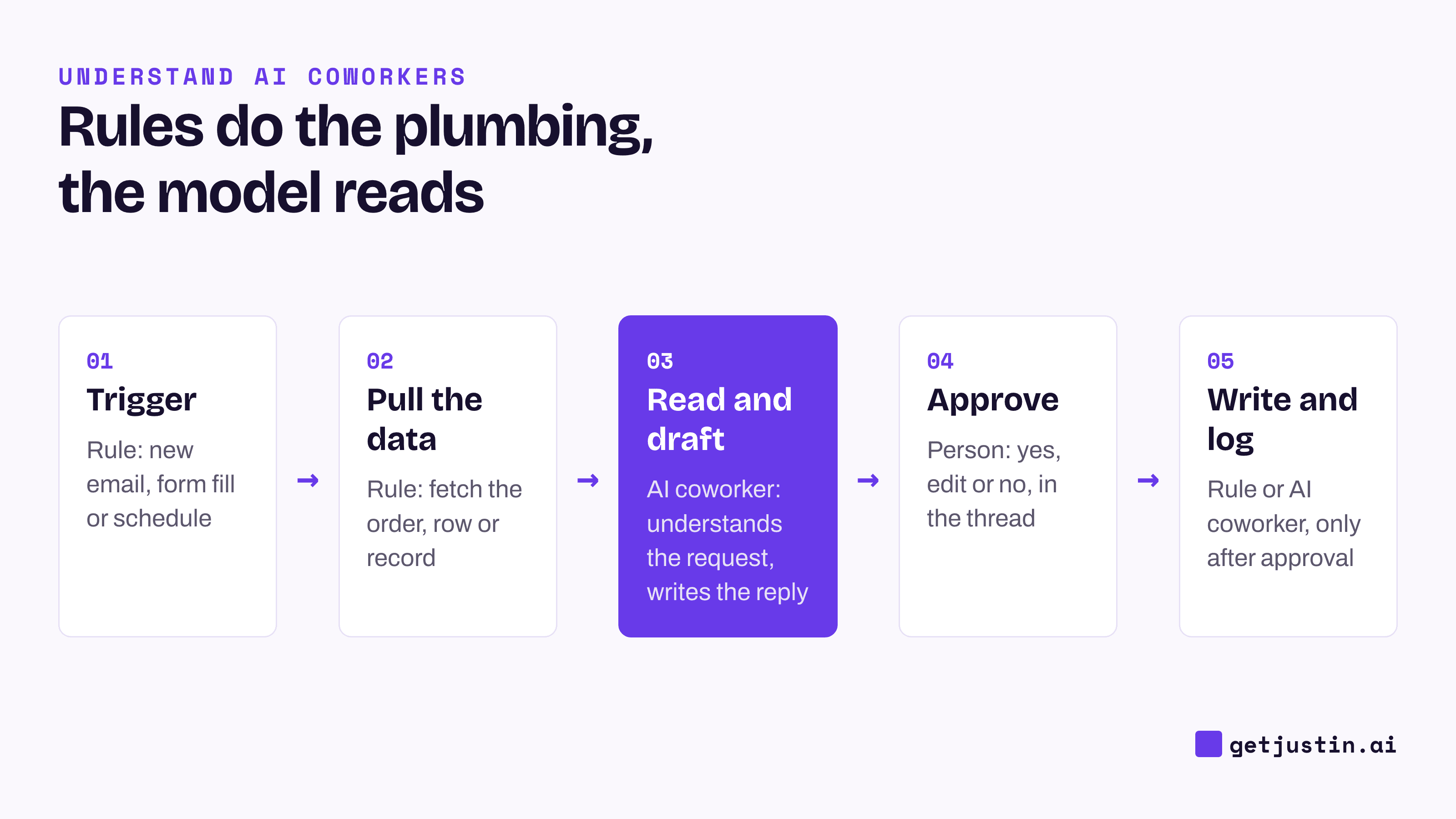
Figure: The model sits in the middle of the run, between fixed plumbing and a human approval.
Our CS ops lead’s twenty or so scheduled jobs follow that line. Sync jobs are deterministic and guard themselves: one refuses to clear any field if the source pull looks truncated. Drafting jobs use a model to write updates the ops lead reviews, and scan jobs write only what the lead approves. The model appears only where a sentence or a judgment is needed.
Connecting the two is simple: a Zap or n8n workflow that starts from a webhook can become one of the AI coworker’s tools, and Zapier MCP exposes Zapier’s actions to AI tools directly. The plain-language MCP guide explains the protocol.
What does each option cost?
Automation tools bill per step or per run, so cost tracks volume. AI coworkers bill on model usage, so cost tracks how much each run reads. Entry prices as of September 2026:
Tool | Billing unit | Free tier | Entry paid plan |
|---|---|---|---|
Task: each successful action step; triggers don’t count | 100 tasks/mo | Professional from $19.99/mo billed annually, 750 tasks | |
Credit: usually one per action | 1,000 credits/mo | Core $9/mo, 10,000 credits | |
Execution: one full workflow run, any number of steps | Self-hosted Community edition | Starter €20/mo billed annually, 2,500 executions | |
AI coworkers | Model usage, usually sold as credits or tokens | Varies | Varies; runs that read more cost more |
The practical rule: don’t put a model on a step that runs thousands of times a day and never changes. Put it where a person currently reads each item before anything can happen.
FAQ
Does Zapier have its own agents now?
Yes. Zapier’s core product is still rule-based: a trigger starts a fixed series of steps. Zapier Agents, billed separately in “activities”, choose their own steps toward a goal instead.
Can an AI agent replace Zapier?
For most teams, no. Keep the Zaps and n8n workflows that run cleanly; they are cheaper and more predictable than any model. Move a step to an AI coworker when you keep adding filters for exceptions, or when a person still reads each item by hand.
Is n8n better than Zapier for AI steps?
n8n suits teams with an engineer: it can be self-hosted for free, bills per full workflow run rather than per step, and has an AI Agent node. Zapier is easier to start with and connects to more apps. For a non-technical team, which steps need reading matters more than which tool you pick.
Can an AI coworker run my existing Zaps?
Often, yes. Any Zap or n8n workflow that starts from a webhook can be triggered by a tool that can call a URL, and Zapier’s MCP server uses two tasks per tool call (as of September 2026). If the Zap writes to a shared system, decide who approves each run before you connect it.
Doing this with Justin
Justin, the AI coworker for Slack, takes the steps that need reading and leaves your fixed plumbing where it is. Ask in a channel or a DM, and it reads the thread, reaches into connected tools and replies. It connects to thousands of apps, including Shopify, HubSpot and Zendesk, and to internal systems through a custom MCP server reachable over HTTPS. Reading doesn’t need approval; it asks in the channel before it writes to your connected tools, and you can approve once or for that kind of action. For a standing job, ask in plain words (“every weekday at 9am New York time, post the Zendesk tickets still waiting on a reply to #support”), and ask Justin to read the terms back before it starts.