

Short answer: RAG (retrieval-augmented generation) is a method where an AI looks up relevant passages in your documents before it answers, then writes its reply from what it found instead of from what the model absorbed in training. It cuts made-up answers about your own policies and products, but only as far as your documents are current, findable and correct. A good RAG answer names its source and date, and says so when it found nothing.
RAG explained for business: what happens when you ask
For business questions, retrieval-augmented generation runs the same four steps every time. Example: a CSM asks, “What’s our refund window on annual plans?”
Search. The system searches the connected documents for passages that match the question’s meaning, not just its exact wording.
Select. It keeps the few passages that score highest, such as the refund section of the current terms page.
Answer. The model writes a reply using those passages as its evidence.
Cite. It shows which document each claim came from, so a person can check it.
The diagram below shows the four steps.
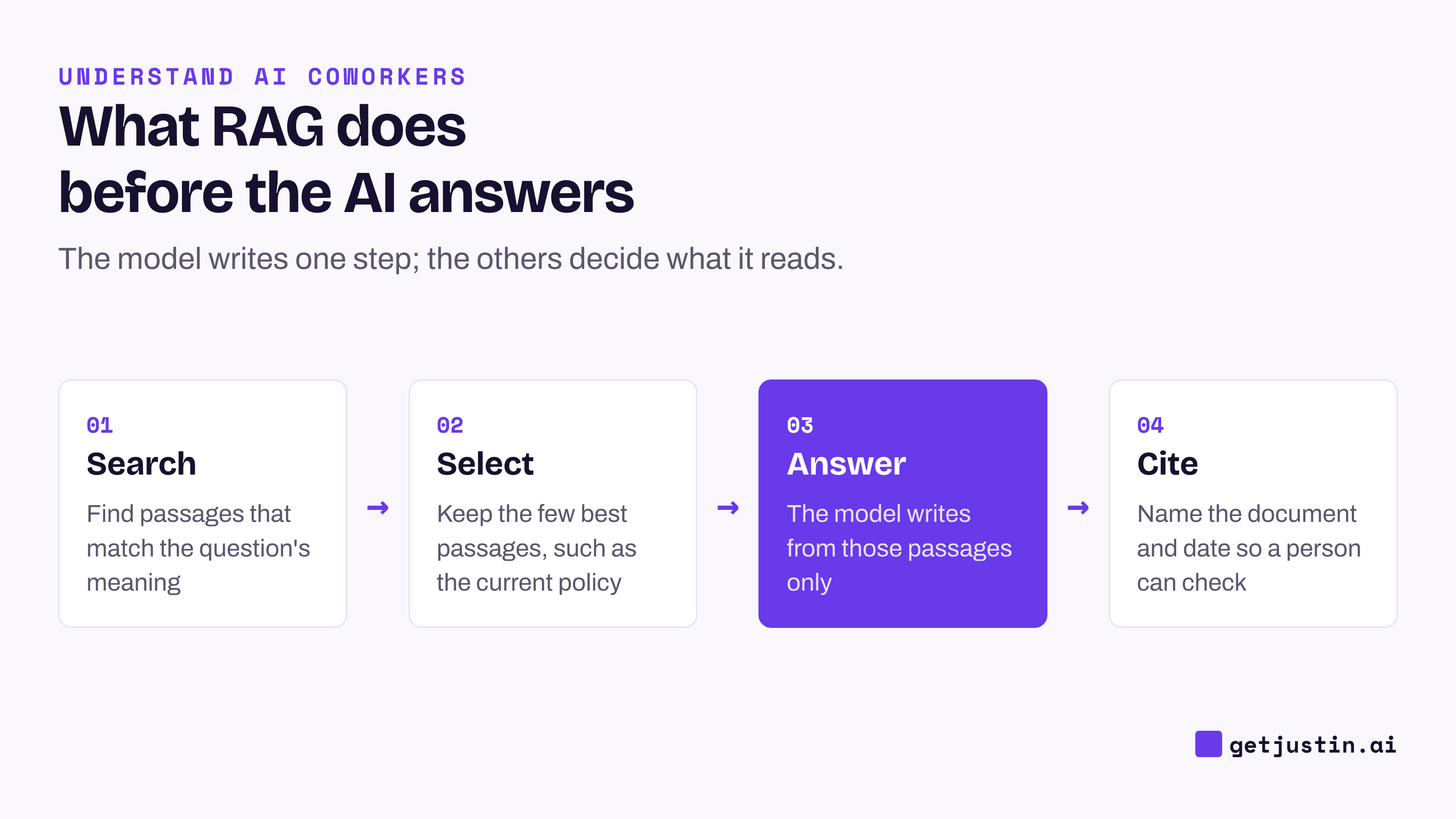
Figure: The model writes step three; the other steps decide what it reads and how you check it.
The model never learns your documents; passages are handed to it at question time, so an edited policy changes the next answer with no retraining. Answer quality is decided before the model writes a word, by what’s in the library and what the search picks. Both are business decisions.
Does RAG stop AI from making things up?
RAG reduces made-up answers but does not remove them. When Stanford researchers tested legal research tools built on retrieval, the tools hallucinated less than a general chatbot, yet still produced wrong or unsupported answers 17% to 33% of the time (Stanford RegLab, 2024).
Most wrong RAG answers trace back to what was retrieved, because the model answers faithfully from whatever it was handed.
What went wrong | What you see | The fix |
|---|---|---|
The right document isn’t in the library | A plausible answer built from a nearby document | Add it, or make “not found” an acceptable answer |
An old version outranks the current one | Last year’s price or policy, stated confidently | Archive superseded versions; date every policy page |
Two sources disagree | One of them picked, with no warning | Rank your sources; show both when they conflict |
The source is an AI summary | The summary’s errors repeated as fact | Search raw records, not summaries of them |
The passage was found but misread | A claim the document doesn’t make | Show the passage next to the claim |
The asker can’t open the source | An answer nobody can check, or a leak | Match what it searches to the asker’s access |
The summary row is the one teams miss. On our CS team, AI-extracted “customer questions” in meeting summaries were audited against raw transcripts across 63 demo calls, and about 40% were the rep’s own narration rewritten as questions. An AI retrieving those summaries would cite them perfectly and still be wrong. Our CS ops lead’s rule: an AI summary is a lead, not evidence.
Which documents should an AI coworker search?
Fewer, ranked sources beat everything at once, because every folder you connect is another chance for an old version or a stray draft to win the search.
Our CS ops lead’s product Q&A helper for sellers and CSMs searches a short, fixed list of sources, and team chat is deliberately not on it, because in chat a colleague’s guess sits next to the expert’s answer with equal weight. When the ops lead drafts an answer from a thread, the answer includes only what the expert asserted and keeps their hedges, because hedged and correct beats crisp and wrong.
For your own library:
One current version of each document in the searchable folders; archive the rest.
A fixed order when sources overlap, for example published help articles first, then internal product docs (which often run ahead of the help center), then answers an expert has confirmed.
A date and an owner on every policy or pricing page.
Raw records over summaries of them.
Decide what’s out: chat history, drafts, personal notes.
RAG vs memory vs connectors
RAG, memory and connectors are three ways an AI coworker gets facts, and each fits a different kind of question. In the four-layer model from how AI coworkers work, RAG and memory sit in the knowledge layer, while connectors belong to the actions layer.
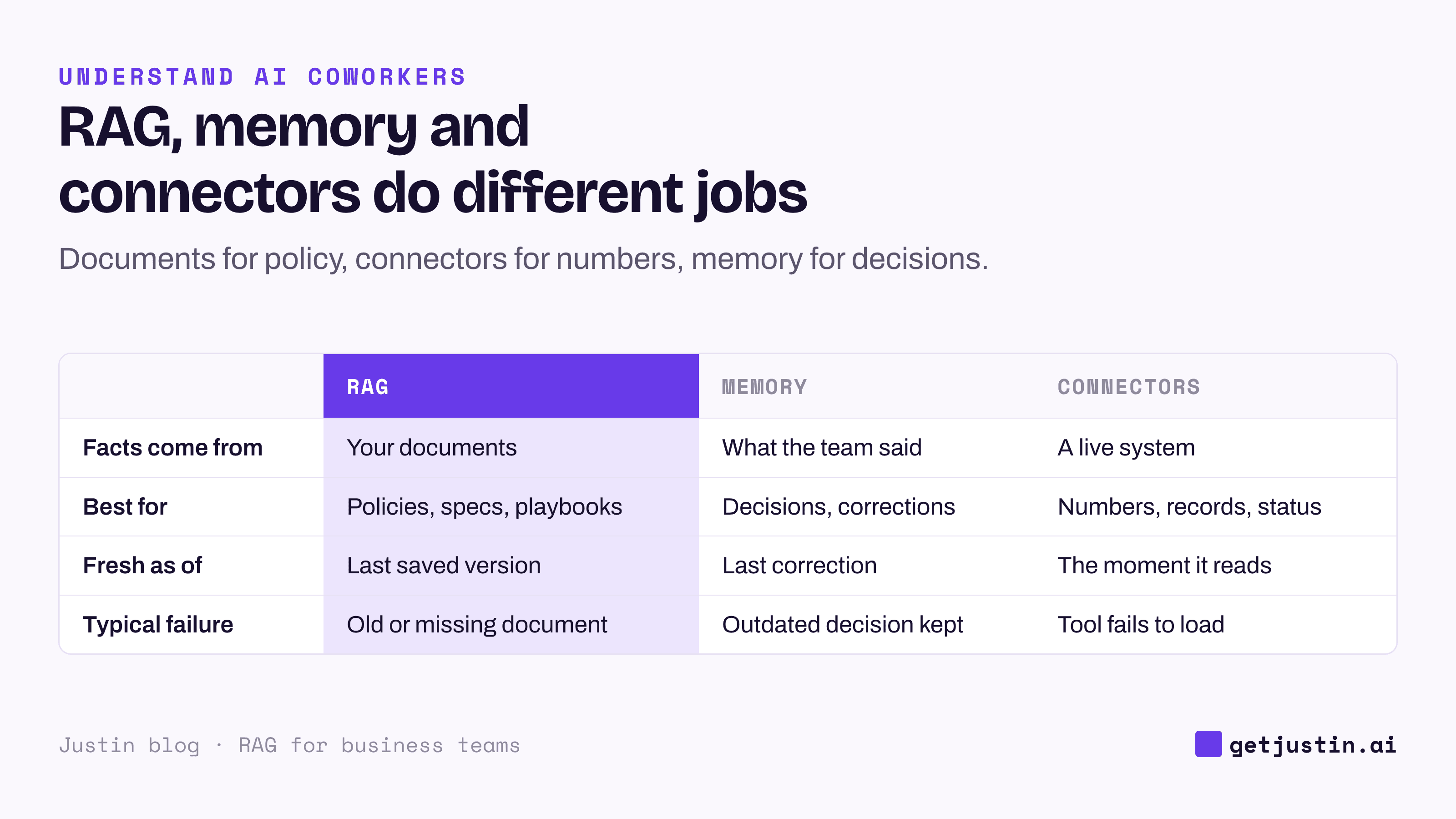
Figure: Documents for policy, connectors for numbers, memory for decisions.
A spend figure copied into last month’s deck is last month’s; read it live through a connector instead. A policy saved in memory stays frozen after the document changes; keep it in the document. How AI memory works at work covers memory scoping, and the plain-language MCP guide covers how connectors reach your tools.
What a cited answer should look like
A cited answer lets you check it in under a minute: document and section, date or version, and the passage behind anything consequential. When sources conflict, it says which one it used and why. When nothing matches, it says so instead of guessing.
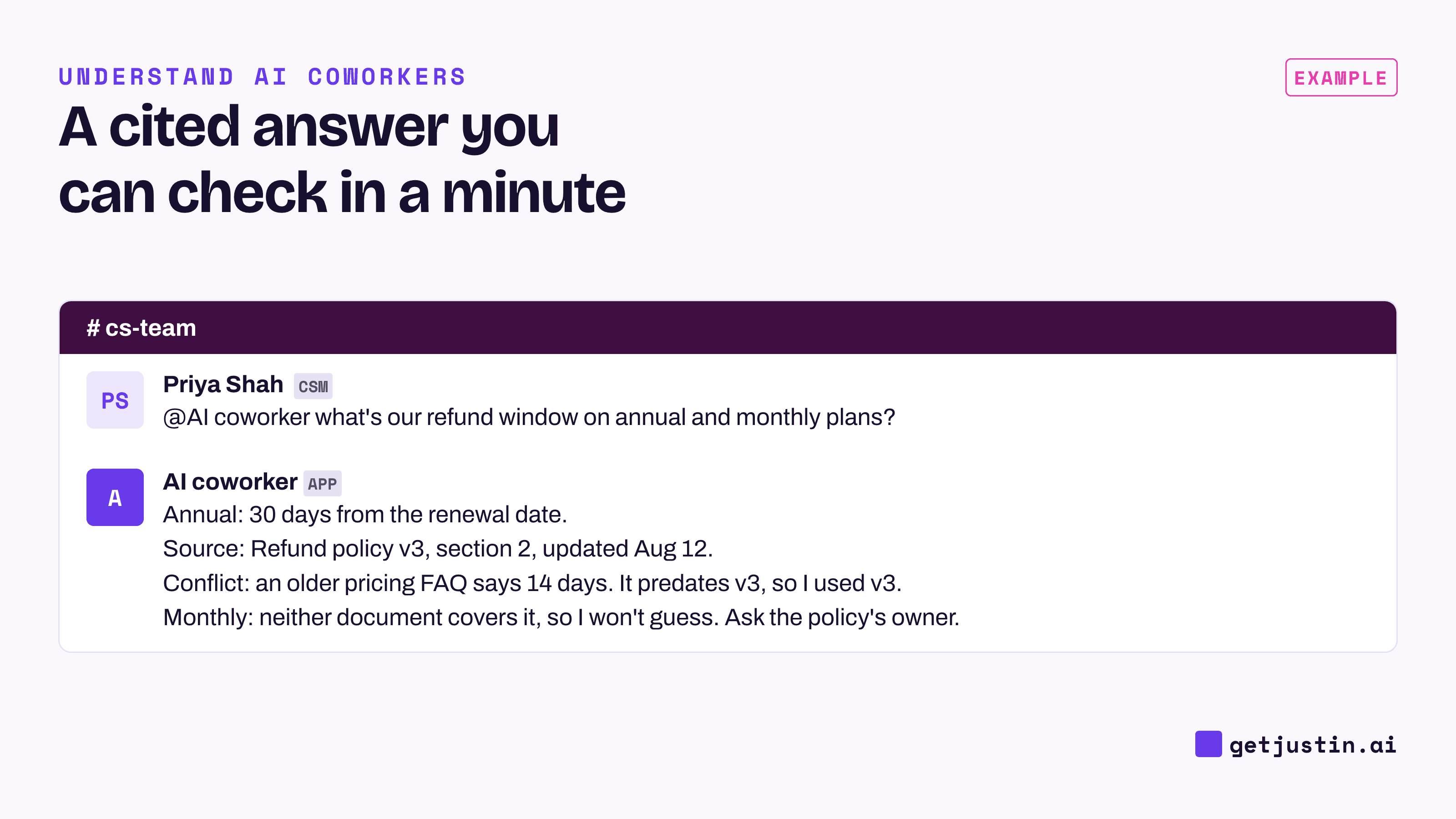
Figure: The useful answer shows its source, notes the conflict, and admits the gap.
The weaker the source, the less an answer should be allowed to do. A workable rule for suggested answers to support tickets: an exact match in a table of confirmed answers can go into the reply itself, while a match only in a general best-practices guide stays a suggestion in the thread. When the only evidence is a similar past ticket, the suggestion should wait for a person to judge.
Test any RAG setup with three questions you can answer yourself: one where the policy changed recently, one where two documents disagree, and one no document answers. The third is the most revealing.
FAQ
Is RAG the same as training an AI on my documents?
No. Training or fine-tuning changes the model itself, which is slow and must be redone when documents change. RAG leaves the model alone and hands it relevant passages at question time. Most business teams need retrieval, not training.
Does RAG mean my documents are used to train the model?
Not by itself. Retrieval passes passages to the model for one answer; whether a vendor also stores or trains on that content is a separate policy. Ask each vendor whether your content is used for training and how long it is kept.
Do business teams need a vector database for RAG?
Usually not directly. A vector database is the index that lets a system search by meaning, and most AI coworkers and knowledge tools run one behind the scenes. Your team controls the library: which documents are in it, which version is current, and who can see what. The AI glossary for business teams defines the related terms.
How do we keep RAG answers current?
Give every policy document an owner and a date, and move superseded versions out of the searchable folders, where they compete with the new ones. After a major policy change, re-ask your known-answer questions.
Doing this with Justin
The library rules above apply to Justin, the AI coworker for Slack, as well: what it knows about your policies comes from what your team gives it. It can read the thread and look back through the channel when you ask. You can share a file with your question, or connect the tools your documents live in, such as Notion or Google Sheets; nothing is connected until someone on your team authorizes it. A live page Justin builds shows when its data was last updated, and you can ask where any number came from. Ask it to remember a correction, and it keeps it for the team. Justin uses large language models, so its output can be wrong or incomplete; check anything consequential. Start by sharing your current policy doc in one channel and asking three questions you already know the answers to.