
Short answer: Useful AI memory at work is scoped: what’s said in a client channel stays with that channel, what you tell the AI in a direct message stays yours, and company-wide rules apply everywhere. Shared team memory means an AI that everyone in a channel works with remembers the same context and the same corrections, so nobody briefs it from scratch. The question to ask is not how much it remembers, but who can see what it remembered.
Memory is one part of the knowledge layer in how AI coworkers work. Looking things up in documents at the moment of a question is a different mechanism, retrieval, covered in RAG for business teams.
The three kinds of memory at work
At work, an AI’s memory comes in three scopes, and each one has a different audience.
Scope | What it holds | Who sees it | Example |
|---|---|---|---|
Company | Rules that apply everywhere: definitions, house style, instructions an admin sets | Everyone who uses the AI | “Our fiscal quarters start in February” |
Channel | What the team said, shared and decided in one channel, plus corrections given there | People in that channel | “For this client, report CAC on new customers only” |
Personal | What one person told the AI in a direct message | Only that person | “Draft my updates as bullet points” |
Developer guides sort memory by duration: short-term for the current task, long-term across sessions. For a team, scope matters more than duration, because a fact remembered forever in the wrong place does more harm than one forgotten. The diagram below stacks the three scopes.
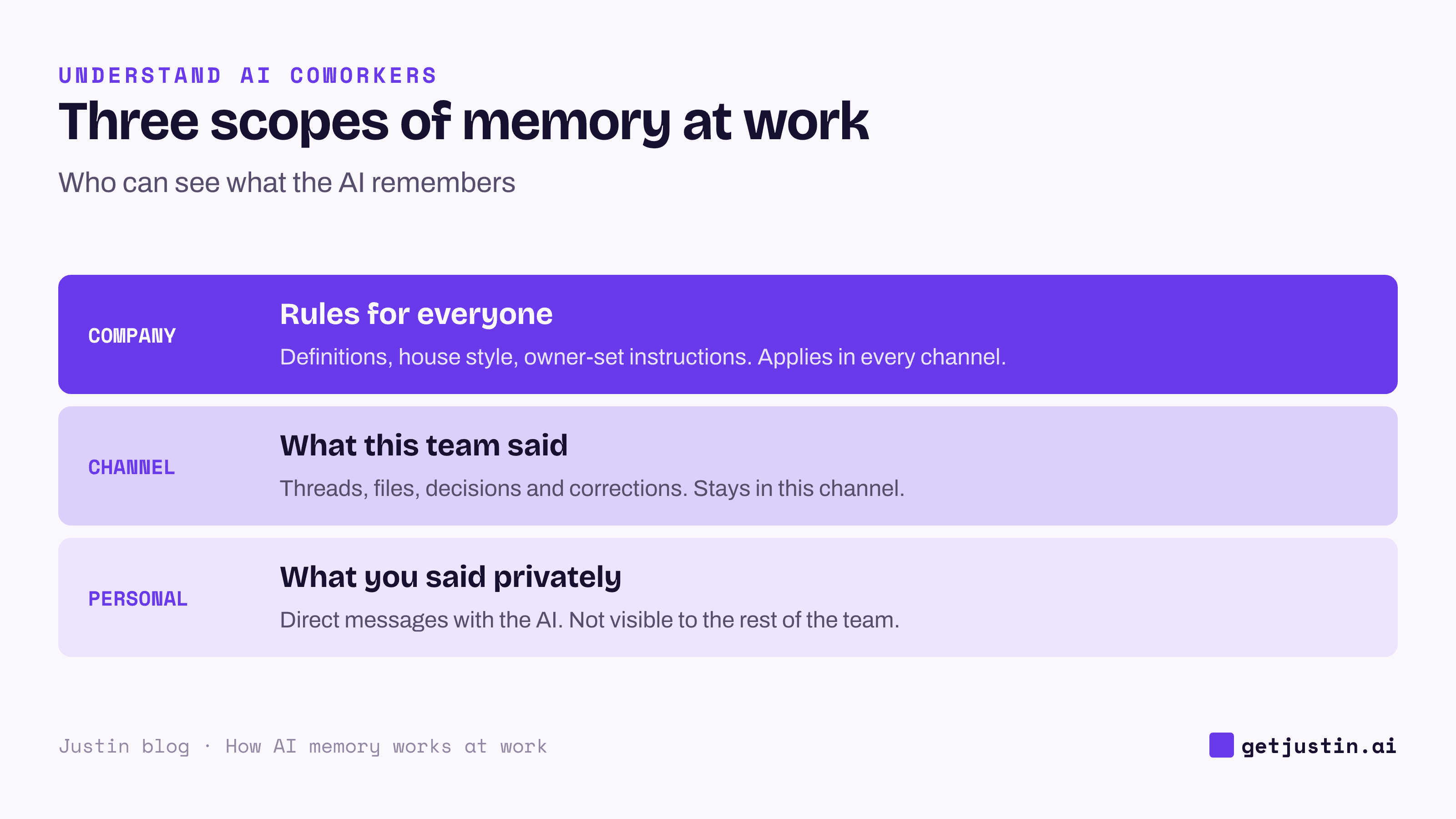
Figure: A fact belongs in the narrowest scope that needs it.
Why personal assistants don’t give you shared team memory
A personal assistant remembers per person. Five people on a team teach five assistants five versions of the same account, and a correction one of them gives never reaches the other four. When someone is out, their assistant’s context is out with them.
That drift exists before any AI arrives. When our CS ops lead ranked 1,351 client questions from 222 meetings, the headline wasn’t a missing answer: 140 questions got materially different answers depending on which CSM was in the room. Personal assistants copy that drift into every draft. Shared team memory gives the agreed answer one home, which is the core difference between a personal assistant and an AI coworker in the comparison of AI agents, chatbots and copilots.
Scoping and privacy: who can see what the AI remembers
Scoping is the rule that decides which memories an AI may use in which conversation. Get it wrong and the AI becomes a leak: one client’s numbers surfacing in another client’s channel, or a private note appearing in a team thread.
Four rules cover most teams:
Client channels are sealed. Context from one client’s channel is never used in another’s.
Direct messages stay private. What you tell the AI one to one isn’t visible to the rest of the team.
It reads only where it’s invited. No private channels it wasn’t added to, and never other people’s direct messages.
An owner sets company rules, so one person’s preference doesn’t become team policy by accident.
You can test scoping in ten minutes. Tell the AI a harmless made-up fact in one channel, then ask about it in a second channel and in a direct message. It should know the fact in neither place.
Ask it to remember a correction
A correction is the most valuable thing a team can put into an AI’s memory, because it records a judgment the model could not have guessed. On a weekly recap, our CS ops lead computed cost to acquire a customer the obvious way, spend divided by new-customer orders, and a CSM asked whether that was the dashboard’s figure or a made-up one. It was made up: the dashboard scoped the metric to one storefront, the recap summed every storefront, and the two figures were about ten times apart. The ops lead’s rule since: “A metric is a definition, not a formula you reinvent.”
The correction went into the AI’s memory in a fixed format: the rule, a “Why” naming the incident, and a “How to apply.” Every note is listed in one index the AI reads at the start of each session, so the rule shapes every future recap, not just the one that was wrong. The “Why” is what lets the AI judge a case the rule’s wording didn’t foresee. The ops lead’s AI memory now holds 107 notes: 24 corrections, 41 on ongoing projects and 42 reference notes on where things live.
The example thread below shows the same pattern in a marketing channel.
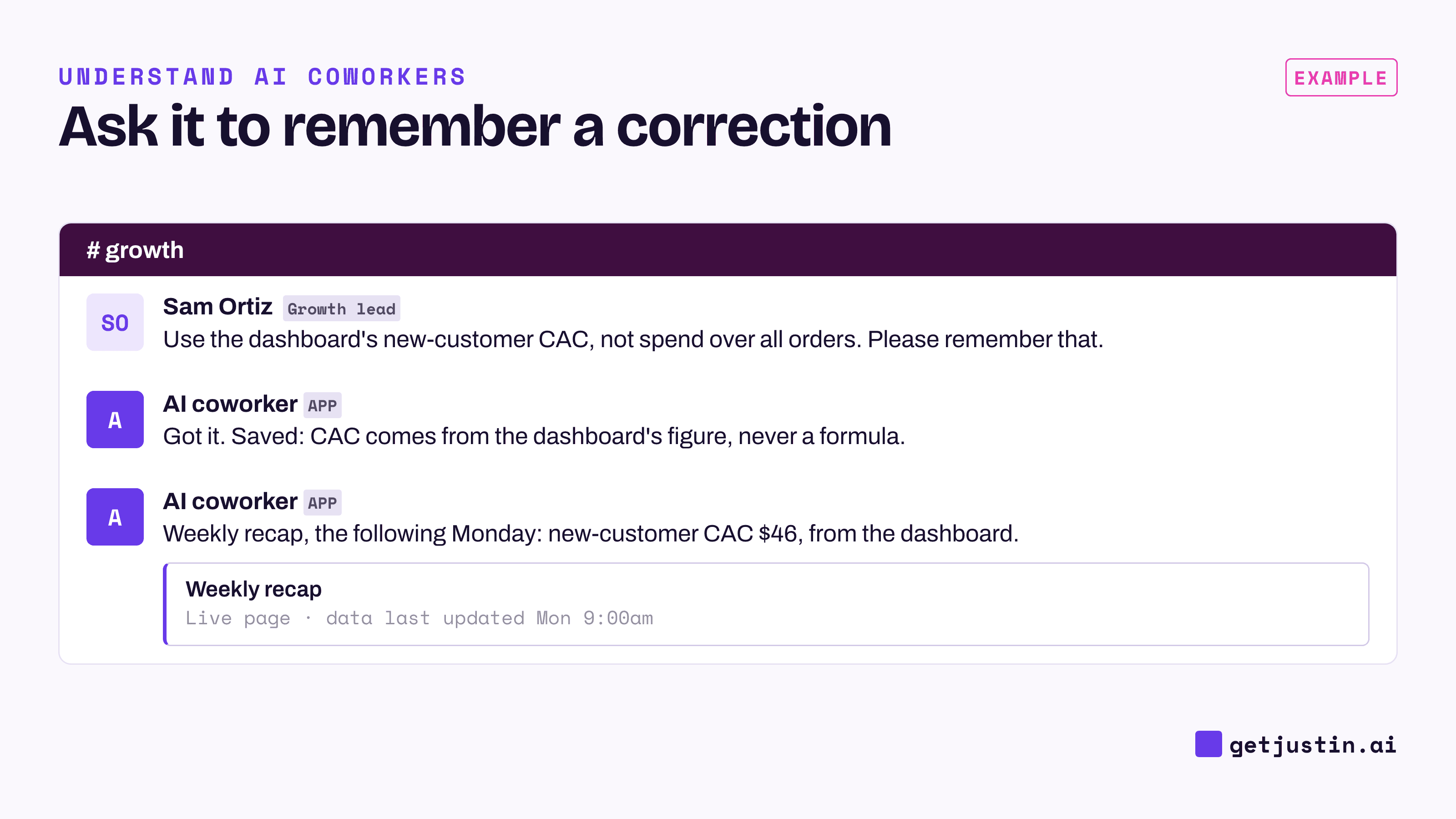
Figure: The growth lead asks the AI to remember the correction, and the next report follows it without a reminder.
What should an AI never store?
Some things should never become memory, however convenient:
Passwords, API keys and access tokens. Connect tools through their own sign-in instead of pasting credentials into chat.
One client’s data outside that client’s channel.
Personal and HR details such as pay, health or performance notes, in any shared scope.
AI-written summaries saved as facts. A summary is a lead; the source is the evidence. RAG for business teams shows how far AI-extracted meeting notes drifted from the transcripts on our CS team.
Unverified guesses. A “probably” saved today is read back next month as a fact.
Memory also goes stale. Some of the notes in the ops lead’s AI memory exist only to record that a data source was retired, so the AI stops reaching for it. Review a team’s AI memory the way you review a shared doc: remove what is no longer true.
FAQ
What is shared team memory in AI?
Shared team memory is context an AI keeps for a group rather than one person: the threads, files, decisions and corrections from a shared channel. Everyone in that channel gets answers built on the same context, and one person’s correction applies to everyone’s next request. It should still be scoped, so one channel’s memory never leaks into another.
Can an AI coworker read my direct messages?
A well-designed AI coworker sees only its own conversations with you, and keeps those private from the rest of the team. It never reads direct messages between other people or private channels it wasn’t invited to. Confirm both in the vendor’s documentation before you roll it out.
Is AI memory the same as training the model on our data?
No. Memory is stored context the AI reads back while it works; the model itself doesn’t change. Whether a vendor uses your data to train models is a separate policy, so ask about it directly.
How do I make an AI forget something?
Ask it to, then check by asking a question that would use the fact. If the fact came from a message, edit or delete that message too, since the AI can read the thread again. For anything sensitive, ask the vendor how stored data is deleted.
Doing this with Justin
Justin, the AI coworker for Slack, gives the whole team one account, with one set of connectors and a shared team memory. It works in Slack, with a web app for setup and live pages. It remembers what your team tells it, and it can read the thread and look back when asked, so nobody briefs it from scratch. Ask it to remember a correction, and it keeps it for the team. What you say to Justin in a DM isn’t visible to the rest of your team. The workspace owner can set custom instructions for the whole team, which covers the company layer. It never sees private channels it isn’t in, or DMs between other people. Start in one channel, and when it gets something wrong, ask it to remember the correction.