

Short answer: An AI coworker is a large language model that a whole team shares in the channel your team already uses, with the team’s context, access to its tools, and rules for when to ask before acting. How AI coworkers work comes down to four layers: the model that reads and writes, the knowledge it draws on, the actions it can take, and the people who approve them. In our experience, most failures happen in the last three layers, not in the model.
Our CS ops lead runs about twenty scheduled AI jobs for a customer success team, plus 13 skills the team runs on demand. When something broke, the cause was rarely the model. It was an assumption nobody checked, a job that failed without saying so, or a write nobody had clearly approved: one failure for each layer above the model.
What is an AI coworker?
An AI coworker is a shared AI: the whole team works with it in a group channel, and it remembers the team’s context, uses its connected tools and asks before it changes anything.
A chatbot answers one person, a copilot helps one person inside one app, and an agent takes steps toward a goal; the comparison of AI agents, chatbots and copilots covers when each fits.
The diagram below shows the four layers and how each one tends to fail.
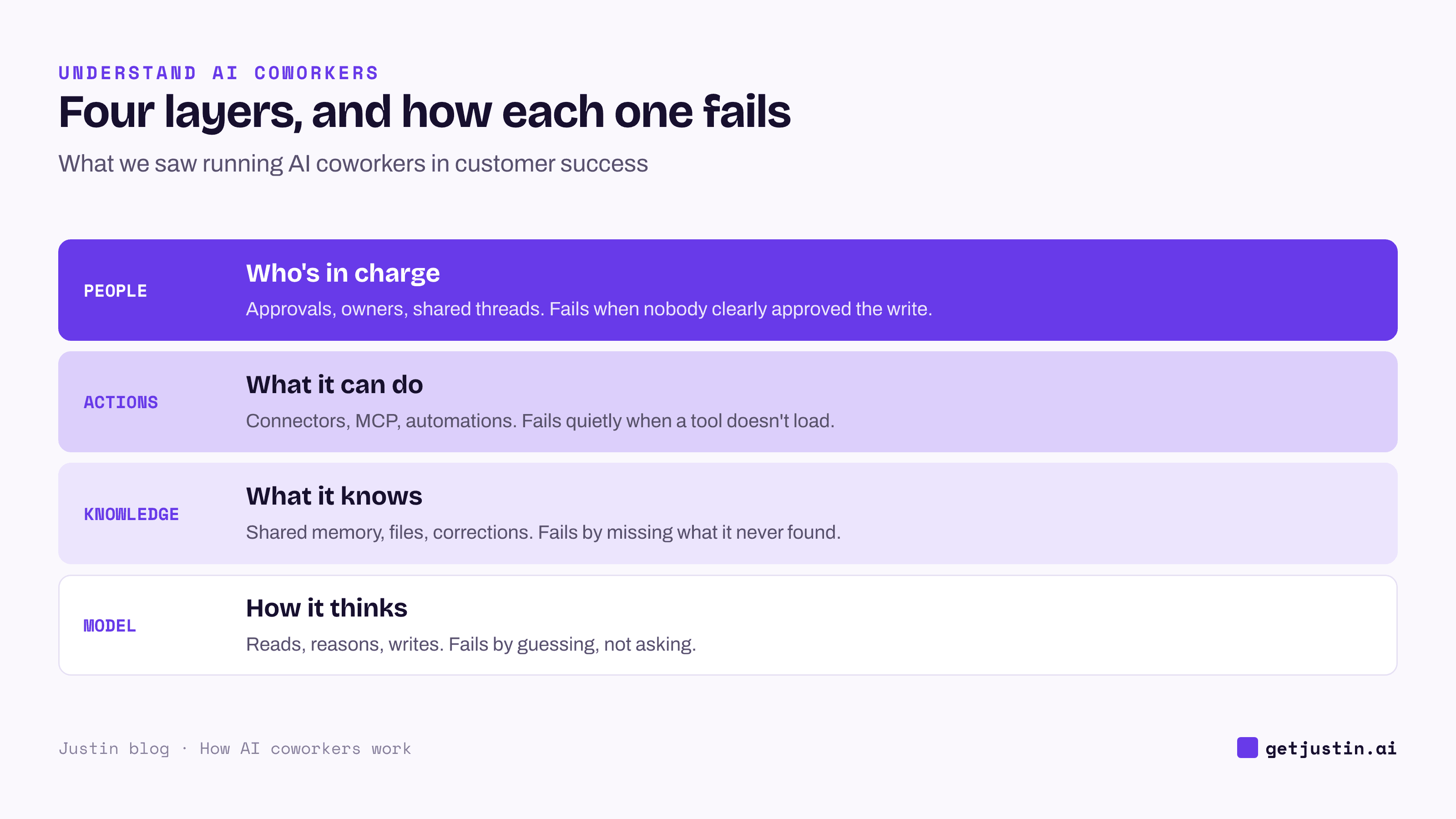
Figure: In our experience the model is rarely the layer that fails; the three above it are.
How AI coworkers work: one request through four layers
A single request touches all four layers. Example: a growth lead asks how Meta spend tracked against plan last week, and wants a two-line summary posted in #leadership.
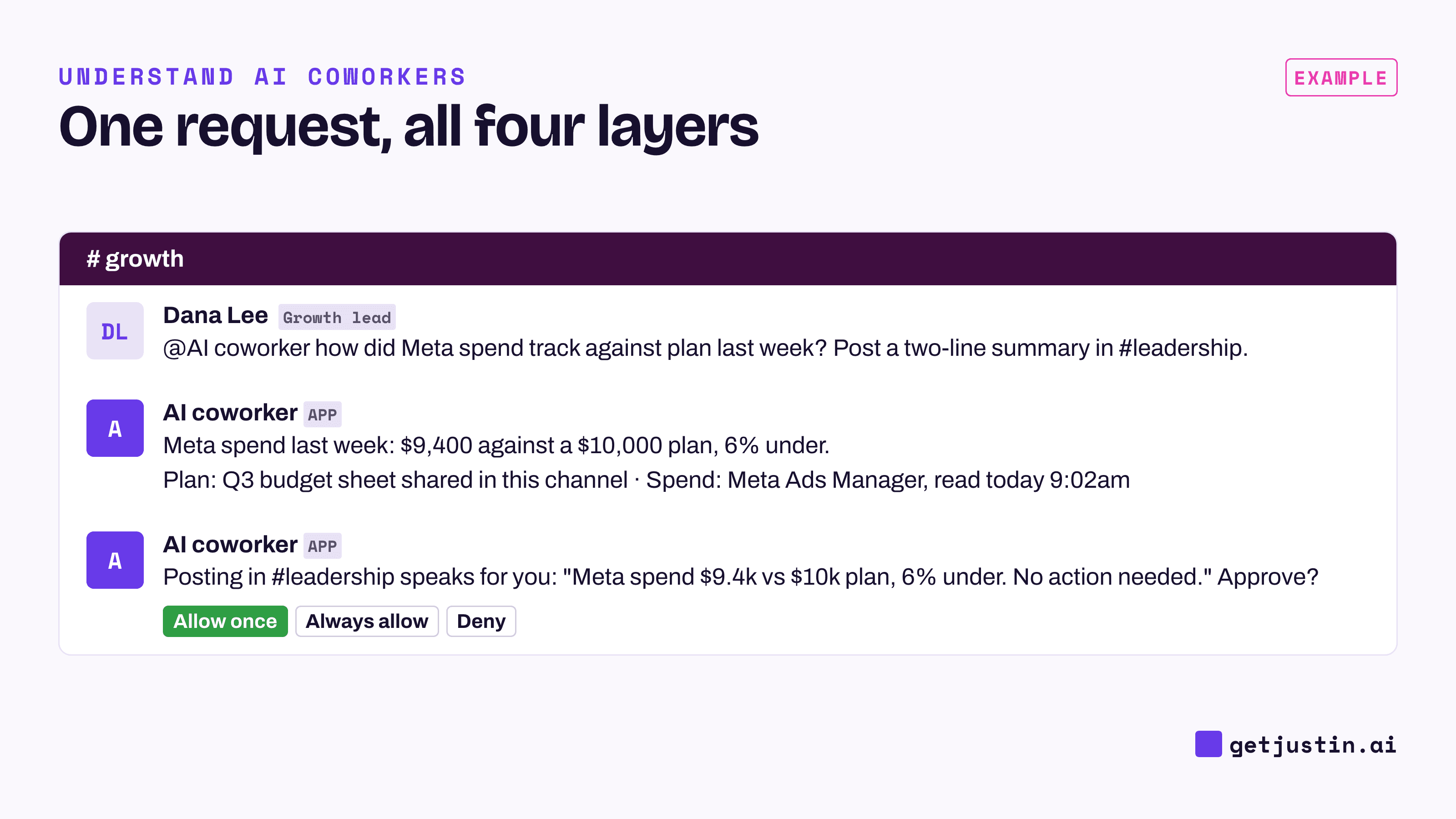
Figure: Reading and answering needs no approval; speaking for someone in another channel does.
Model: read the request, saw it needed two numbers, and wrote both replies.
Knowledge: found the plan figure in a budget sheet shared in the channel weeks earlier.
Actions: pulled last week’s spend from Meta Ads Manager through a connector.
People: held the #leadership post for the growth lead’s approval, because it speaks for her.
Remove any layer and the request breaks in its own way: the model guesses the plan, asks you to paste the spend, or posts with nobody’s say-so.
The model: strong at language, blind to your business
The model is a large language model (LLM): software that reads whatever is placed in front of it and writes the most useful next thing, whether an answer, a plan, a draft or a choice of which tool to call. It reasons well over what it is given, and knows nothing about your business beyond that.
The model also rarely admits confusion. As our CS ops lead wrote in the team’s prompting tips, “The AI never says ‘I’m not sure what you mean.’” It guesses, and the guess shows up only as a confident answer.
The ops lead’s working rule is that numbers come from code and words come from the model: every figure in the team’s scheduled jobs comes from the source system or a script, and the model writes the sentences around it. The jobs also run a stronger model for decisions and a cheaper one for routine prose, so the brand matters less than buyers expect; the guide to open-weight vs proprietary models covers what does matter.
Knowledge: what an AI coworker knows about your team
The knowledge layer is what an AI coworker can draw on beyond the model’s training: threads and files in the channels it has joined, documents it looks up on demand, and corrections the team has given it. Good knowledge is scoped, and you should know the scope: whether what it learns in one channel can come up in another, and whether a direct message stays private.
The typical failure is a missing fact presented as complete. Our CS ops lead built an account summary that looked clean, until the CSM who knew the account asked where her four open tickets were. The summary had searched ticket titles for the account name, and two of the four had titles like “UX wording change for clarity.”
The fix was structural: start from the account’s own record and follow its links, never search by name. Corrections become written rules the AI reads at the start of every session; how AI memory works at work covers that and scoping.
Actions: connectors, MCP and automations
The actions layer is what an AI coworker can do in other tools. A connector is an authorized link to one tool, such as HubSpot or GA4, with scopes that set what it may read or write. MCP (Model Context Protocol) is the common plug that lets one AI use many tools, including internal systems, and the best MCP servers for business teams are where to start. Automations are standing requests that run on a schedule or a trigger, and rule-based tools like Zapier still beat an agent on fixed steps.
Failures in the actions layer are quiet. Our CS ops lead’s scheduled syncs kept reporting “blocked,” so the ops lead measured every scheduled run over eight weeks: 1,578 of them. On that count, 28% never received their data connector, though it showed as connected and usually loaded fine in hands-on sessions on the same machine. The guardrails held and nothing stale was written, but the lost runs looked normal in the task list.
The lesson: a “connected” status is a setting, not proof, so an unattended job should fail loudly rather than post a quietly thinner report.
People: approvals, owners and shared threads
The people layer decides who is in charge: what needs approval, who gives it, where the work is visible, and who owns each automation. Reading is low-risk; writing changes what other people rely on. The guide to agentic AI for business teams covers why approvals matter more than autonomy.
Approval has to be specific. While building a skill that sets up campaign-grouping rules in client accounts, our CS ops lead answered design questions about three live accounts, and the AI read that as permission to write. It wasn’t, and those rules can’t be cleanly undone once created. The skill’s default became “no write until approval,” and it was later validated on nine accounts without a single write; in the ops lead’s words, “Approving a plan is not approval to write it.”
Two more habits transfer. Put approval where the person already is: the ops lead built a separate approval bot, then tore it out, and now the AI posts a numbered list and waits for a reply like “approve all except #5.” And keep irreversible calls human: “The machine is good at surfacing the candidate. It has not earned the irreversible call.”
How to evaluate an AI coworker before your team relies on it
Test each layer with one question, on work you already know cold. The missing-tickets bug surfaced only because the CSM knew the true count; an easy test account would have passed.
Layer | Question to ask | A good answer | A red flag |
|---|---|---|---|
Model | Where do the numbers in its answers come from? | The source tool, with the date it was read | It recalculates metrics its own way |
Knowledge | Ask about something you know by heart. Did it find everything? | It follows records and names its sources | A confident answer with items missing |
Knowledge | Can what it learns in one channel come up in another? | A clear answer you can check in a trial, and DMs stay private | Nobody can say where a fact will resurface |
Actions | What happens when a connector fails during a scheduled run? | The run is marked failed and someone hears about it | The report posts anyway, quietly thinner |
People | Which actions need approval, and who gives it? | Every write to a connected tool asks first, in the thread | Approving a plan counts as approving its writes |
FAQ
Where do AI coworkers usually fail?
In our experience, rarely in the model. Most failures are a fact the AI didn’t find, a connector that quietly didn’t load during a scheduled run, or a write nobody clearly approved. A newer model fixes none of those; scoped knowledge, loud failures and per-action approvals do.
Does an AI coworker remember everything said in Slack?
A well-designed AI coworker sees only channels it has joined or been invited to, never private channels it isn’t in or other people’s direct messages. Memory scope varies: some products keep each channel apart, others share one team memory across channels. Ask which, and test it in a trial, before adding one to a client channel.
Can an AI coworker take actions without asking?
Technically, yes: once a tool is connected with write scopes, software can act on it. A well-designed AI coworker reads without asking but asks before it writes to a connected system, and it records who approved. Treat any write without a per-action approval as a red flag.
How should a small team test an AI coworker?
Start in one channel with a question you already know the answer to, ideally about a messy account or campaign. Check that the answer is complete, that it can tell you where each number came from, and that it asked before writing to any connected tool. If it passes, widen the scope one channel at a time.
Doing this with Justin
Justin, the AI coworker for Slack, is built on these four layers. It runs on large language models; typing \ultra turns on deeper reasoning for the rest of a conversation. It can read the thread and look back when asked, and it remembers what your team tells it as shared team memory; ask it to remember a correction, and it keeps it for the team. It connects to thousands of apps, or to your own systems through a custom MCP server, and nothing is connected until someone on the team authorizes it. Reading doesn’t need approval. It asks before it writes to your connected tools; approve once, or for that kind of action, and approvals are recorded. Start by inviting it to one channel and asking something you already know.