

Short answer: A chatbot answers questions in a conversation, and a copilot helps one person inside one app. An AI agent takes steps across tools toward a goal. An AI coworker is an agent a whole team shares, with the team’s context and an approval before it changes anything.
The labels are marketing, and one product often wears several. Compare them on what you can check: who each works for, what it can touch, what it remembers, and who approves a change.
What is the difference between a chatbot, a copilot, an AI agent and an AI coworker?
Chatbot. Answers in a conversation and changes nothing outside it. Test: close the window, and nothing in your tools is different.
Copilot. An assistant built into one app, working on whatever is open there. Test: it cannot see the tool next door.
AI agent. Plans and takes steps toward a goal: it reads, picks a next step, calls a tool, checks the result and repeats. Test: you give it a goal, not a question.
AI coworker. An agent the team shares in its group channels, with shared team memory and an approval before any write to a connected tool. Test: a colleague can pick up yesterday’s thread without re-briefing it.
The model underneath can be identical in all four. What differs is the context, access and approvals around it; the guide to how AI coworkers work breaks those layers down.
AI agent vs chatbot vs copilot: two questions sort all four
Two questions place any AI product: does it take actions, and does it work for one person or a team? The matrix below shows where each type lands.
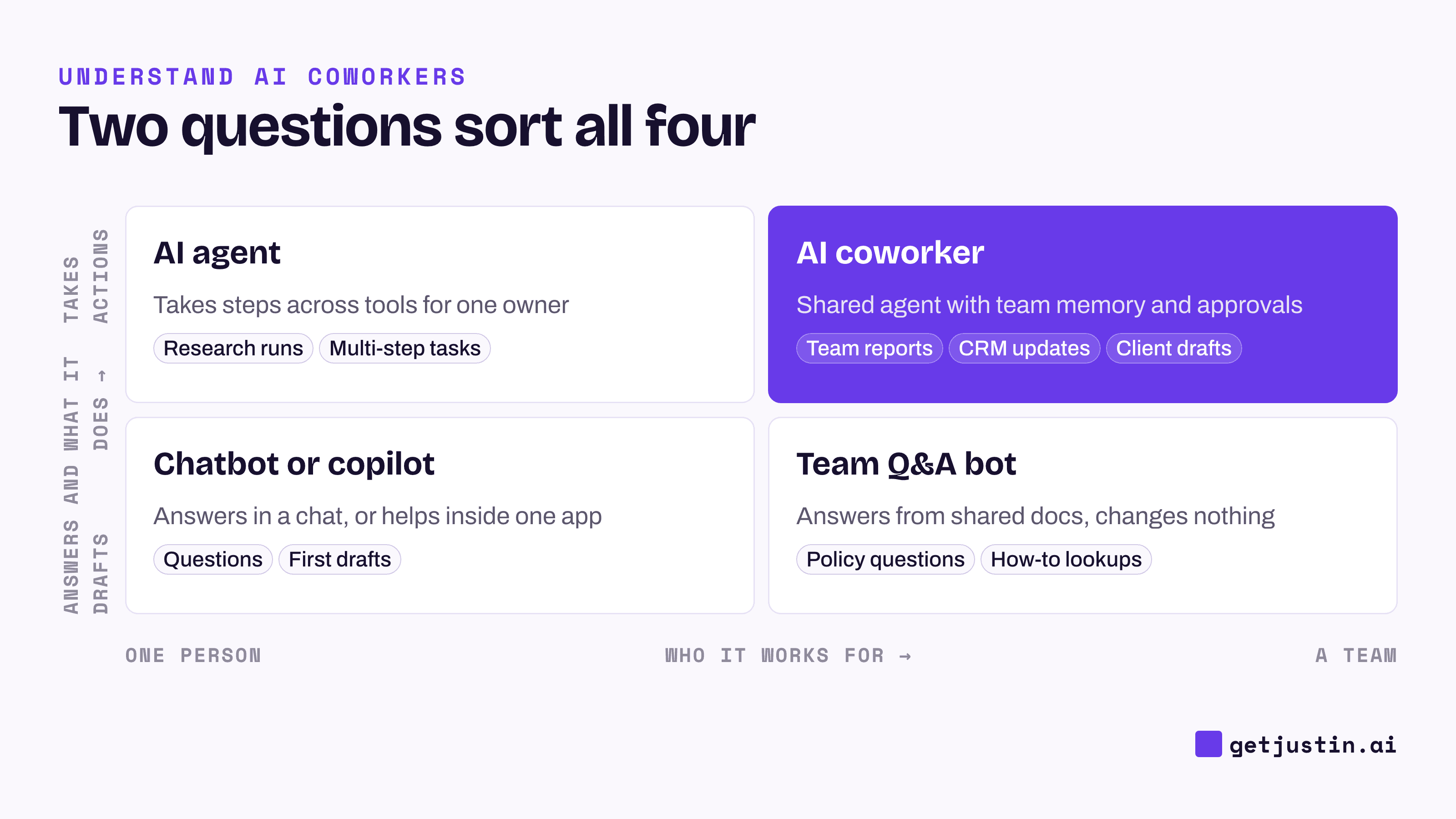
Figure: Sort AI products by whether they act and who they work for, not by how autonomous they sound.
Chatbot | Copilot | AI agent | AI coworker | |
|---|---|---|---|---|
Works for | One person per chat | One person in one app | One person or process | The whole team |
Can touch | Nothing outside the chat | The open file or record | Any tool it was given | Tools the team connected |
Remembers | The conversation | The document | The task, often nothing between runs | What the team tells it, and the thread it’s in |
Approves changes | You, by copying the answer | You, by accepting it | Depends on setup, sometimes nobody | The team, per action, in the thread |
Typical failure | Confident wrong answer | Good edit, wrong version | An action nobody reviewed | Stale context nobody corrected |
The same request, four answers
Example: at a 15-person software company, the growth lead asks, “Cost per demo request doubled last week. Find out why and tell our agency.”
Type | What it does | What you still do |
|---|---|---|
Chatbot | Lists common causes and asks you to paste the numbers | Pull the data, find the cause, write the email |
Copilot in your ad platform | Charts cost per demo request by campaign and spots the one that jumped | Check the landing page and CRM elsewhere, write the email |
AI agent | Pulls ad spend and CRM leads, ties the jump to a campaign whose landing page stopped converting, drafts the email and, depending on setup, sends it | Check whether it sent anything, tell the team |
AI coworker | Same pull in the team’s thread, looks back through the channel and finds that the demo form was shortened on Tuesday, drafts the email in the thread | Check the draft, then approve or send it |
Only the AI coworker found that the form had changed, because a colleague mentioned it in the channel that day and it looked back. And only its draft sat where the team could check it before anything went out.
When is each the right choice?
Work through five questions in order and stop at the first yes. The first one asks whether the job needs AI at all.
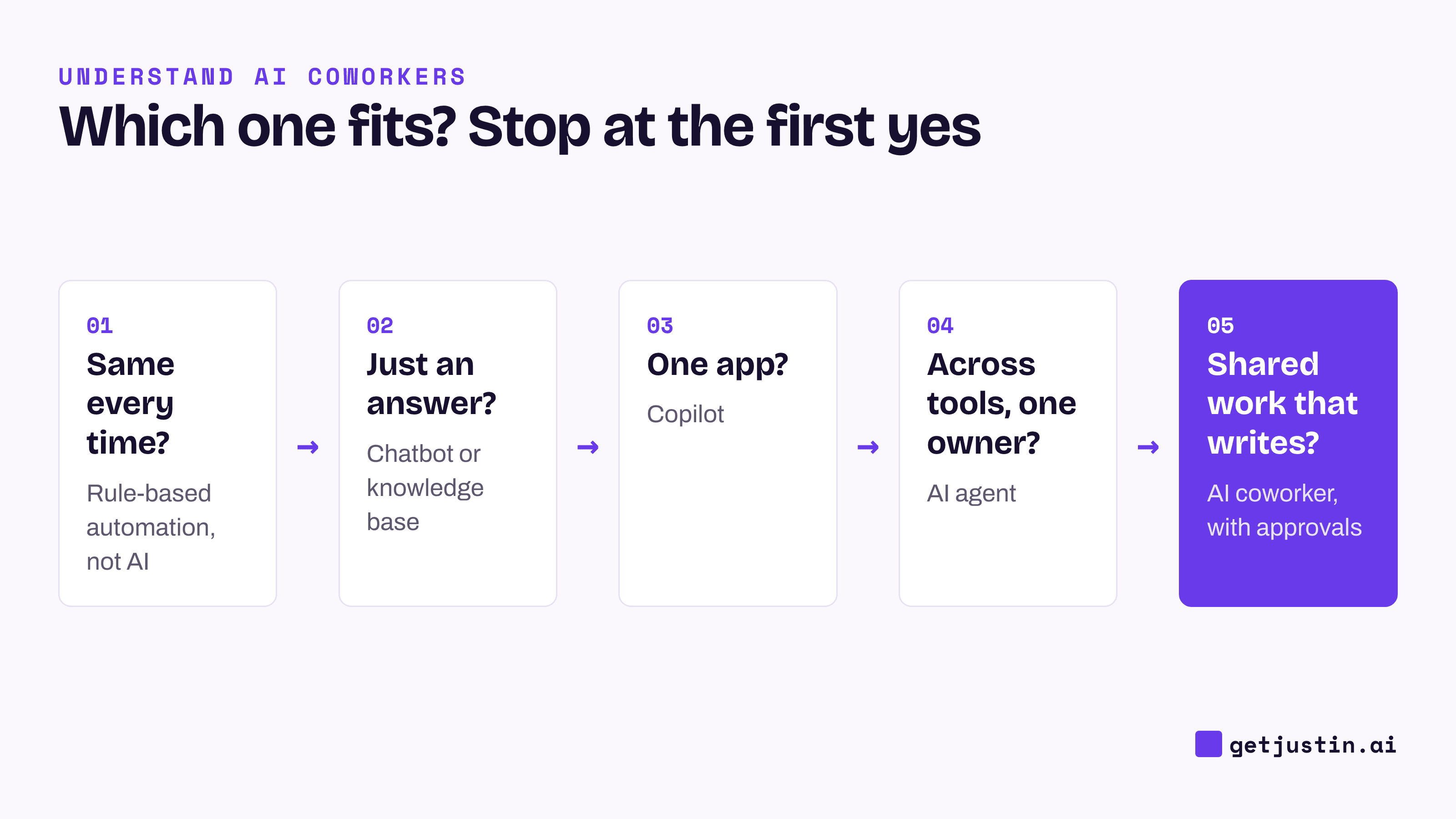
Figure: Stop at the first yes; the first question often rules AI out entirely.
The order comes from how our CS ops lead sorts AI work for a customer success team, stopping at the first question that answers. If the output must be identical every time to be correct, it is a rule-based workflow, not AI; in the ops lead’s words, “A skill may never compensate for a broken product.” If it is only an answer, it belongs in a knowledge base.
Mapped onto the four types:
Same output every time? Use a rule-based automation; see AI agents vs Zapier, n8n and Make.
Only an answer? A chatbot or a well-kept knowledge base.
One person’s work in one app? A copilot.
Steps across tools, one owner? An AI agent.
Recurring team work that writes to shared tools? An AI coworker.
The question that matters more than autonomy: who owns the output?
Who owns the output decides where the review sits. If one person owns it end to end, like a first draft, a chatbot or copilot is fine: the owner checks it first. If it reaches other people, like a client email or a CRM field, the review has to happen where the team can see it, before the write.
Our CS ops lead applied the same logic in turning down a fully autonomous agent for the team’s support work; the guide to agentic AI for business teams tells that story and covers granting autonomy one action at a time.
AI coworker vs AI agent: is it just a new name?
Partly. Every AI coworker is technically an AI agent; the term means something only if the product passes three checks in a trial:
Predictable memory. Mention a fact in one channel, then ask about it in another channel and in a DM. You should be able to say where a fact will come up before you add a client channel.
Approval per write. Ask it to update a record in a connected tool. It should stop and ask, and approving a plan should not count as approving its writes. Then ask it to email someone, and note whether it asks first or just sends.
A record. Ask how approvals are recorded, and whether your team can see who approved what.
A product that fails these is an agent with a new label. How AI memory works at work covers what good scoping looks like.
FAQ
What is the main difference between an AI agent and a chatbot?
A chatbot answers questions inside a conversation and changes nothing outside it. An AI agent is given a goal and uses connected tools to reach it, reading data and acting. The test is whether anything in your tools is different afterwards.
Is a copilot the same as an AI agent?
No. A copilot suggests and drafts inside one app, and you accept or reject each suggestion. Many copilots now add agent features, so check what one can reach outside the app and whether it acts without your click.
Is ChatGPT a chatbot or an AI agent?
It depends on the mode. Asked a question, ChatGPT behaves as a chatbot; with agent mode on, it takes steps for you. The standard app is set up mainly for one person, but workspace agents, available in ChatGPT Business, Enterprise and Edu as of September 2026, can be shared across a workspace and deployed to Slack channels.
Do small teams need an AI agent, or is a chatbot enough?
Start with what the work produces. If the team only needs answers, a chatbot or a good knowledge base is enough. If the work pulls from several tools and ends in something others rely on, like a report, you need an agent the team shares, with approvals.
Doing this with Justin
Justin, the AI coworker for Slack, works the way the last column of the comparison table describes. Invite it to a channel and @-mention it; it replies in a thread. It can read the thread and look back when asked, and it remembers what your team tells it as shared team memory. It reaches thousands of apps once someone on the team authorizes them. Reading doesn’t need approval; it asks before it writes to your connected tools, and you can approve once, or for that kind of action. Try the demo-request question from this article in one channel.