

Short answer: The best AI agents for Slack fall into four kinds, depending on whether you want answers or actions, and whether you work with the agent in its own app or in the Slack thread. Slackbot and the ChatGPT app in Slack suit one person’s search and drafting; Claude Tag, ChatGPT workspace agents, Viktor, Dash and Justin take on shared work in channels; Zapier and n8n win on fixed, high-volume automation. Before you pick, test what each does after you approve a plan and when nobody is watching.
The best AI agents for Slack at a glance
Pick the kind of agent first, then the vendor. Skip the connector counts: Viktor, Dash and Justin each list thousands, so the number rarely decides anything.
Option | What it is | Where it wins | Watch out for | Price, as of September 2026 |
|---|---|---|---|---|
Slackbot | Slack’s built-in personal AI agent | Already in Slack; MCP actions, search and Surfaces; no new vendor | Personal design; Business+ message caps (Slack help) | Business+ $15/user/mo, billed yearly (Slack) |
Agentforce in Slack | Salesforce’s CRM and employee agents, deployed into Slack | Sales, service and marketing work for companies already running Salesforce | Needs an Agentforce license plus Slack, set up by a Salesforce admin (Salesforce) | Per conversation, Flex Credits or per-user plans (Salesforce) |
ChatGPT in Slack | One-on-one ChatGPT in the Slack sidebar | Individual drafting, recaps and search across channels you can access | Chats are private to one person; no deep research or agent mode in Slack; usage limits not published. Shared workspace agents are generally available in ChatGPT Business, Enterprise and Edu (as of September 2026) and bill in credits (OpenAI) | Needs a paid ChatGPT plan: Plus, Pro, Business, Enterprise or Edu (OpenAI) |
Claude Tag | A shared Claude any channel member can tag, in beta since June 2026 | Strong model; public-channel memory shared across the workspace; schedules its own follow-ups | Claude Team or Enterprise only; no per-action approval described | Claude Team or Enterprise; channel work bills to the org’s usage balance, capped by admin spend limits (Anthropic) |
Viktor | Slack-native AI coworker | Big integration catalog; Microsoft Teams too; lists SOC 2 | Credit-metered, so price your heaviest job | From $50/mo per workspace (Viktor) |
Dash (Process Street) | Slack-native AI coworker | Approve before send; Microsoft Teams too; lists SOC 2 and ISO 27001 | Credit-metered after the $100 starter credit | $50/mo for the whole team (Dash) |
Justin (ours) | AI coworker for Slack, with a web app for setup and live pages; connects Google Analytics, HubSpot, Shopify and more | Shared team memory; thousands of apps or your own MCP server; asks before it writes to your connected tools, approved once or for that kind of action; live pages that show when their data was last updated | Early access; no Microsoft Teams; monthly plan credits reset | From $20/mo, no seats (Justin) |
Which kind of Slack AI agent do you need?
Two questions sort the market: does the agent mostly answer or act across your tools, and do you use it in its own app or in the Slack thread? The diagram below places each option on those two lines.
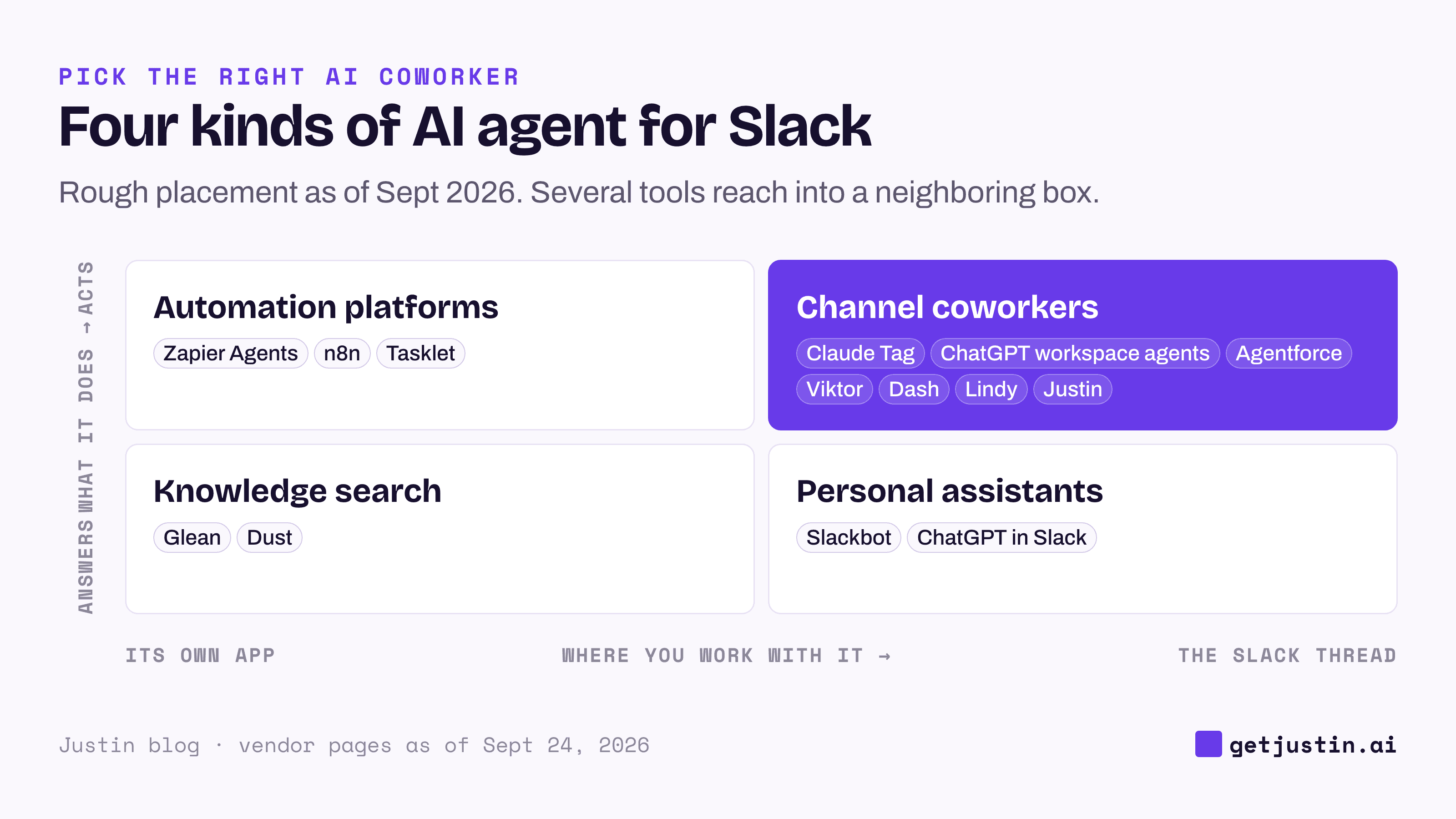
Figure: Decide whether you need answers or actions, and where the work happens, before comparing vendors.
In the thread, mostly answers. Slackbot and ChatGPT in Slack are the fastest start for one person’s search, recaps and drafts. Slackbot now reaches other tools through MCP and builds Surfaces, but it’s still designed around each person. A Slack AI assistant of this kind won’t carry a job for the whole team.
In the thread, acts. Claude Tag, ChatGPT workspace agents, Viktor, Dash, Lindy and Justin are what most people mean by an AI agent for Slack: a shared coworker the channel can hand work to. They differ on memory, approvals, platforms and price. Agentforce in Slack sits here too, as specialized CRM agents a Salesforce admin sets up.
Its own app, acts. Zapier Agents, n8n and Tasklet run work you design in their own app; Slack can start a run or receive the result. They’re best when the steps are known in advance.
Its own app, mostly answers. Glean and Dust index company knowledge and answer from it, inside a large company’s permission model.
How to choose between them
Choose Slackbot if you’re on Business+ and want each person to search and summarize faster, with no new vendor. It can now build dashboards too (Slack, September 2026).
Choose Agentforce in Slack if your company already runs Salesforce and has an admin to set agents up. Slackbot remains the personal front door; Agentforce adds specialized CRM agents on top.
Choose ChatGPT in Slack if the work is one person’s drafting or research. For individual deep work, ChatGPT and Claude used directly are the stronger choice. On ChatGPT Business, Enterprise or Edu, OpenAI’s workspace agents can also run shared jobs; Justin vs ChatGPT in Slack compares both.
Choose Claude Tag if you’re on Claude Team or Enterprise and want a strong model the whole channel can tag, with admins scoping its tools per channel. Justin vs Claude compares it with a team coworker.
Choose Viktor or Dash if you need Microsoft Teams as well as Slack, or your security review needs a certification report today.
Choose Glean for permission-aware search across a large company, and Zapier or n8n for work that runs the same way every time.
Choose Justin if your team wants one AI coworker the whole channel shares, with work in one place: shared team memory, thousands of apps or your own MCP server connected once for everyone, and live pages that show when their data was last updated. You decide what’s automatic: it asks before it writes to your connected tools; approve once, or for that kind of action. Every plan covers the whole team, with no seats.
Five tests to run before you pick a Slack AI agent
Demos show the happy path; the costly differences show up in week three. At WorkMagic, our CS ops lead runs AI coworkers for the customer success team, and each test below comes from something that went wrong there. These were the ops lead’s own setups, not any product on this list.
1. The write test: approve the plan, then watch. On our CS team, an AI coworker once read answers to its design questions as permission to write. In your trial, have the agent plan a HubSpot list or campaign update, reply “looks good”, and see whether it writes or asks again with the exact change.
2. The unattended test: check what the 6 a.m. run actually read. On our CS team, more than a quarter of 1,578 scheduled runs never received their data connector, though settings said “Connected”. In your trial, schedule a Monday 6 a.m. job, such as last week’s signups from Google Analytics or new deals by rep from HubSpot, and check which sources the run actually read. Then remove one source and see whether the run reports a failure or posts a tidy report with a hole in it.
3. The memory test: does a correction reach the team? The ops lead writes every correction down as a standing rule, with the incident behind it, because a fix that lives in one chat is gone by the next session. In any trial, ask the agent to remember a correction, then have a colleague ask the same thing in the same channel a few days later. Ask in a second channel and in a DM too, because vendors scope memory differently: per Anthropic’s docs, as of September 2026, Claude Tag shares public-channel memory across the workspace. Whatever a vendor says, see for yourself which channels get the fix before client work goes in.
4. The approval test: count the steps to a yes. Our CS ops lead once built a separate approval bot for a daily scan, then replaced it with a numbered list in the thread and a reply like “approve #1 #3”. In your trial, ask for a batch of changes, such as CRM field updates or campaign name fixes, count the clicks from request to yes, and check that the yes is recorded with a name and a time.
5. The permission test: does the error name the fix? A CSM reported a connector as broken when a permission had simply never been granted, and the two look identical from the outside. Connect Google Analytics or HubSpot with one permission left off, ask for a report that needs it, and read the error.
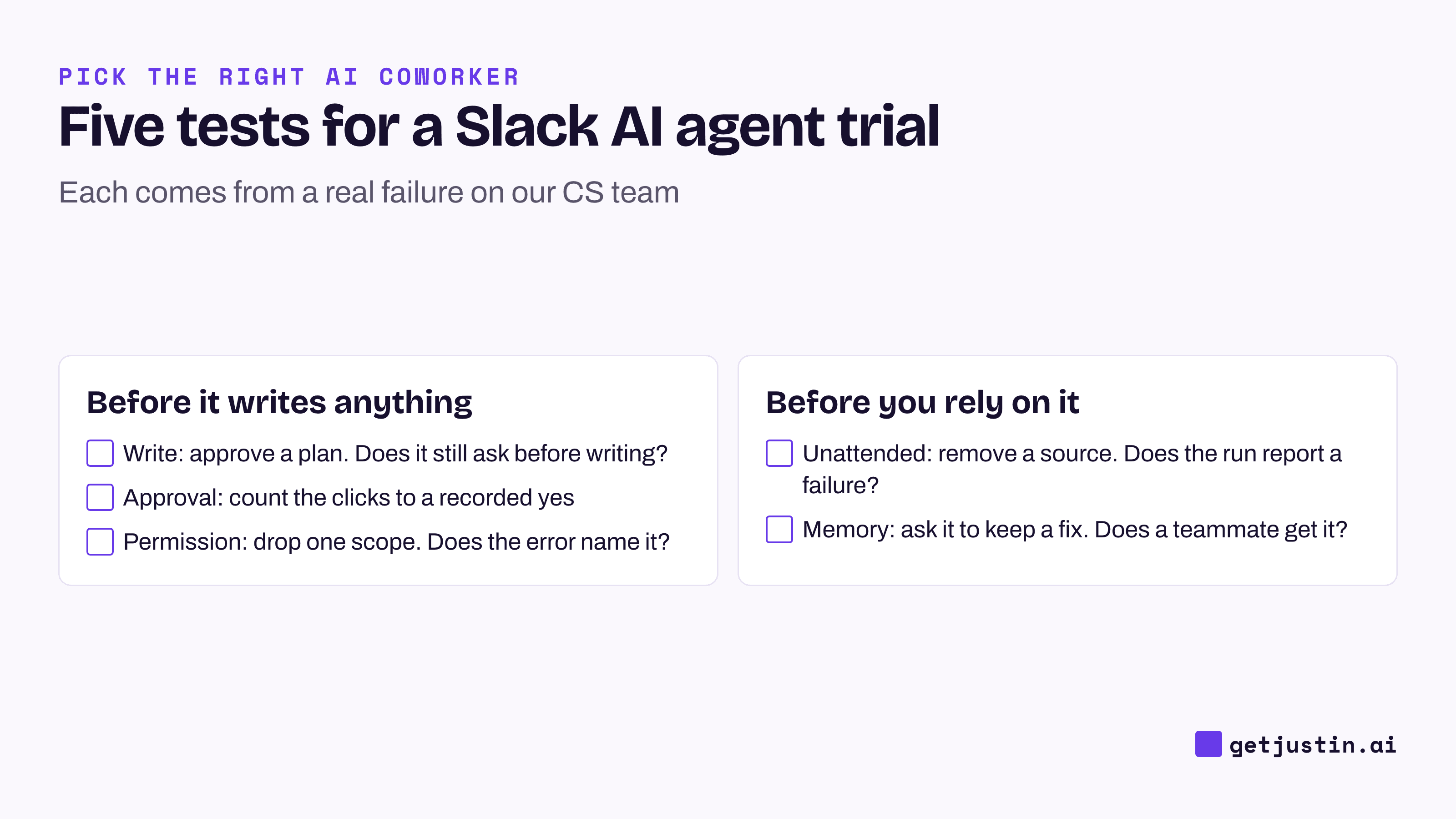
Figure: Five tests that separate Slack AI agents in a trial week, each drawn from a real failure.
FAQ
Is Slackbot enough, or do I need a separate AI agent?
Slackbot is enough if people mainly search Slack, recap channels and draft replies for themselves. Teams add an agent when they want a shared coworker that works in other tools, runs on a schedule and asks before it writes. On Business+, Slackbot also has plan limits.
Slackbot vs Agentforce: what’s the difference?
Slackbot is each person’s built-in AI in Slack for search, recaps and drafting. Agentforce is Salesforce’s set of specialized CRM agents for sales, service and marketing work, deployed into Slack; it needs an Agentforce license and a Salesforce admin to set it up. Many Salesforce customers use Slackbot for personal work and Agentforce for CRM jobs.
How much does a Slack AI agent cost for a 10-person team?
Example: at Slack’s Business+ rate of $15 per user a month billed yearly, ten people pay $150 a month, which also covers the rest of Slack’s paid plan. Viktor and Dash start at $50 a month per workspace, and Justin at $20. Credits buy different amounts of work at each vendor, so price your heaviest real job.
Can a Slack AI agent change things without approval?
Some can, depending on the tool and its admin settings. Check that approval is asked per action, in the thread, and recorded with who approved and when. Admin tool scoping limits what an agent can reach, but it isn’t the same as asking before each write.
Which AI agents for Slack also work in Microsoft Teams?
Viktor and Dash both list Microsoft Teams alongside Slack, as of September 2026. Justin works in Slack, with a web app for setup and live pages, but not in Microsoft Teams. If part of your company is on Teams, that alone may decide it.
Do we need an AI agent if we already use Zapier?
Not for work that runs the same way every time; Zapier or n8n is cheaper and more predictable there. An agent earns its place on requests that change each time, like “why did signups dip last week?”, where something has to read the context and choose what to pull.
Doing this with Justin
Justin, the AI coworker for Slack, is our entry on this list. Use the five tests above as the trial script; here is how to run them on Justin. The trial covers the whole team for 14 days or until you’ve used 1,000 credits, if that comes sooner, and needs no card. Invite Justin to a channel and @-mention it. Ask it to plan a HubSpot update, approve the plan, and check that it still asks before it writes to HubSpot; approve once, or for that kind of action, and each approval records who gave it and when. Ask for a weekly report as a live page; it shows when its data was last updated, and you can ask where any number came from. Ask it to remember a correction, then have a teammate ask again in the same channel.