

Short answer: Tasklet is a strong choice for event-driven automation: its agents run on schedules, emails, calendar events and Slack messages, browse the web, run code, and bill per organization with no seat fees. Teams look at Tasklet alternatives when the work starts as a request in a Slack channel rather than an automation built in another app, or when the steps are fixed and a cheaper, predictable tool will do. For Slack-first work, compare channel coworkers such as Claude Tag, Viktor, Dash and Justin; for fixed steps, Zapier or n8n.
What Tasklet does well
Tasklet does event-driven work outside Slack better than most Slack-first tools. Its guide lists triggers for schedules, webhooks, RSS, Gmail and Outlook, Google Calendar and Drive, Notion, HubSpot, GitHub, Telegram, text messages and Slack. You can also talk to an agent by email or text, as well as in its web app.
Every agent can search and read websites, and has a sandboxed command-line environment for scripts and files; paid plans add a dedicated web browser for logging in and filling out forms on complex sites (Tasklet pricing). For work like “research each new calendar booking and file a brief,” that reach matters more than where the chat happens.
Tasklet is built for teams too. Several people can share an agent, its threads and its connections, and an agent’s memory carries across all of its threads. Billing is per organization, with unlimited members and one shared credit pool.
Why Slack teams look for Tasklet alternatives
Slack teams look elsewhere mainly because Tasklet’s home is its own app. Agents, threads, memory and approvals live there; Slack is one of the places an agent can be triggered from or post to.
Slack is an automation you configure. Per Tasklet’s guide, an agent runs on new Slack messages or emoji reactions that match filters you set. That suits an internal Q&A bot or file intake, but it differs from inviting a coworker to a channel and @-mentioning it with whatever comes up. As of September 24, 2026, the guide doesn’t say whether the agent answers in the same Slack thread or keeps context when someone follows up there, so make that a trial check.
Memory follows the agent, not the channel. An agent’s memory spans its threads in Tasklet. If your decisions and corrections happen in Slack threads, check what reaches that memory.
Approvals happen in Tasklet. Tasklet’s pricing page lists approval settings for agents, and the guide describes an approval card when an agent needs a tool that hasn’t been enabled yet. Neither says whether an approval can be given in the Slack thread, so if your people approve by replying in the channel, test it.
Tasklet AI pricing: what the credits pay for
Tasklet AI pricing is per organization, not per seat, as of September 24, 2026: Starter is $25 a month, Pro $100, and Custom from $250, with extra one-time credits available (Tasklet pricing). Monthly credits reset each cycle and don’t roll over.
Tasklet is open about what drives the cost of a request: how hard the task is, how much it reads, which tools are on, how often the automation fires, and the model tier. A trigger that fires all day costs far more than a weekly report. Admins can see usage across the organization and set limits per agent.
Viktor, Dash and Justin also price per workspace or team, so seats aren’t the difference. Credits buy different amounts of work at each vendor, so run your busiest real automation in each trial and read the usage view.
Tasklet alternatives compared
The main Tasklet alternatives split into channel coworkers, which start from a Slack conversation, and automation platforms, which start from a trigger. Lindy is the other agent builder teams often weigh.
Option | Pick it over Tasklet when | Where Tasklet wins instead | Price, as of Sept 2026 |
|---|---|---|---|
Zapier or n8n | Steps are fixed and high-volume, and you want every run identical | Requests that change each time; browsing and code | Separate usage-based plans |
Claude Tag | You’re on Claude Team or Enterprise and want an agent any channel member can tag | Triggers beyond Slack; no seat pricing | Claude Team or Enterprise, per seat (Anthropic) |
Viktor | You want a Slack-native coworker and Microsoft Teams support | Email, text and calendar triggers | From $50/mo per workspace (Viktor) |
Dash (Process Street) | You want writes that pause for approval by default (per Dash), in Slack or Microsoft Teams | Email, text and calendar triggers | $50/mo per workspace, 20K credits (Dash) |
Justin (ours) | Requests start in Slack channels, with shared team memory and a coworker that asks before it writes to your connected tools | More trigger types; a dedicated browser and code sandbox; Justin is in early access | From $20/mo, no seats (Justin) |
Where the line between an agent and a fixed automation falls is covered in AI agents vs Zapier and n8n.
Match the tool to the job’s shape
The quickest way to choose is to sort your scheduled work by shape. At WorkMagic, our CS ops lead runs about twenty scheduled routines for the CS team, and each is one of three shapes.
Sync jobs copy data between systems, dry run by default, and message the ops lead only on a change or an error. Drafting jobs write an announcement or an update and post it marked for review; nothing publishes itself. Scan-and-approve jobs post a numbered list, stop, and write only the items approved in the conversation.
The diagram below maps each shape to the kind of tool that fits it.
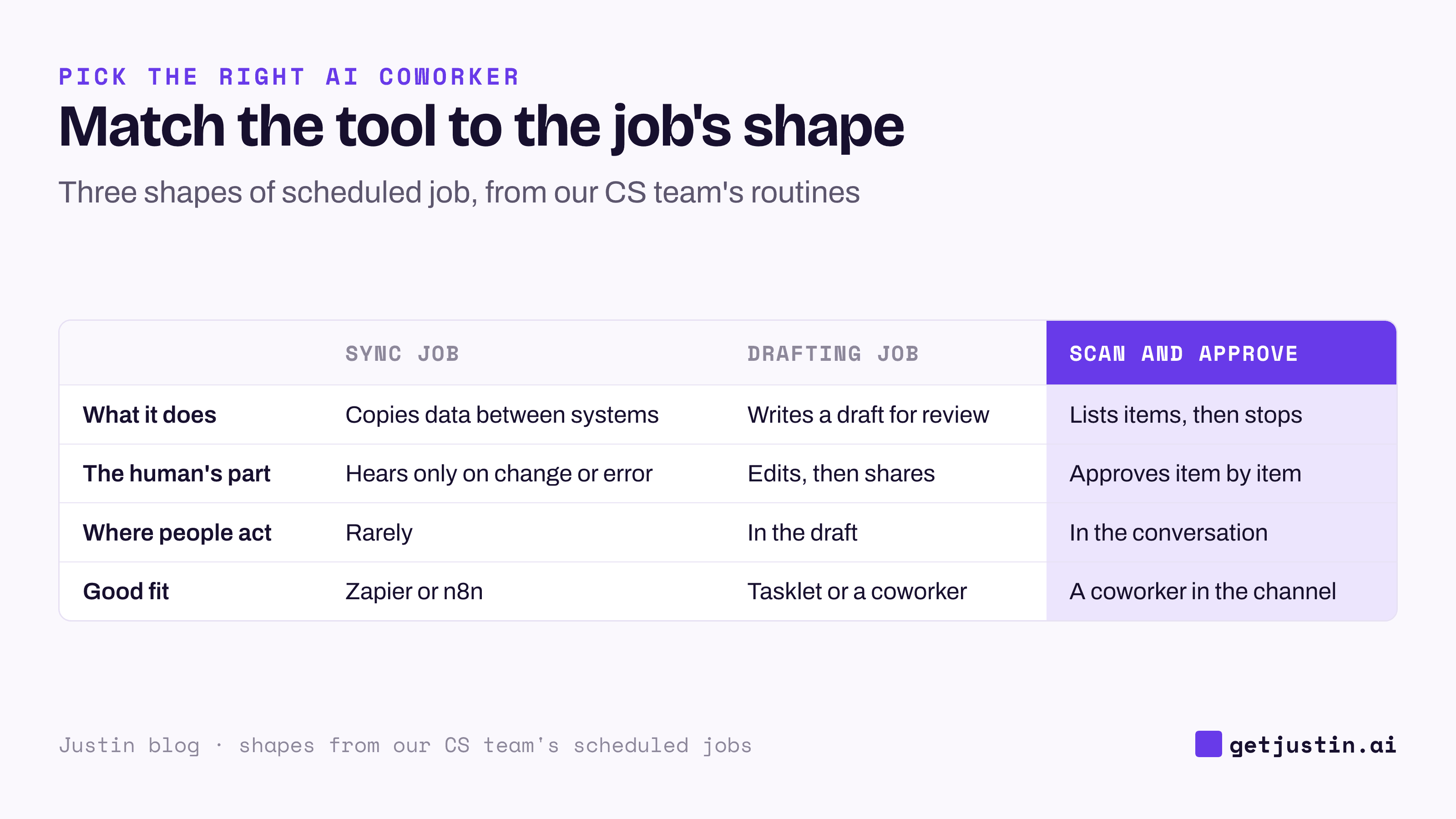
Figure: Sort scheduled work by shape first; the tool choice mostly follows.
A list of mostly sync jobs doesn’t need an agent at all. A list heavy on scan-and-approve jobs wants the approval where people already talk, usually the Slack channel.
Test a scheduled agent before you trust it
Whichever tool you pick, test how it fails before you rely on it. On autopilot, the failure to fear isn’t a crash; it’s a report that looks normal and is quietly missing something.
Our CS ops lead found four of those in our own reporting stack. A document write reported success while the write had failed, and two days of a daily report vanished. A tool printed a warning line before its data, and the parser read 3 of 96 chat threads as empty, including the busiest one that day. A meeting source returned nothing for 30 days, and the daily report kept publishing without its Meetings section. And a new weekly job’s first Sunday run came back empty, because a tool approval hadn’t been granted and nobody was around to click it.
The checklist below turns those into trial tests. The first check matters most for any tool that asks to enable a tool mid-run, Tasklet included.
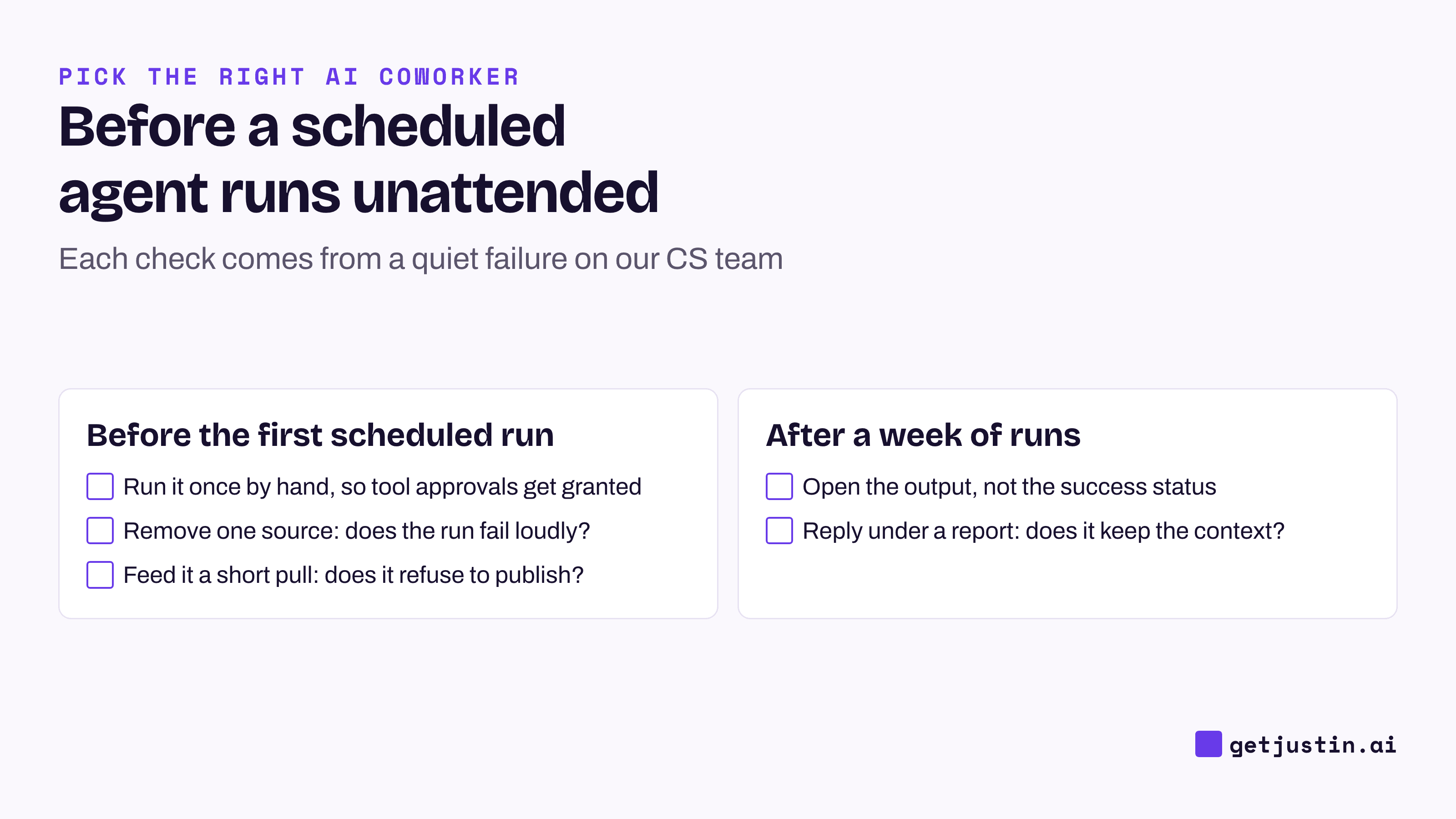
Figure: Five checks that catch the quiet failures before a scheduled agent goes unattended.
For approval and memory tests, run the five trial tests for Slack AI agents.
Tasklet vs a Slack coworker: how to choose
Choose Tasklet if your triggers live outside Slack (inbox, calendar, Drive, webhooks), agents need a browser or code, or you want many agents in one app with no seat fees.
Choose Zapier or n8n if the steps are the same every time and volume is high.
Choose Claude Tag if you already pay for Claude Team or Enterprise.
Choose Viktor or Dash if part of the company works in Microsoft Teams.
Choose Justin if your team’s requests start in Slack channels and you want shared team memory, follow-ups under a delivered report, and a coworker that asks before it writes to your connected tools.
FAQ
Does Tasklet work with Slack?
Yes. Tasklet’s guide lists Slack as an automation trigger: an agent runs on new messages or emoji reactions, filtered by channel, user, keyword, thread or emoji. Agents are built and managed in Tasklet’s own app.
How much does Tasklet cost?
As of September 24, 2026, Tasklet charges $25 a month for Starter, $100 for Pro and from $250 for Custom. Plans are billed per organization with no seat fees and a shared credit pool. Credit use depends on task complexity, data, active tools, trigger frequency and intelligence level.
Tasklet vs Zapier: which is better for recurring work?
Zapier is better when each run should follow the same steps, because it’s predictable and easy to audit. Tasklet is better when the agent has to read context, browse or decide what to do next.
Do Tasklet credits roll over?
No. Tasklet’s pricing page says monthly credits reset each billing cycle and don’t roll over. One-time credits bought separately stay valid for a year.
Doing this with Justin
Justin, the AI coworker for Slack, is our entry here, so run the checklist on it. Invite it to a channel, @-mention it, and ask for a recurring report in one sentence; the pricing page lists scheduled tasks on Pro and Max. Ask Justin to read the schedule and destination back before it sets it up. Justin asks before it writes to your connected tools, and a scheduled run can’t stop to ask, so if the report writes anywhere, run it once in the channel first and approve that kind of action. When you choose the destinations, a run is marked failed if any of them fails, rather than reported as sent. Reply under the delivered report with a follow-up question, and Justin picks up from that report.