

Short answer: To automate a weekly marketing report, describe it once in a single sentence: the five or so numbers, where each comes from, what counts as news, when it runs and where it lands. An AI coworker that can read GA4, Shopify and your ad accounts then posts it every Monday, conclusion first. On a quiet week it should still post one line, because a report that goes silent looks exactly like one that broke.
The scheduling is the easy part; it never broke in the reports we run for our customer success team. What broke was a number that meant something different from the dashboard, or a source that returned nothing while the report posted anyway.
What should a weekly marketing report include?
A weekly marketing report should answer one question in its first line: does anything need a decision this week? Everything after that is support. The weekly marketing report template below is where we’d start for a small brand; five numbers is a ceiling, not a target.
Block | What it holds | Example: a 12-person DTC brand |
|---|---|---|
Headline | The week’s conclusion, and whether anything needs a decision | “Revenue held; one Meta change is worth a look.” |
Five numbers | Each against last week and its target | Spend, revenue, new customers, blended CAC, conversion rate |
Worth a look | Zero to three items, one line each, with a link to the source | “Prospecting CPA up since Thursday’s creative swap” |
Freshness | Every source, with the time it was read | “Meta Ads, Shopify, GA4 read Mon 8:01” |
Not checked | Anything that failed or was skipped | “Google Ads not read: connection expired” |
Give each number its own bar for news: blended CAC against its target, conversion rate against its recent average, spend against plan. One flat rule for every metric fires on noise for small numbers and stays quiet on expensive ones.
Keep the post short, but never let rows disappear. One draft we reviewed had quietly shrunk a 13-row table to 7, hiding a channel that carried nearly a fifth of spend. The full table belongs one click behind the post, and deciding what to cut is a person’s job. The example below shows the shape.
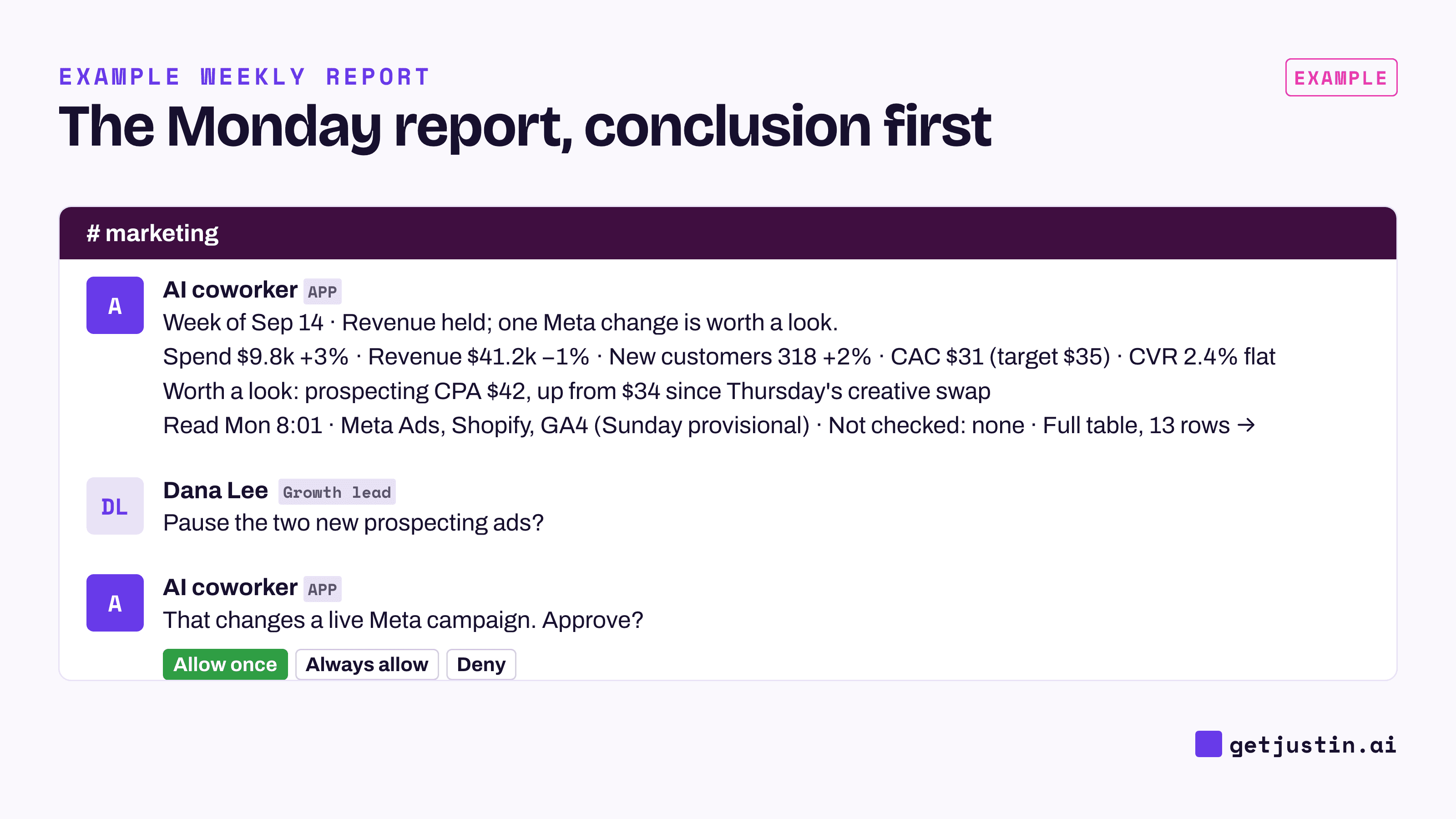
Figure: The whole report fits in one post, and the full table sits one click behind it.
How do you automate a weekly marketing report in one sentence?
You automate a weekly marketing report by writing the request once, the way you’d brief a colleague, and letting an AI coworker run it on a schedule. The sentence has five parts: when, which numbers, from where, what counts as news, and where it lands. Then add the two clauses most people skip: what to post when nothing happened, and what to do when a source breaks.
Example: “Every Monday at 8am New York time, post last week’s spend, revenue, new customers, blended CAC and conversion rate from Meta Ads, Shopify and GA4 to #marketing, against the week before and our targets; flag anything that crossed its bar, with a link to the source; if nothing did, say so in one line; and if any source comes back empty, post what failed instead of the report.”
Every clause removes a guess, and you write it once. Name the time zone in the request, and ask the AI to read the terms back before the first run, while a wrong one is still cheap to fix.

Figure: Each part of the sentence answers a question the AI would otherwise guess.
Leave out anything that changes weekly. This week’s context, like a promo or a site outage, goes in a reply under the report.
How do you check the report’s numbers against each platform?
Connecting each source is a one-time authorization; matching the platform’s own number takes a check. For the first two Mondays, compare two figures per platform with the report. When they differ, the report is using a different definition, and the report is the one that’s wrong.
On our CS team, the ops lead once built a weekly recap and worked out cost per new customer the obvious way: total spend over new-customer orders. A CSM asked whether that was the dashboard’s number or a homemade one. It was homemade. The dashboard counted one storefront’s new customers, the recap had added up every storefront, and the two figures were about ten times apart.
The rule our CS ops lead took from it: “A metric is a definition, not a formula you reinvent.” Have the report take each finished number as the platform defines it, such as Meta’s own CPA or Shopify’s own net sales. If every row is off by the same few percent, suspect a filter like the date range or time zone.
GA4 and Shopify will disagree on revenue most weeks because they count different things; pick one, label it, and move on. GA4 also keeps processing after the day ends, so an early-Monday post should mark Sunday’s GA4 figures provisional (GA4 reporting in Slack covers the timing). Pulling GA4, Shopify and Meta into one thread has its own guide.
What should the report post on a quiet week?
On a quiet week, the weekly report should get shorter, not disappear. An alert can stay silent on a normal day because its job is to interrupt. A report’s job is to be expected, and when an expected post doesn’t arrive, nobody can tell a calm week from a broken job.
We learned this from quiet failures in our own reporting jobs. A meeting-notes source returned nothing for 30 days, and our daily report kept publishing without its meetings section. A parser read three of 96 chat threads as empty, including the busiest thread of the day. The first run of a new weekly board produced nothing, because it needed a one-time approval and nobody was there to give it.
None of those crashed; each looked normal. The jobs we trust now follow three rules:
Quiet week: post one line (“nothing crossed its bar”) and the five numbers, without commentary.
Short pull: don’t post the report. Our jobs now refuse to publish when a pull comes back short or a count looks implausible. Check yours for zero rows and missing columns, which is what a renamed field looks like, and post what failed instead.
New automation: run it once by hand first, so any approval it needs is granted while you’re watching.
The diagram below shows the three Mondays side by side. For drops that can’t wait a week, add anomaly alerts for marketing metrics between reports.
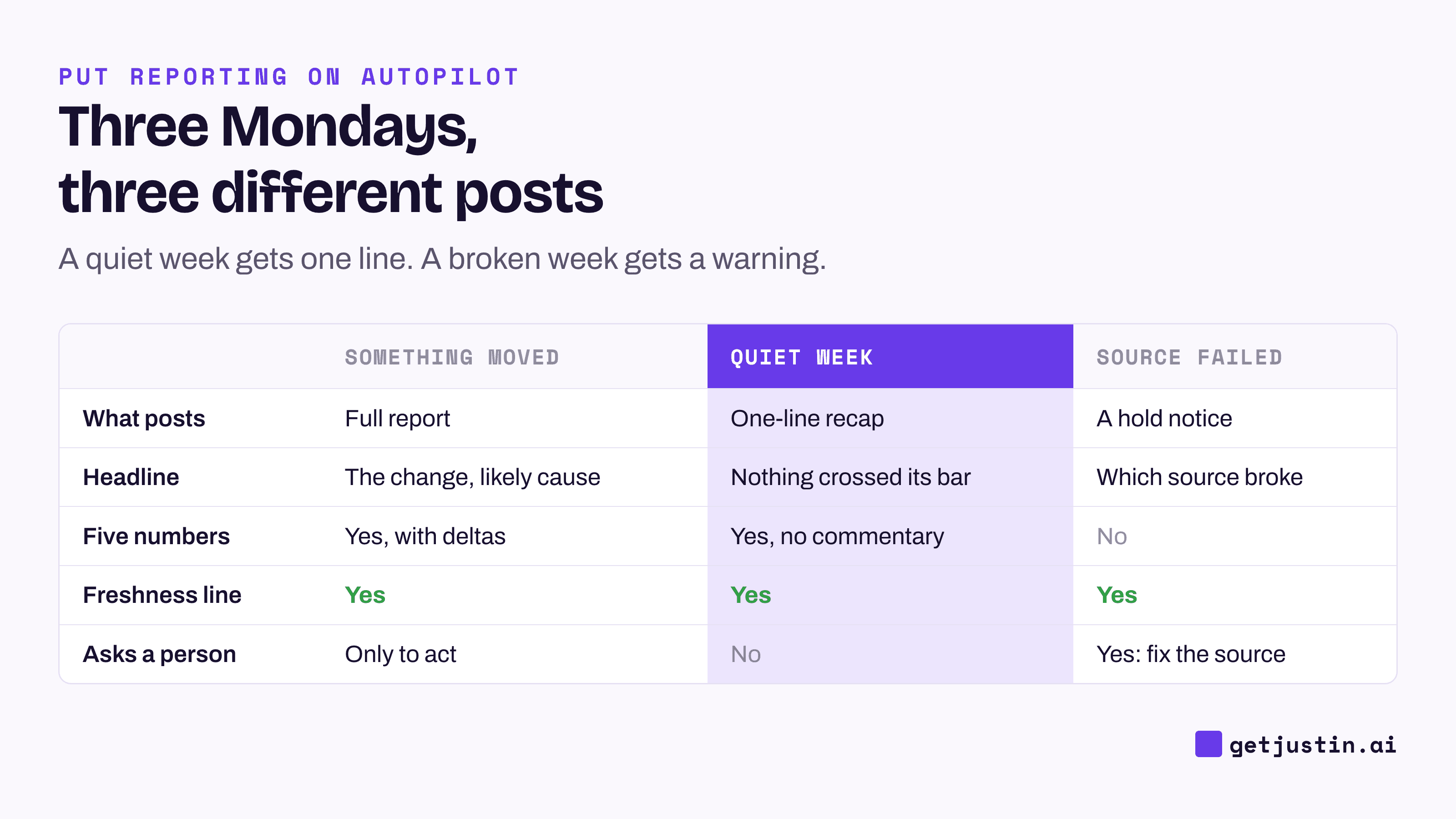
Figure: A quiet week gets one line and a broken week gets a warning; neither gets silence.
Who acts on what the report finds?
The automated marketing report flags; a person decides. Our CS ops lead’s rule: “The machine is good at surfacing the candidate. It has not earned the irreversible call.” Pausing an ad set whose CPA jumped changes a live campaign, so it waits for a named person’s approval; the AI marketing analyst that asks before it writes covers that approval model.
The report also can’t know what hasn’t been written down. One of our Monday jobs drafts leadership updates from the ops lead’s work log and may not call anything shipped on its own; those items go under “Confirm before pasting.” A feature once read “preview only” in Sunday’s log and was live by the Monday readout. The report knows the numbers, not the flash sale someone launched Friday night.
How should the report change over time?
Treat the first month as a draft. When the same follow-up question comes up in the thread a second time, add it to the report. Our CS ops lead’s rule for repeat work: “Once is a fluke, twice is a pattern.” If nobody has asked about a number in a month, consider cutting it at review.
FAQ
How many metrics should a weekly marketing report have?
Five is a good ceiling for a small team: spend, revenue, customers, efficiency and conversion. Beyond that, the headline stops being readable in a chat post, so keep the rest in the full table behind it.
Can I automate a weekly marketing report without a dashboard tool?
Yes. An AI coworker can read GA4, Shopify and your ad accounts directly and post the numbers in a channel, with no dashboard build first. Dashboards still help for exploring; see live pages vs screenshots vs BI links.
Do I still need alerts if I have a weekly report?
Usually, yes. The report posts every week, even when it has one line to say. An alert posts only when something crosses a threshold, such as spend running off pace, so a problem doesn’t wait until Monday.
Can Zapier or Looker Studio automate a weekly marketing report?
Looker Studio (renamed Data Studio in 2026) can email a dashboard on a schedule, and Zapier can post fixed numbers to a channel. Neither writes the headline, judges which change matters this week, or answers a follow-up in the thread; AI agent vs Zapier covers where each fits.
Should the automated report go straight to my CEO or clients?
No. Anything leaving the team needs context only you have, such as why a number moved. Draft it automatically, review it, and send it yourself; the automated monthly marketing report covers that version.
Doing this with Justin
Justin, the AI coworker for Slack, can run this report as an automation. Connect Google Analytics, Shopify and Meta Ads or Google Ads once in app.getjustin.ai/connectors; one person’s connection covers the whole team by default. Invite Justin to #marketing, @-mention it with your sentence, name the time zone in the request, and ask Justin to read the terms back before it starts. Use Run now to see a real report before Monday. Ask for the full table as a live page; live pages show when their data was last updated, and you can ask where any number came from. Reply under any report to follow up, with no mention needed. Pausing a campaign, or any other write, waits for your approval. The pricing page lists scheduled tasks on Pro and Max.