

Short answer: Marketing anomaly detection alerts should fire when a metric moves outside what’s normal for that metric on that weekday, not when it crosses one fixed number. Each alert names the metric, how far off it is, the likely cause and one first check, and it stays silent on a normal day. Missing data needs an alert too: a source that returns nothing has to say so, or the silence reads as calm.
A weekly marketing report posts every Monday, even on a quiet week. An alert has the opposite job: it interrupts only when something can’t wait, such as purchases falling to near zero on a Thursday while spend keeps running.
Why do fixed thresholds make noisy marketing KPI alerts?
Fixed thresholds ignore the rhythm of your own data, so they fire on normal days and miss real drift. “Alert if CPA goes over $50” fires every quiet Sunday and stays quiet while a $30 campaign drifts to $48. Small numbers make it worse: three purchases falling to one looks dramatic and means nothing. A few alerts like that and the team stops reading the channel.
Keep fixed thresholds for hard limits that don’t depend on rhythm: a budget cap, spend at zero, or a conversion event that stopped firing. Pacing is a different alert: it compares spend with the monthly plan, not with the metric’s own normal, and budget-pacing alerts covers it.
The diagram below shows the three outcomes a good alert has, including the one most setups forget.
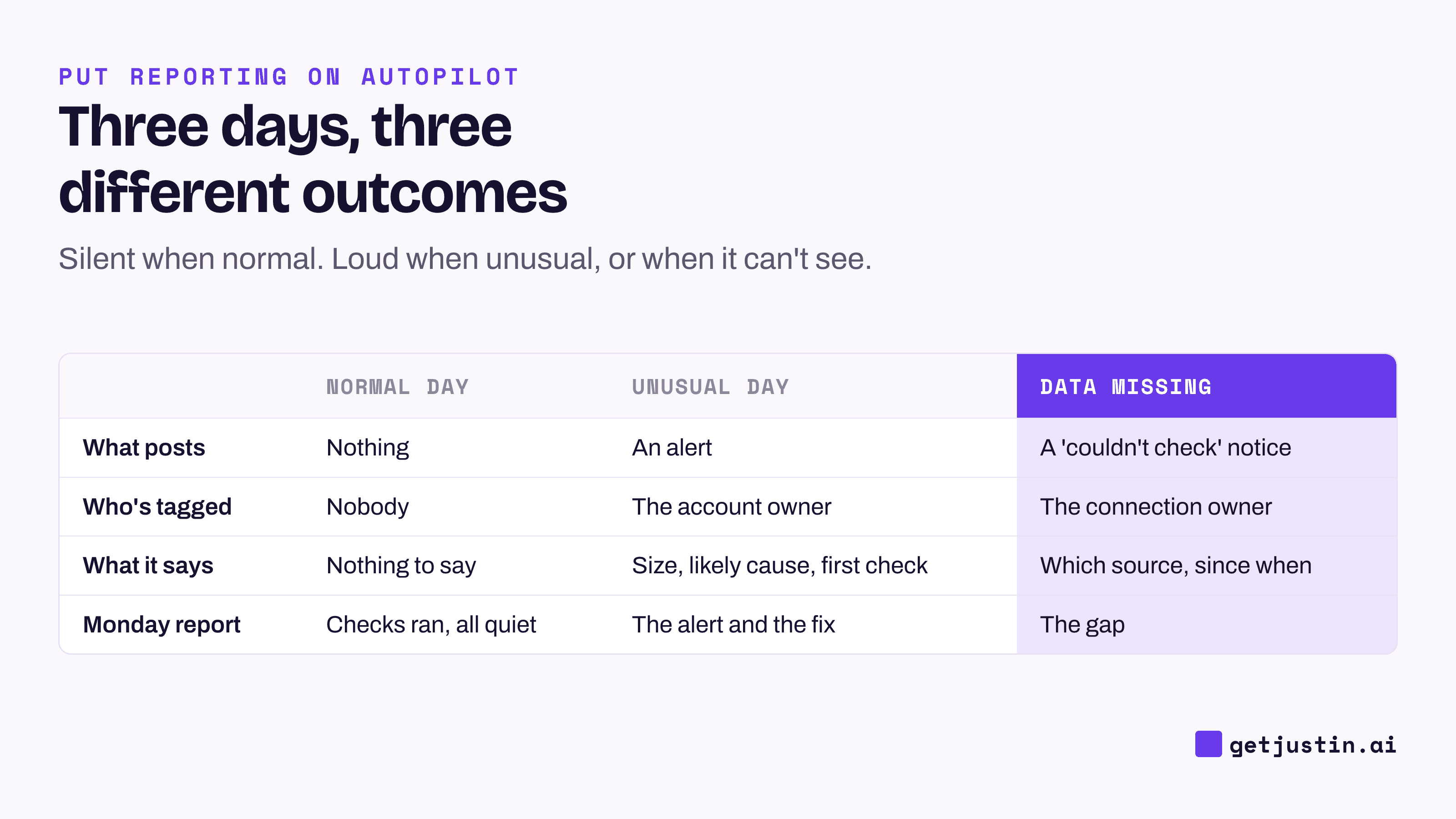
Figure: A normal day is silent; an unusual day and a missing source both post.
What counts as unusual in marketing anomaly detection?
A metric is unusual when it’s far from its own recent normal for the same weekday, at enough volume to matter, for long enough to rule out a blip. For a small team, comparing each day with the last four of the same weekday is a reasonable start; tighter statistics can come later.
Example rules for a 12-person DTC brand, checked every morning at 7am:
Metric | Compared against | Fires when | Minimum volume | First check |
|---|---|---|---|---|
Purchases (Meta, Google Ads) | Last 4 same weekdays | Down 40% or more | 20 purchases on a normal day | Is the purchase event still firing? |
Cost per purchase | Last 4 same weekdays | Up 30% for two days running | 10 purchases a day | Recent edits or new creative |
Spend per account | Last 4 same weekdays | Down 50% or up 50% | Any | Billing, paused campaigns, a budget edit |
Site conversion rate (GA4) | Last 4 same weekdays | Down 30% | 1,000 sessions | Test the checkout on a phone |
Revenue (Shopify) | Last 4 same weekdays | Down 35% | 30 orders | Stock-outs, a discount code that ended |
Tracking | Clicks against conversions | Clicks normal, conversions near zero | Any | Pixel, tag or checkout change |
Treat those percentages as a starting point and adjust them after two weeks of real alerts.
If GA4 is your only source, it can do part of this itself: as of September 2026, its custom insights offer a “Has anomaly” condition and email notifications, with daily anomalies judged against 90 days of history (Google, Google). It won’t see ad spend or post in a channel; GA4 reporting in Slack covers that gap.
How do you set up an ad performance drop alert in Slack?
You set up an ad performance drop alert by describing it once, like the weekly report, plus three clauses a report doesn’t need: what to compare against, what to post when data is missing, and to stay silent otherwise.
Example: “Every morning at 7am, check yesterday’s purchases, cost per purchase and spend per ad account, and GA4 conversion rate, against the last four same weekdays; if one breaks its rule in our table, post in #marketing-alerts, tag the owner, and give the change, the likely cause and one first check; if a source returns nothing, post ‘couldn’t check’ and which source; otherwise post nothing.”
Post alerts in their own channel and tag one named owner per account; an alert addressed to everyone is read by no one. The example below shows the shape.
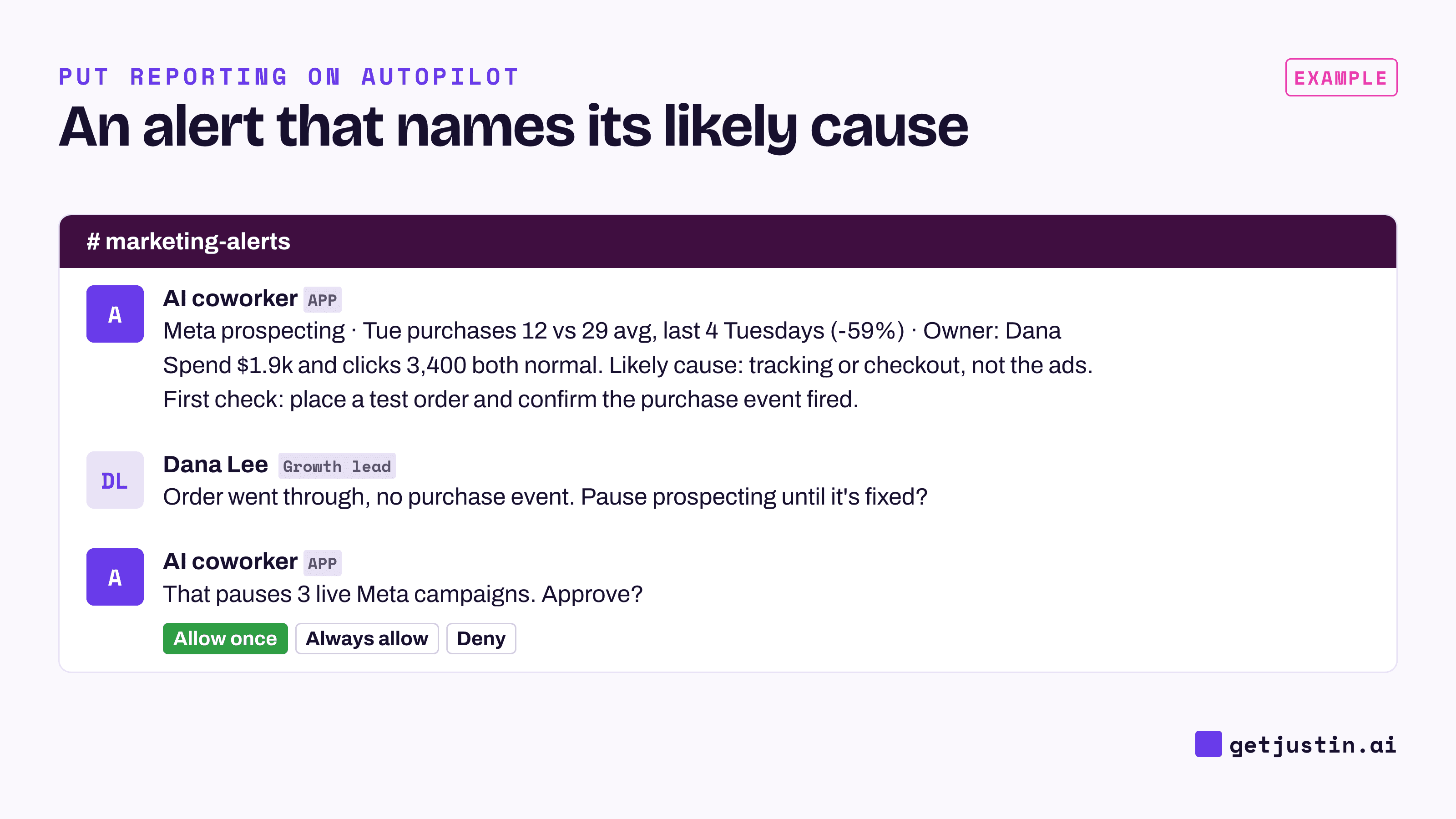
Figure: The alert names the likely cause and the first check; pausing the campaign waits for a person.
The alert says “investigate”; a person decides whether to pause, the approval line described in an AI marketing analyst that asks before it writes.
What should an alert do when the data is missing?
When a source returns nothing, the alert must post a “couldn’t check” notice, because silence would tell the team everything was fine. Most setups skip this one, and in our experience it’s the failure that happens most.
On our CS team, our scheduled sync jobs kept reporting “blocked.” We measured every scheduled run over eight weeks: 1,578 runs. 28% never received the data connector they needed, across 84 separate outages. The same connector was there 93% of the time in hands-on sessions but 72% in scheduled ones, on the same machine. “Connected” on a settings screen is not proof a scheduled job can reach the data.
A blank must never be read as zero, either. For an alert, that mistake makes a failed pull look like a crash, and the team starts debugging a campaign that’s fine.
Silence is only trustworthy if you can check it. Add one line to the Monday report, such as “Alerts: 7 daily checks ran, 1 fired, 0 couldn’t check.” The alert stays quiet all week, and the report proves it was awake.
How do you triage an alert when it fires?
Triage an alert in the same order every time: is the data real, did someone change something, and is it one campaign or everywhere.
Pattern in the alert | Likely cause | First check |
|---|---|---|
Clicks normal, purchases near zero, every channel | Tracking, checkout or the site broke | Place a test order on a phone |
Spend down across one account | Billing or a budget edit | The account’s billing page and change history |
Cost per purchase up in one campaign after an edit | New creative or audience | What changed, and when |
Revenue down, orders flat | Order value fell | A discount code or bundle that changed |
Whatever the cause, the owner replies in the thread with one line on what they found, which becomes context for next week’s report.
FAQ
How are marketing anomaly detection alerts different from threshold alerts?
A threshold alert fires when a metric crosses a fixed number, like CPA over $50. An anomaly alert fires when a metric is far from its own normal for that weekday, at a minimum volume. Use thresholds for hard limits and anomaly rules for metrics with a weekly rhythm.
Can GA4 send anomaly alerts on its own?
Yes, by email. As of September 2026, GA4 custom insights offer a “Has anomaly” condition, hourly to monthly checks, and up to 50 insights per property, created by Editors or Administrators. They don’t cover ad spend or other sources.
How many marketing KPI alerts is too many?
Too many is when people stop reading them. If an alert fires twice without anyone acting, raise its floor or delete it. A small team rarely needs more than the six rules above.
Should an alert pause the campaign automatically?
No. A broken pull, a planned promo ending or a launch day can all look like a drop. Let the alert name the likely cause, and let the account owner decide on the pause.
Doing this with Justin
Justin, the AI coworker for Slack, can run these rules on a schedule. Connect Google Analytics, Shopify, Meta Ads and Google Ads through app.getjustin.ai/connectors, then invite Justin to #marketing-alerts. @-mention it with your alert sentence, the rule table as a file and your time zone, then ask Justin to read the schedule and destination back before it sets it up. On a normal day it stays silent. When an alert posts, reply under it to ask for the breakdown by campaign, with no mention needed. Justin asks before it writes to your connected tools, so pausing a campaign from that thread waits for your approval.