

Short answer: A GA4, Shopify and Meta Ads report in Slack works when you connect each source once, then ask the cross-channel question in plain words, naming each metric the way its own platform names it. A good answer labels every number with its source, date range and read time, so the three tools’ disagreements stay visible. Keep the questions you ask every week as a live page or a scheduled report.
The three tools will never agree, and the thread shouldn’t pretend they do. Turning a trusted answer into a Monday post is covered in automating your weekly marketing report.
Which number comes from GA4, Shopify or Meta Ads?
Each number in a cross-channel marketing report should come from the tool that records it first-hand, under that tool’s own name for it. Shopify owns orders and money, Meta Ads owns spend and delivery, and GA4 owns site behavior. A number that mixes two tools is a calculation, and the answer should say so.
Question | Take it from | Metric name to ask for | Not from |
|---|---|---|---|
How much did we sell? | Shopify | Net sales, orders | GA4, which depends on browser tracking |
How many new customers? | Shopify | Orders from new customers | Meta, which sees only buyers its ads reached |
What did we spend on Meta? | Meta Ads Manager | Amount spent | GA4, unless you import Meta cost |
What did the ads deliver? | Meta Ads Manager | Impressions, link clicks, CPM | GA4 sessions, which count visits |
Where did visitors land and convert? | GA4 | Sessions, default channel group, key events | Meta, which sees only its own traffic |
Spend against revenue | Calculated | Total ad spend ÷ Shopify net sales | Any one platform’s ROAS |
Meta and GA4 will both claim credit for some of the same orders. Which claim is right is contested; label each as that platform’s claim, beside Shopify’s order count.
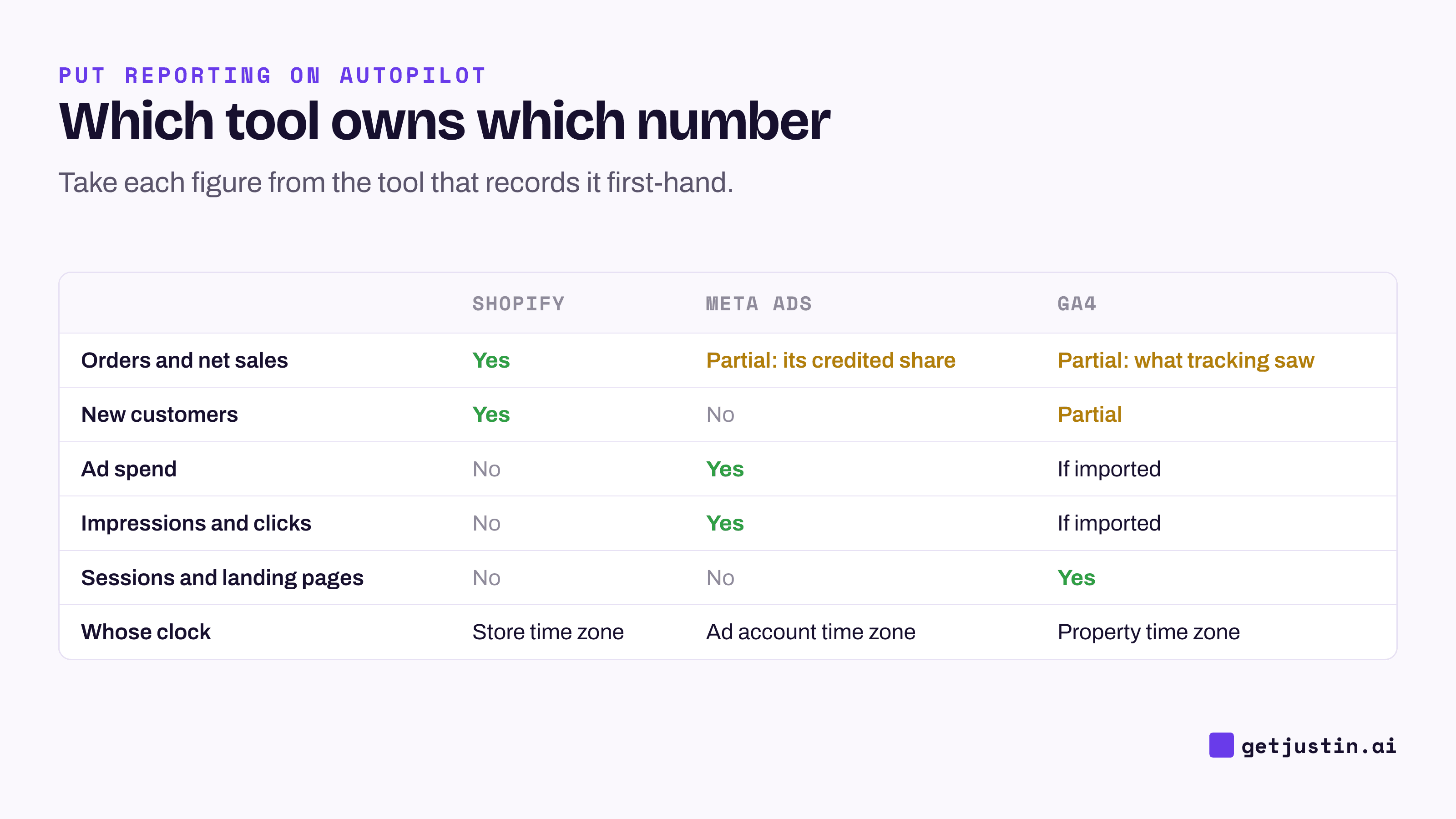
Figure: Take each figure from the tool that records it first-hand, and note whose clock it runs on.
How do you connect GA4, Shopify and Meta Ads to Slack?
You connect each tool to an AI coworker in Slack once, by signing in and choosing the GA4 property, Shopify store and Meta ad account it may read. Read-only access covers everything here. Name the property and ad account you mean, or a leftover test property or old agency account can answer instead.
Then test each connection with a question you already know the answer to, such as yesterday’s order count. “Connected” in a settings screen is not proof the tool answers.
Two GA4 details decide whether Meta shows up correctly. Meta ad URLs need UTM tags, or GA4 can’t tell a paid Meta visit from an organic one. And as of September 2026, GA4 can import Meta Ads cost, clicks and impressions itself, if every ad URL carries utm_source and utm_medium; the import’s settings can’t be edited once created (Google Analytics Help, accessed 2026). For GA4 alone, see GA4 reporting in Slack without Looker Studio.
Five questions to ask first
These five questions cover most of what a small team needs. Each pins the date range, time zone, metric name and source, so the AI has nothing to guess. The rule behind them is from a tip sheet our CS ops lead wrote for the CS team: “Be specific about what you see and set in the product. Let the AI resolve — and verify — how it’s stored.”
Ask this in the thread | Reads | What it tells you |
|---|---|---|
“Last Monday to Sunday, store time: Meta amount spent, Shopify net sales and orders, and spend divided by net sales.” | Meta, Shopify | Whether spend and sales moved together |
“Same week: Shopify orders from new customers, and Meta spend divided by them. Show the formula.” | Meta, Shopify | Cost per new customer, labelled as a calculation |
“Top five Meta campaigns by amount spent, with GA4 sessions for each matching utm_campaign.” | Meta, GA4 | Which spend brings visits, and which tags are broken |
“Top five landing pages by GA4 Paid Social sessions, with key event rate.” | GA4 | Where paid visitors land and whether they convert |
“Each day last week: Meta-reported purchases beside Shopify orders. Where is the biggest gap?” | Meta, Shopify | A tracking check, not a verdict on the ads |
The third question doubles as a tagging audit: spend with no sessions usually means a misspelled utm_campaign. In the fifth, a steady gap is two tools counting differently; a gap that jumps overnight points to a pixel or checkout change.
How should the answer show its sources and dates?
A trustworthy cross-channel answer tags every figure with its tool, the platform’s name for the metric, the date range with its time zone, and when the tool was read. Calculated numbers show their formula. A source the AI couldn’t read is named and left blank, never filled with an older figure. The example below shows the shape.
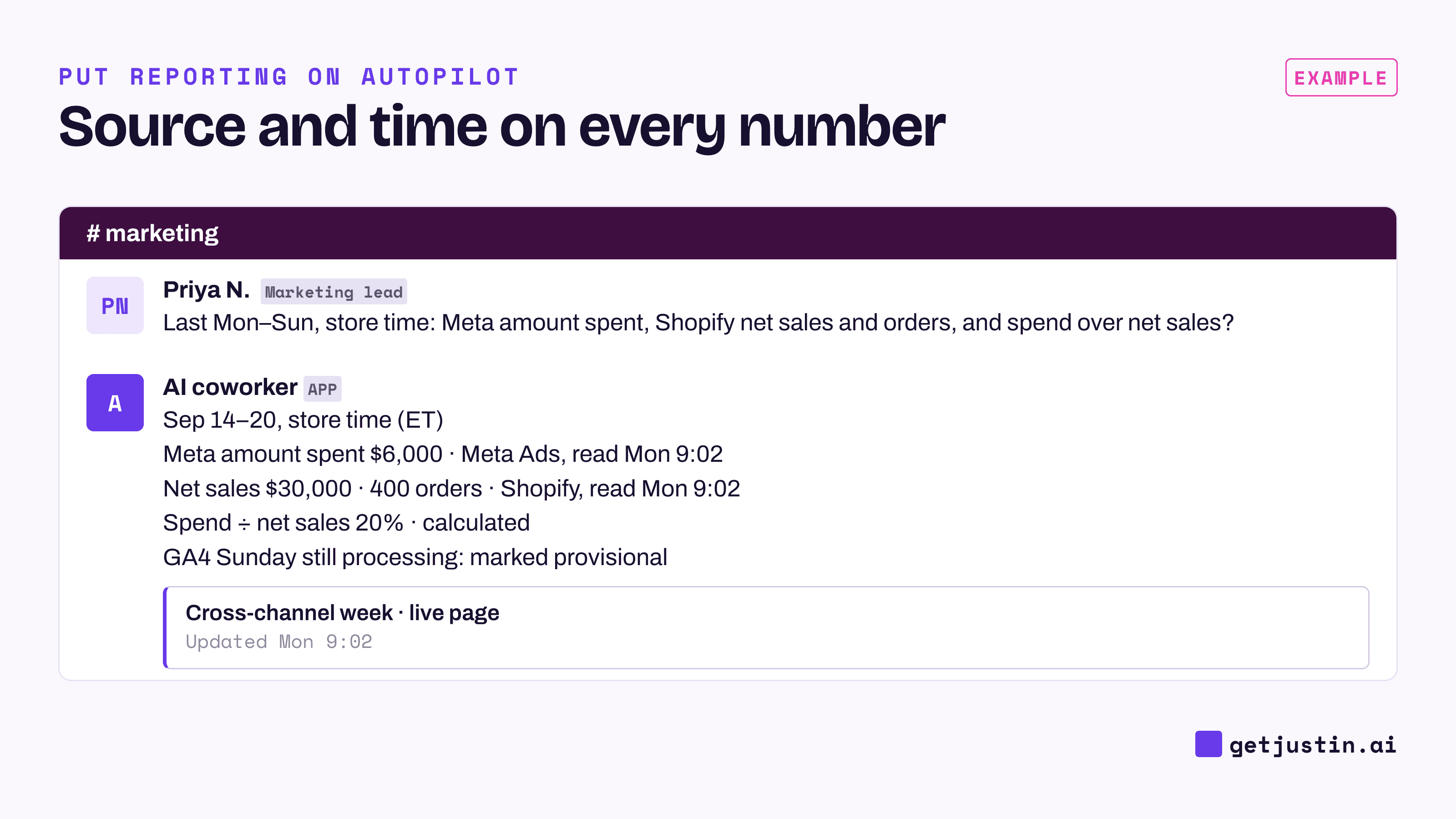
Figure: A good answer shows where every number came from, when it was read, and which one is still provisional.
Time zones and processing lag are where “last week” stops meaning one week. The store, the ad account and the GA4 property each keep their own time zone. GA4 also keeps processing after the day ends: Google puts daily data at about 12 hours for standard properties, and says processing can take 24–48 hours, with report numbers changing meanwhile (GA4 data freshness, accessed 2026). Ask on Monday morning and Sunday’s GA4 figures should be marked provisional.
The read time should belong to the data, not the message. A rule we kept from auditing our team’s own scheduled jobs: never answer from yesterday’s cached copy, because re-posting it restamps “last refreshed” and makes stale data look current.
The platform’s own screen still beats internal checks: one of our audits once passed every internal check while every figure ran 3–4% high, as told in the AI marketing analyst that asks before it writes.
How do you turn a good answer into a live page?
Once an answer is right and you’ve asked it twice, keep it: as a live page that re-reads the sources on open, or as a scheduled post. A live page suits numbers people check on their own time; a scheduled post suits numbers someone must see. Spend against the monthly plan is better watched by a budget-pacing alert. Either way, ask for the four tags on every figure and check they’re there, since a live page may show one update time for the whole page; live pages vs screenshots vs BI links compares the formats.
FAQ
Why don’t GA4, Shopify and Meta Ads show the same revenue?
They count different things. Shopify records completed orders, Meta reports purchases its ads get credit for, and GA4 counts what its browser tracking saw. A steady gap is normal; a sudden change is worth checking.
Which revenue number should go in a cross-channel marketing report?
Use Shopify’s net sales, because it counts actual orders. Show Meta’s and GA4’s figures as each platform’s own claim, labelled that way. Adding them into one total double-counts orders both platforms credit themselves with.
Can I combine GA4 and Meta Ads data without a data warehouse?
Yes. An AI coworker that reads each tool directly can answer cross-channel questions in a thread, and GA4 can import Meta cost, clicks and impressions itself. A warehouse pays off when you need years of joined history or custom modelling.
Does the AI need write access to my ad account to report on it?
No. Every question in this guide only reads. Keep access read-only until you want to change a campaign from the thread, and even then the change should wait for a named person’s approval.
Doing this with Justin
Justin, the AI coworker for Slack, can answer these questions in a thread. Connect Google Analytics, Shopify and Meta Ads in app.getjustin.ai/connectors; one person’s connection covers the whole team by default. Ask in a DM, or invite Justin to #marketing and @-mention it. Ask for the answer as a live page: live pages show when their data was last updated, the numbers refresh when you open it again, and you can ask where any number came from. Anything that writes to a connected tool waits for your approval.