
Short answer: Onboard an AI coworker like a new hire with a narrow first assignment: one weekly job, one channel, one named owner, only the permissions that job needs, and a first run on a case the owner knows by heart. Onboarding rarely fails because the model is weak. It fails on an unchecked guess, a silent failure or a responsibility nobody owns, and the checklist below is built to catch all three.
Most advice on how to onboard AI agents assumes an AI committee and a platform team; this checklist is for teams of 5 to 200. On our CS team, the ops lead builds and runs the AI coworkers our customer success managers (CSMs) use, and nearly every item here was earned by something going wrong.
Is onboarding an AI coworker like onboarding a new hire?
Onboarding an AI coworker is like onboarding a new hire in the obvious ways and unlike it in three that cause most of the trouble. Both need a first assignment, a manager, limited access and a week-one review, and Joseph Fuller argued in HBR (2026) that agents deserve an onboarding plan. On those basics he’s right.
The three differences:
It doesn’t ask when it’s unsure. As our CS ops lead tells the team, “The AI never says ‘I’m not sure what you mean.’” It fills the gap with a plausible guess.
It only knows what’s written. A new hire absorbs unwritten norms in weeks; an AI coworker knows only what it can read.
Its mistakes can happen out of view. Scheduled runs happen when nobody is watching, so a failure can look like a normal report.
So in week one, the owner does most of the learning: writing down what the team knows, and asking the AI coworker to question them before its first attempt.

Figure: The analogy holds for scope and ownership, and breaks on guessing, unwritten rules and unattended work.
How to onboard AI agents: the 14-point checklist
The checklist is mostly organizational on purpose: in a Stanford study of 51 successful enterprise AI deployments, about 77% of the challenges were organizational, not technical (Stanford Digital Economy Lab, 2026).
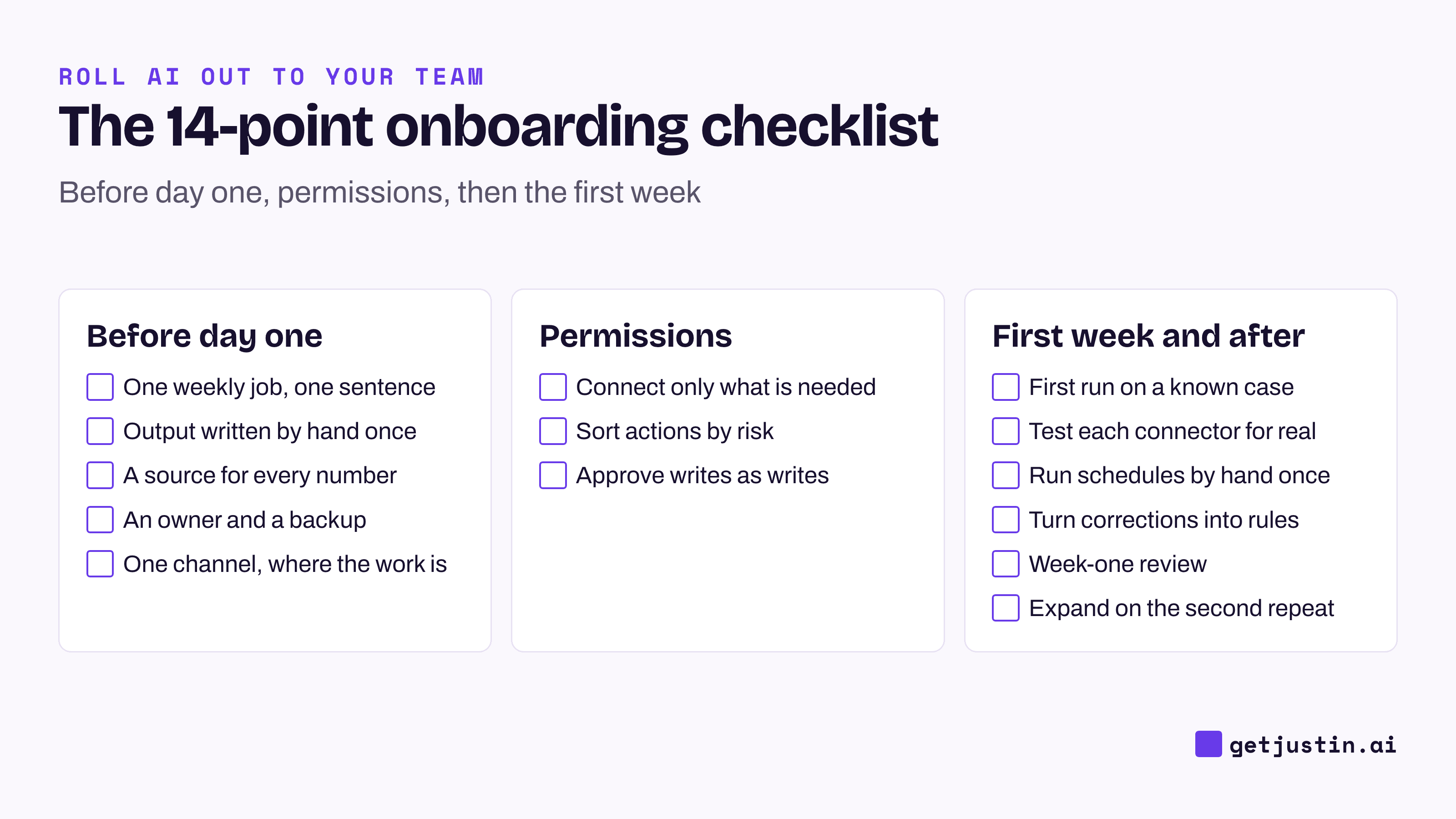
Figure: Fourteen steps in three phases; copy this AI agent onboarding checklist into your team doc.
Items 1 to 5 come before day one, items 6 to 8 set permissions, and items 9 to 14 cover the first week and after; the sections below take each phase in turn.
# | Item | Done when | Guards against |
|---|---|---|---|
1 | One weekly job, in one sentence | It names a day, a channel and an output | Unchecked guess |
2 | The finished output, written by hand once | A page shows what right looks like | Unchecked guess |
3 | A source and definition for every number | Each figure points to a report or field | Unchecked guess |
4 | An owner and a backup for the job | Two people can check it and pause it | No owner |
5 | One channel, where the job already happens | The people who’d spot an error see every output | Silent failure |
6 | Only the tools that job needs | Each connection has a step and an approver | No owner |
7 | Actions sorted by risk | Sends and shared-system writes need a yes, or stay drafts | No owner |
8 | Writes approved as writes, not with the plan | Nothing live changes on a “sounds good” | No owner |
9 | A first run on a case the owner knows cold | The owner has checked every figure | Unchecked guess |
10 | A real test request through each connector | Each tool returns data, not a “connected” badge | Silent failure |
11 | One manual run of every scheduled job | Full output arrived, nothing awaiting approval | Silent failure |
12 | Every correction saved as a standing rule | No correction is given twice | Unchecked guess |
13 | A 15-minute review after week one | You’ve chosen keep, change or stop | No owner |
14 | Expansion only on a second same-shape job | It has its own owner and example | No owner |
Before day one: one job, one answer key, one owner
Before day one, the most useful thing a team can produce is a hand-written example of the finished work. Pick the job that eats someone’s Monday and write the version you’d sign; without it, you can’t tell plausible from wrong.
Keep the job narrow: “The general one sounds better in a Slack message; the specific one gets re-invoked.” Note where each number comes from and how that source defines it. After one of the ops lead’s metrics landed about ten times apart from the dashboard’s, the rule became “A metric is a definition, not a formula you reinvent.” A weekly marketing report makes a good first job.
Name an owner per job, not per AI coworker: whoever does the job today, plus a backup. Otherwise whoever set it up ends up owning everything; the AI champions program tells how that happened on our team.
What permissions should an AI coworker have on day one?
On day one, an AI coworker should read only the tools its first job needs, and every write should wait for a person. Sort actions before connecting anything:
No approval needed: reading, summarizing and drafting in the thread.
Ask every time: anything sent outside the team or hard to undo, such as an ad budget. Test in a trial which of these your AI coworker actually stops for, and keep the rest as drafts in the thread.
Standing approval: routine writes you’ve checked several times, such as adding rows to the team’s tracking sheet.
Keep plan approval and write approval separate. Testing a setup job on three live client accounts, our CS ops lead answered the AI’s design questions, and it read those answers as permission to write. The ops lead had to type “dry run only please.” We then validated that job on nine accounts with zero writes, because “Approving a plan is not approval to write it.” For the written version, start from an AI agent usage policy template.
The first week: test on what you know, then hunt for silent failures
In the first week, run the job on a case the owner knows by heart, because only someone who knows the right answer can spot a wrong one. Few people check otherwise: in a 47-country survey, 66% said they rely on AI output without evaluating its accuracy (KPMG and University of Melbourne, 2025).
On our CS team, an account summary we built looked clean on its first run. The CSM who owned the account asked where her four open tickets were; it showed none. It searched ticket titles for the account name, and two were titled things like “UX wording change for clarity.” No test account would have caught it.
Next, hunt for failures that look like success. One CSM reported a connector as broken when a permission had never been granted; a missing permission looks exactly like a broken tool. And the first unattended Sunday run of a new weekly job came back empty, because a tool approval sat waiting with nobody there to give it. Items 10 and 11 exist for these.
Save every correction as a written rule with its reason, and repeat the loop below until a run needs nothing fixed by hand. At the week-one review, be willing to stop: “Sometimes the right move is killing a skill, not improving it.”
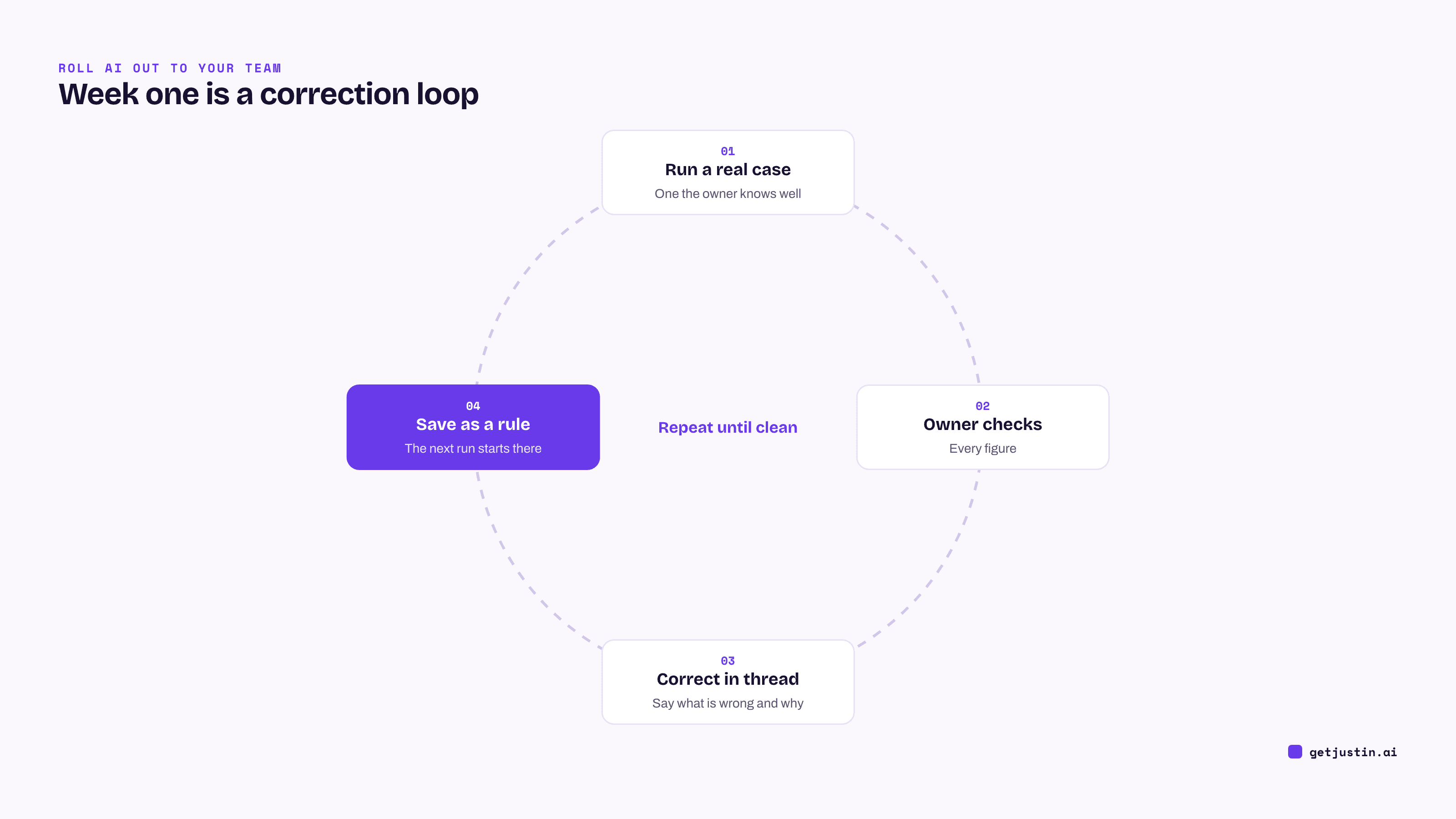
Figure: Week one is a correction loop that ends when a run needs no fixes.
When should you expand to a second job or channel?
Expand when a second job shows up with the same shape as the first. “Once is a fluke, twice is a pattern,” as our CS ops lead puts it. Building from one example bakes in its quirks; the guide to writing your first skill covers what to write down, and crowdsourcing use cases from your team finds the next job.
Make the next person’s start cheap, because activation is a setup-cost problem before it’s a training problem; the guide to getting employees to use AI shows how we removed the first step. The 30/60/90-day rollout plan paces what comes next, and the AI adoption scorecard shows whether the habit is spreading.
What we still don’t know is whether a team keeps this discipline once its builder stops cleaning up behind it. A different owner per job is our best hedge.
FAQ
How long does it take to onboard an AI agent?
Plan on about a week for the first job: a day for the job, owner and permissions, a few days of runs and corrections, then a short review. If the same corrections keep coming, narrow the job.
What should an AI coworker’s first job be?
A recurring internal job with a known right answer, such as a weekly performance recap posted to the team’s own channel. Pick one someone already does by hand, so there’s a real example to compare against. Skip anything that emails customers or changes a live system in week one.
Who should own an AI coworker on a small team?
The person who does each job today, not IT and not whoever installed the tool. Name an owner and a backup per job so the work doesn’t route through one person.
How do you know onboarding an AI coworker is finished?
Onboarding is finished when a run on a real case needs nothing fixed by hand and every correction is saved as a rule. Then the job can move to a schedule. Keep reading outputs for a few more weeks, because unattended runs fail differently from supervised ones.
Doing this with Justin
Justin, the AI coworker for Slack, maps onto this checklist. Invite it to the job’s channel and @-mention it; it replies in a thread. Nothing is connected until someone on the team authorizes it, and a connection is shared with the team by default, which you can narrow per connector. Reading doesn’t need approval, and it asks before it writes to your connected tools; approve once, or for that kind of action. Ask it to remember a correction, and it keeps it for the team. When the job is ready, ask for the automation in a sentence and ask Justin to read the terms back before it starts; Run now lets you trigger the first run yourself.
Related reading
AI agent skills for non-technical teams, and how to write your first one
Your first 30/60/90 days with an AI coworker: a small-team rollout plan
An AI usage policy for agents that take action (template)
How AI coworkers work: the model, what it knows, what it can do, and who’s in charge