

Short answer: An AI agent skill is a written playbook your AI coworker follows every time a certain request comes in: when to use it, what it reads, the steps, an example of finished work and the bar the output must clear. Non-technical teams are the right authors, because the hard part is judging what good looks like, not code. Start with one weekly job and a finished example you wrote by hand.
Most guides to AI agent skills are written for engineers; this one is for the person who knows the work. On our CS team, the ops lead writes the skills our customer success managers (CSMs) run, and about four hours of conversation with a senior CSM separated the version that worked from the one that didn’t.
What is an AI agent skill, if it isn’t a prompt?
An AI agent skill is a saved set of instructions the AI coworker picks up whenever a request matches, so nobody retypes a good prompt from memory. A prompt is one ask; a skill is the standing brief for a recurring one.
The best-known format is Anthropic’s Agent Skills, an open standard since December 2025 (Anthropic, 2025): a folder with a SKILL.md file that opens with a name and a line saying when the skill applies (Agent Skills). The judgment inside that file is what a non-technical author supplies.
Does this job need a skill at all?
A job needs a skill only when it produces something people use repeatedly and someone can say what a good one looks like. We ask the four questions below in order and stop at the first that settles it.
Question | If yes, it’s |
|---|---|
Must the output be identical every time? | A rule in your software or spreadsheet, not AI |
Is it only an answer to a question? | Knowledge: a doc the AI coworker can read |
Is it a deliverable someone consumes? | A skill candidate; ask the last question |
Can you name three past examples done well, and one owner? | A skill. Write it |
Two rules follow. “A skill may never compensate for a broken product”: fix bad data upstream. And “Knowledge always precedes skill”: a skill that has to guess the facts will guess them confidently.
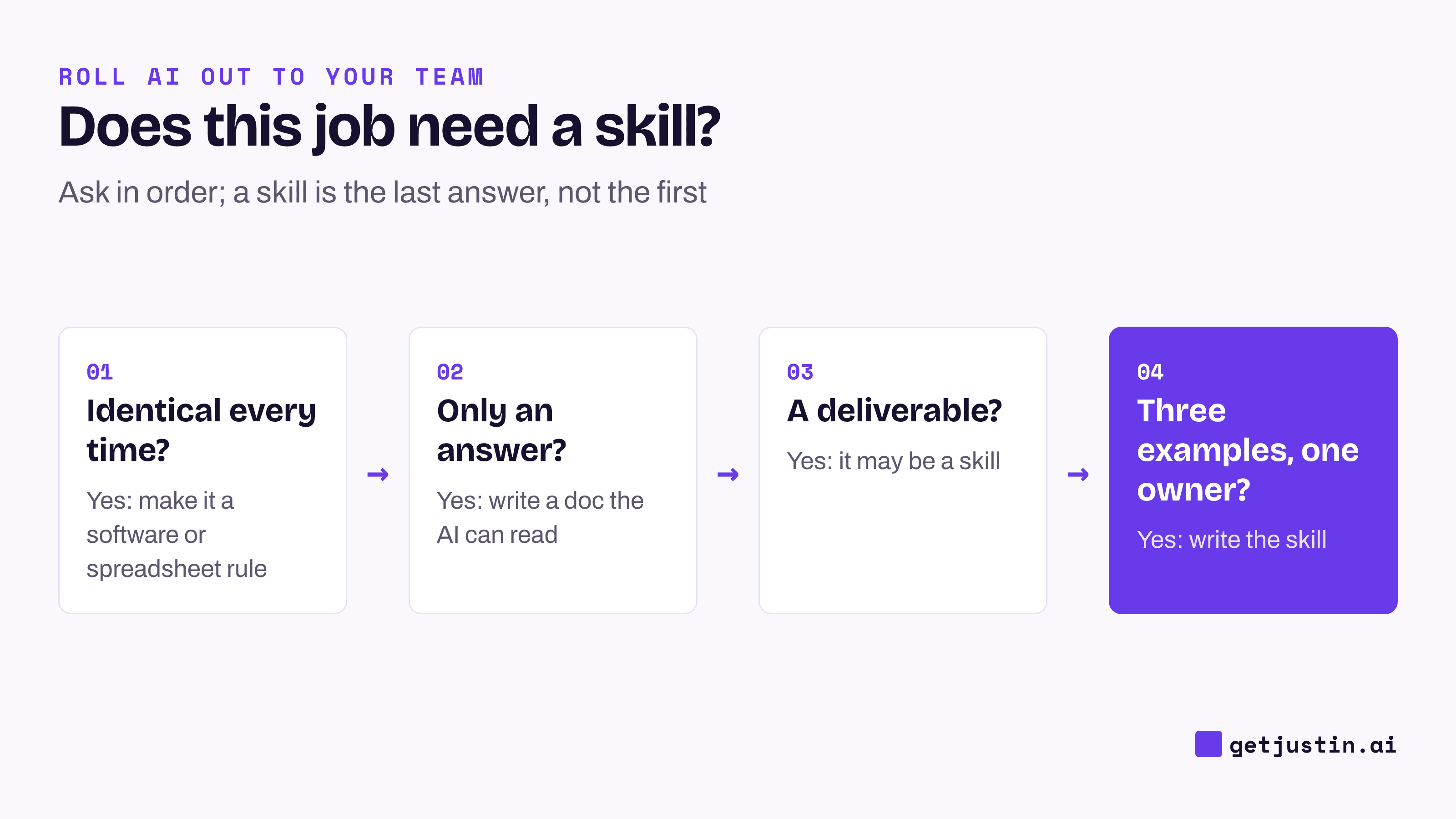
Figure: A skill is the last answer in the sequence, not the first.
The five parts of a skill, and what to write in each
A skill has five parts, each written in plain sentences, stacked in the diagram below.
Trigger. When to use it, in the words people type (“how did paid do last week”), and when not to. The AI coworker reads only this before opening the skill, so hard limits go here; after an AI took our CS ops lead’s plan approval as write approval (see the onboarding checklist), our no-write rule moved into the trigger. Keep it short: some tools cap its length, and an over-long description can stop a skill from installing at all.
Inputs. Every source the skill reads, and how that source defines each number.
Steps. The order you’d work in, including the checks you do without thinking, like confirming every channel reported a full week.
Example. The finished output, written by hand once, so there’s something to compare against.
Quality bar. What done looks like, plus a banned-strings list of every phrase that makes the expert wince, checked against each output. Ours stopped growing at 14 entries; early drafts had hundreds of hits, later ones none.

Figure: The trigger decides whether the skill runs; the example and quality bar decide whether its output is right.
The most valuable part is often a senior person’s judgment. One of our skills ends with a four-question pre-mortem we almost cut as “too opinionated”; on its first real account, it asked what a senior CSM would ask in week one.
Worked example: a weekly paid-media recap skill
Copy the left column as a template; the right is filled in for Acme, a 12-person DTC brand. The report itself is covered in automating the weekly marketing report.
Part | Example: Acme’s weekly paid-media recap |
|---|---|
Name, owner, version | Weekly paid recap · owner: growth lead · v1, reviewed monthly |
Trigger | “Weekly recap”, “how did paid do last week”, or the Monday 9am schedule. Not for the board report |
Inputs | Spend by channel from each ad platform, orders and new customers from Shopify, sessions from GA4, each on its platform’s own definition |
Steps | Pull last week and the week before. Check each channel reported all seven days. Compare week over week. Name the one change worth a look |
Example | Last month’s recap as the growth lead wrote it, attached |
Quality bar | Conclusion first. Every figure names its source. A channel that stopped reporting is the headline. Flags spend to “investigate”, never pauses it |
Give each metric its interpretation rule, since “higher is better” is a default, not a law, and have the skill flag rather than act. The starter skills for marketing teams show both rules on a recap, plus nine other jobs worth a brief.
How do you test a skill before the team relies on it?
Test a skill on three real cases, each picked to break it a different way; one familiar case only catches obvious errors.
The good case proves the basic path works.
The messy case, with many channels and odd campaign names, shows whether the skill generalizes or memorized its first case.
The case that looks broken but isn’t, such as a subscription brand whose first-order return is low by design. A naive skill raises an alarm; a sound one explains it.
If passing all three needs a special rule for one account, go back to the inputs. Keep the cases and rerun all three whenever the skill changes, so one fix doesn’t quietly break another.
Who owns a skill, and how does it change?
Each skill has one owner, the person who runs that job now, who decides when it changes and whether it should keep existing.
Put a version line at the top (“v3, Sept 10: a channel with missing days now leads the recap”) and review on a set date; monthly suits a weekly job. Edit the copy the team actually runs, not a draft in someone’s folder. Once there are several skills, the skills library playbook covers keeping them current.
FAQ
What is the difference between a prompt and an AI agent skill?
A prompt is a request someone types each time. An AI agent skill is a saved set of instructions the AI coworker uses whenever a matching request arrives, with an example and a quality bar attached, so the result doesn’t depend on who asks.
Do you need to code to write a skill?
No. All five parts are plain sentences. An engineer can add a script later for a fixed calculation, but the judgment about good output has to come from the person who does the job.
How long should a skill be?
One to two pages for a first skill, with a trigger of a few sentences, since some tools cap its length. Put long reference material, like a metric glossary, in a separate file the skill points to.
What is SKILL.md?
SKILL.md is the main file in the open Agent Skills format Anthropic introduced in 2025. It opens with a name and a description of when the skill applies, then plain-text instructions. Many AI tools read it.
Doing this with Justin
Justin, the AI coworker for Slack, has a skills feature. The brief you wrote above is a different thing: it’s instructions, and your team keeps them in two places. Team-wide rules, such as the banned phrases, go in the custom instructions the workspace owner sets for the whole team. The brief itself goes in a shared doc, or into the thread as a file, and your request names it. Invite Justin to the job’s channel and @-mention it with your first request; it replies in a thread, where the owner checks the output against the example and the quality bar. Ask it to remember a correction, and it keeps it for the team. When a run clears the bar, set it to run on a schedule: ask Justin to read the terms back before it starts, and use Run now to watch the first run.
Related reading
From prompt library to skills library: collect your team’s best workflows