

Short answer: People stop using AI when it lives somewhere they have to remember to visit, arrives with no job attached, and nobody fixes its first bad answer. To get employees to use AI again, put the AI coworker in the channel where requests already happen, give each person one job that saves time this week, and correct its mistakes in the thread where everyone sees the fix. The manager asks first, in public.
The usual pattern is a launch, a busy first week, and quiet by week three. It isn’t rare: in BCG’s 2025 survey of more than 10,600 workers, regular AI use among frontline employees had stalled at 51% (BCG, 2025). This guide is for the restart; for a first setup, start with the AI coworker onboarding checklist.
Why do employees stop using AI?
Employees usually stop using AI because the setup handed them extra work: remember a separate tool, invent a use for it, and check its output alone. Few quit because they decided AI is useless. The table maps each complaint to its usual cause and fix.
What people say | What usually happened | What to change |
|---|---|---|
“I forget it’s there” | It lives in a tab outside the day’s work | Put it in the channel where requests already arrive |
“I didn’t know what to ask” | The brief was “explore” | One named job per person |
“It got it wrong” | The first bad answer was never corrected | Fix it in the thread; save the fix as a rule |
“It’s broken” | A permission or setup step was never done | The job’s owner checks setup before the restart |
“I’d rather not be seen using it” | Use is private, so nobody sees what good looks like | The manager asks in the shared channel first |
“It’s faster to do it myself” | The job was rare, or too small to matter | A weekly job with a known right answer |
Almost every row is about setup, not attitude, and a team lead can change setup on Monday.
Put the AI coworker where the request already happens
The biggest single change is location: the AI coworker should sit in the channel where people already ask each other for the work, so asking it costs no more than asking a colleague. If the weekly numbers get requested in #growth, that’s where it goes.
Then remove the first step. On our CS team, colleagues hit install errors on a tool the AI needed, on both Mac and Windows. Instead of writing a guide, we had the AI run the install from inside the chat, so the only thing anyone clicked was a sign-in link. Our current approach goes further: we don’t count on anyone starting AI work on their own, so the skills come preconfigured and the first action is a one-click button in the onboarding to-do. Activation is a setup-cost problem before it’s a training problem.
Give each person one job, not “explore”
“Explore” is the brief that produced the silence, so give each lapsed person one named job. Find it with one 1:1 question: “What did you do by hand last week that you’d happily hand off?” A good answer is weekly, has a right answer the person already knows, and ends in the team channel: a Monday numbers recap, a ticket digest, a UTM check on new campaigns.
Pick the job for the person who stopped, not for the enthusiast, and give them one standard path per job, not a menu; the AI champions program covers what to ask of power users instead. If the same job fits several people, write it down once as a skill; the guide to writing your first AI skill shows the parts.
Fix mistakes in public, and save the fix
A bad first answer ends most restarts, so plan for it. When the output is wrong, the person says so in the thread and asks the AI coworker to remember the fix as a rule for the team. The next teammate gets the fixed version, as the thread below shows.

Figure: A correction made in the thread and saved as a rule means the next teammate never sees the mistake.
Wins need the same visibility: say in the team meeting whose Monday a job saved, and track who comes back with the AI adoption scorecard, not a login count.
What should managers do to increase AI adoption at work?
Managers should go first, in the shared channel, and ask about work rather than about usage. Support matters: BCG found the share of employees who feel positive about generative AI rose from 15% to 55% with strong leadership support, yet only about a quarter of frontline employees said they got it (BCG, 2025).
In the restart, a manager does three things:
Asks for something real in the team channel in week one, and leaves any correction visible.
Asks about work in 1:1s: “What did you hand off this week?”, never “Are you using AI?”
Names wins in the team meeting: whose job moved and what it freed up.
The restart post, to copy:
We’re trying our AI coworker again, differently. It’s now in #growth, and each of you gets one job for it; I’ll confirm yours in our 1:1 this week. If it gets something wrong, say so in the thread and ask it to remember the fix, so everyone gets it. I’ll go first with the Monday numbers.
A two-week restart plan
The restart takes two weeks and changes setup before it measures anything, as the diagram below shows.
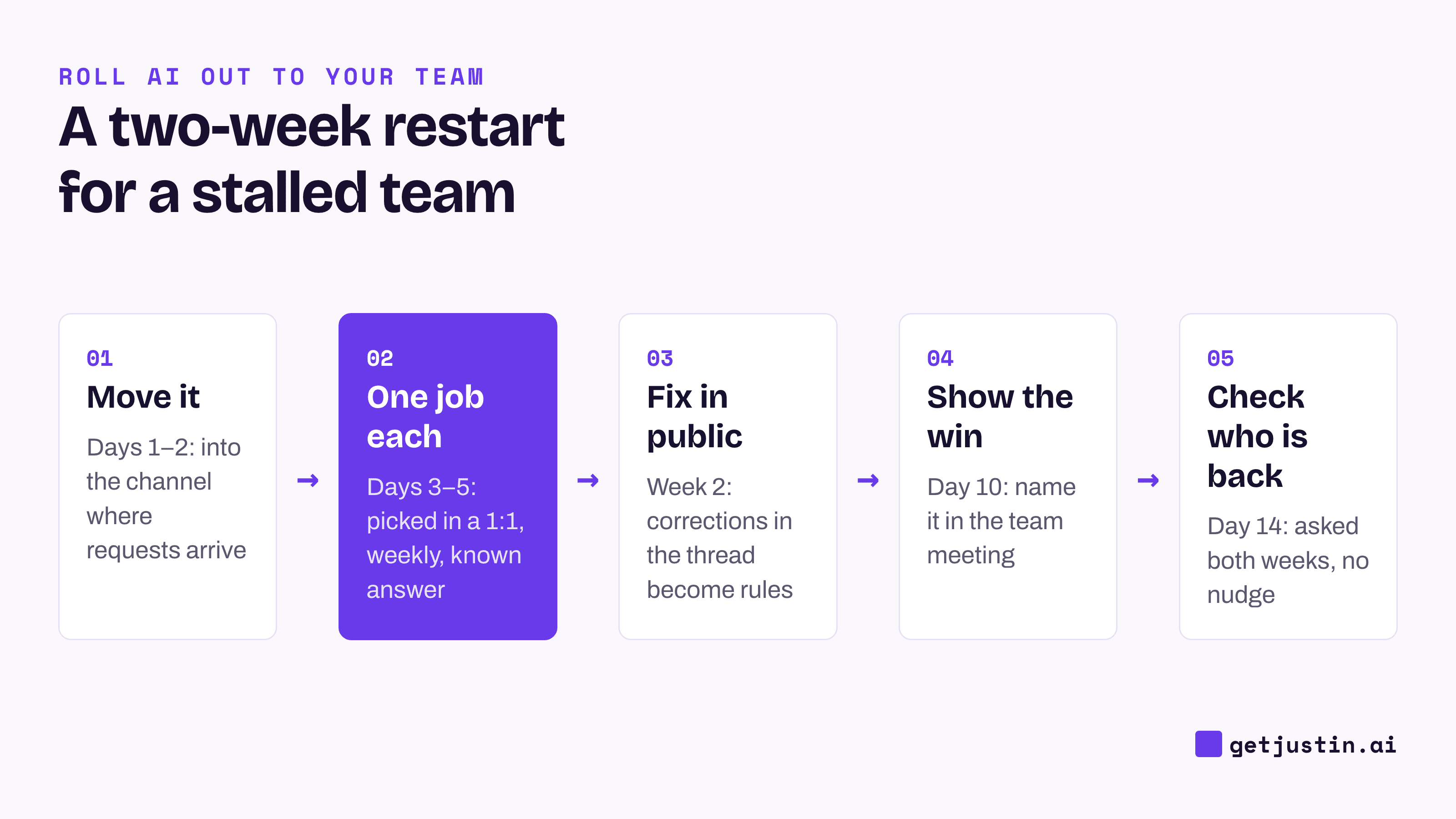
Figure: The restart changes setup first and measures last, on day 14.
On day 14, count who asked the AI coworker for something in both weeks without a reminder. If it’s only the people you nudged, the job isn’t right yet: go back to the 1:1 question and pick a different one.
FAQ
Why do employees stop using AI tools?
Mostly because of setup, not attitude: the tool sat outside their daily work, came with no specific job, and its first wrong answer was never fixed. Changing where it lives and what it’s for matters more than another training session.
Should you make AI use mandatory?
A mandate gets logins, not handed-over work. Ask each person to name one job the AI coworker does for them instead, and review that job in 1:1s, so the reason to come back isn’t a rule.
How much training do employees need to use AI?
More than a launch email. BCG found employees with at least five hours of training plus in-person coaching were much more likely to use AI regularly (BCG, 2025). On a small team, much of that coaching can happen in the thread, as corrections come up.
How long does it take to restart AI adoption on a team?
Allow two weeks for an early read and a month for a real one: first check who came back without a nudge, then whether any recurring job moved. If neither happened, change the job, not the pitch.
Doing this with Justin
Justin, the AI coworker for Slack, works in the channels you invite it to: @-mention it and it replies in a thread, where anyone can follow up without mentioning it again. Ask it to remember a correction, and it keeps it for the team, so the next teammate gets the fixed version. For someone who’d rather try privately first, a DM works with no mention needed, and what they say there isn’t visible to the rest of the team. Every plan covers the whole team with no seats, so a teammate who stopped doesn’t need a license to start again.