

Short answer: Lindy is now a Slack assistant with a private helper in each person’s DMs and a shared one in channels, over 1,000 integrations, and approval on writes in shared threads. Teams compare Lindy alternatives on three points: per-user pricing, each teammate linking their own account and tools, and the narrower toolset Lindy uses in shared channels. For team-priced channel coworkers, look at Viktor, Dash and Justin; for fixed automations, Zapier or n8n.
If you want a Zapier- or n8n-style builder instead
Most “Lindy alternatives” pages compare agent builders (Make, n8n, Zapier, open-source stacks), not Slack channel coworkers. If that’s what you need, start with Zapier Agents, n8n or Make, then come back here for Slack-team pricing and shared memory. This page is for teams comparing Lindy as a Slack assistant to other coworkers in the channel.
What Lindy does well
Lindy is strongest as a personal assistant that also shows up in Slack. According to its homepage, it works in Slack, iMessage, Gmail and the browser, joins meetings on Google Meet, Zoom and Microsoft Teams, and connects to over 1,000 integrations plus MCP servers.
In a DM, Lindy can use everything it has: it books meetings, sends email and texts, sets reminders and reads your meetings (Lindy docs). For one person’s inbox and calendar, few Slack-first tools go that far.
Lindy also does a few team things well:
Memory you can read. Lindy keeps what it learns in plain files, personal or shared with the whole workspace, that you can open and edit (team files are editable by owners and admins) (Lindy docs).
Approval on writes. Anything with outside impact, such as an email or a ticket update, waits for a named approver. Read-only lookups run without asking. Lindy’s docs add that these guardrails apply in shared Slack threads, not in DMs or the web app.
Careful channel answers. In a public channel, it summarizes rather than pasting private data.
Compliance claims. The homepage lists SOC 2 Type II, GDPR and HIPAA; HIPAA with a signed BAA is an Enterprise feature (Lindy pricing).
Why Slack teams look for Lindy alternatives
Slack teams look elsewhere when the work is the channel’s rather than each person’s. Lindy’s Slack design starts from the individual, with three consequences.
Every teammate links their own account. Per Lindy’s docs, an admin installs the Slack app, then each person links their Lindy account and connects their own tools. The first time someone @-mentions Lindy, it sends a connect button before it starts working. An owner or admin can share one of their connections with the whole workspace, but other tools stay personal.
Shared channels get a public-safe toolset. In shared channels and threads, Lindy’s Slack docs (as of September 24, 2026) limit it to searching the web and public Slack, making images, and Notion if the team has connected it. Calendar, email and the rest of the full toolset work in your DMs and your own threads, a term the docs don’t define, and connections an admin shares with the workspace may also be available. That protects private data, but a request like “pull last week’s HubSpot pipeline into this thread” is worth testing in the channel before you rely on it.
Pricing follows headcount. Plus, Pro and Max are priced per user; Enterprise is by quote (Lindy pricing). Lindy’s FAQ states that anyone who uses Lindy, including by @-mention in Slack, takes a seat. Each seat’s credits go into a shared pool, which helps, but the bill still grows with the team.
None of this is a flaw for a team that mostly wants personal assistants. It matters when the channel itself is the customer.
Lindy AI pricing: what a team of ten pays
Lindy AI pricing is per user per month, as of September 24, 2026: Plus $29.99, Pro $99.99, Max $199.99, and Enterprise by quote. Lindy estimates 2 to 250 credits for an everyday task, up to 1,000 for deep work and up to 2,500 for a complex build. Credits reset every billing cycle, and unused ones don’t carry over. When the pool runs out, it pauses credit-using actions instead of billing more.
Example: a 10-person team where everyone uses Lindy or its alternative.
Option | How it’s billed | Example monthly cost, 10 people |
|---|---|---|
Lindy Plus | $29.99 per user | $299.90 |
Tasklet Starter | $25 per organization (Tasklet) | $25 |
Viktor | From $50 per workspace (Viktor) | From $50 |
Dash (Process Street) | $50 for the whole team (Dash) | $50 |
Justin Pro, where the pricing page lists scheduled tasks | $50 for the whole team (Justin) | $50 |
The comparison isn’t one to one. Lindy’s seat buys each person a private assistant for their own email, calendar and phone, which team-priced tools mostly don’t. And credits buy different amounts of work at each vendor, so run your heaviest real job in each trial and read the meter.
Credit burn is mostly a design choice: which model tier each job uses matters as much as the plan. In a Lindy trial, check which tier your busiest agent uses. A paused job protects the budget, but someone still has to notice it paused.
Lindy alternatives compared
The main Lindy alternatives split by whose work they’re for: the channel’s, a fixed process’s, or one person’s.
Option | Pick it over Lindy when | Lindy strength to weigh |
|---|---|---|
Viktor | You want a team-priced Slack coworker that also works in Microsoft Teams | Personal inbox, calendar and SMS help |
Dash (Process Street) | You want approval before writes, SOC 2 and ISO 27001 reports, and one team price | Editable memory; iMessage and meetings |
Claude Tag | You’re on Claude Team or Enterprise and want a shared agent in channels (Anthropic) | No Claude plan needed |
Tasklet | Most work starts from email, calendar or webhook triggers | @-mention in Slack and it replies in thread |
Zapier or n8n | Steps are the same every time, at high volume | Requests that change each time |
Justin (ours) | The channel is the unit: one team price, tools one person connects are shared, shared team memory | Listed compliance reports, meeting recording and personal assistant features; Justin is in early access |
The diagram below compares Lindy and Justin on the points above, including where Lindy comes out ahead.
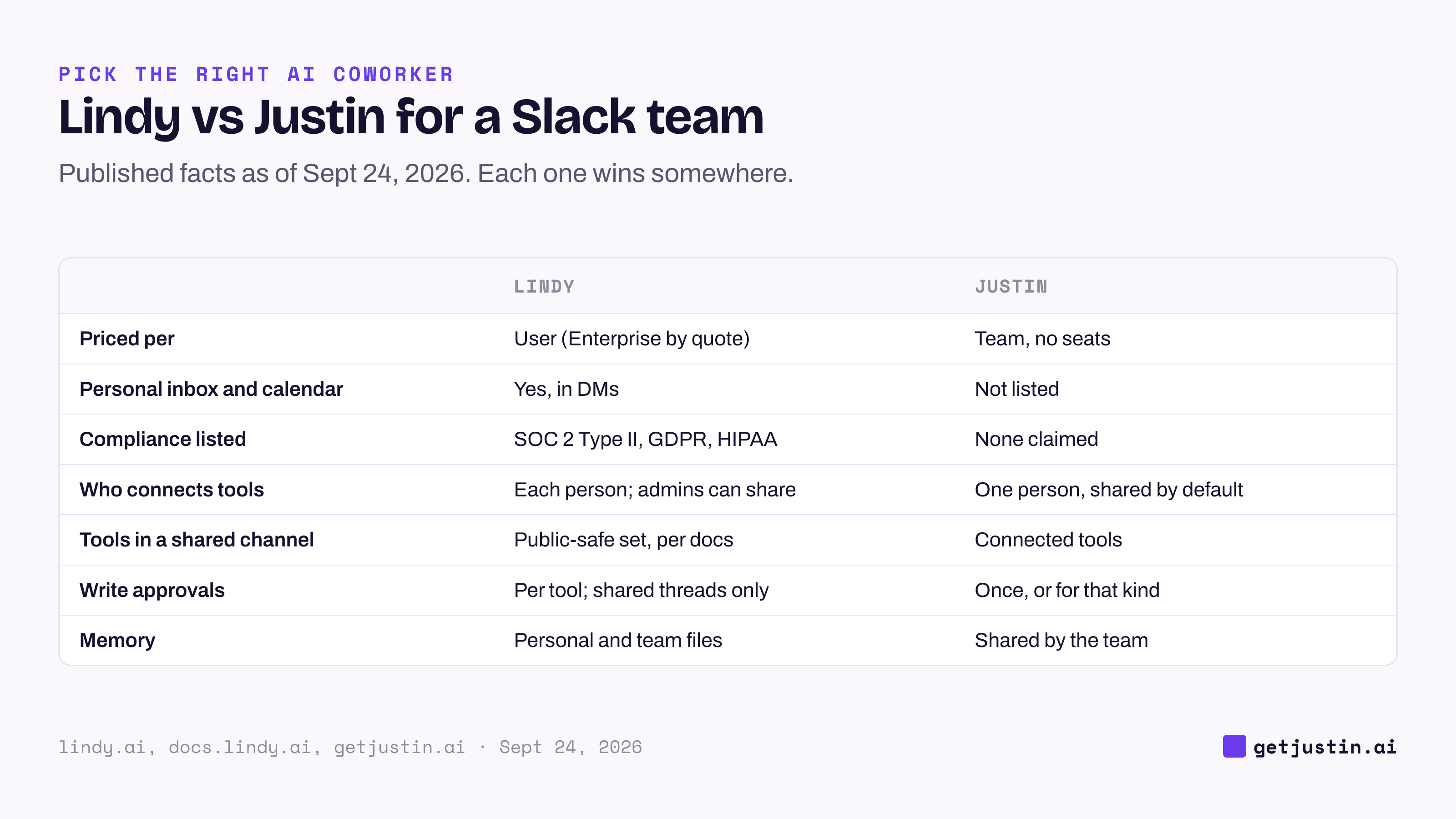
Figure: Lindy is built around each person; a team-priced coworker is built around the channel.
Lindy AI vs a channel coworker: the team-sharing test
The most useful trial for Lindy AI vs a channel coworker is whether the newest person on the team gets the same result as the person who set it up.
At WorkMagic, our CS ops lead learned this from skills of their own. Three that the ops lead had described as shipped were built and packaged, but never reached the set installed for the team. For two of them, the cause was a description a few characters over an upload limit, which is “exactly why they kept getting rejected.” The ops lead’s rule since: the team’s real toolkit is what’s installed where the team works, not what one person has built.
Per-person setups make that gap easy to miss; the checklist below turns it into a trial.
Seats. Count everyone who would need a seat to use it, including people who only @-mention it.
Newest teammate. Have the newest person ask for real work with nothing connected on their side.
Channel CRM pull. Ask for a CRM pull in a shared channel, not a DM.
Heaviest job. Run your heaviest real job, then read the usage meter.
Low credits. Let credits run low and see who hears about it.
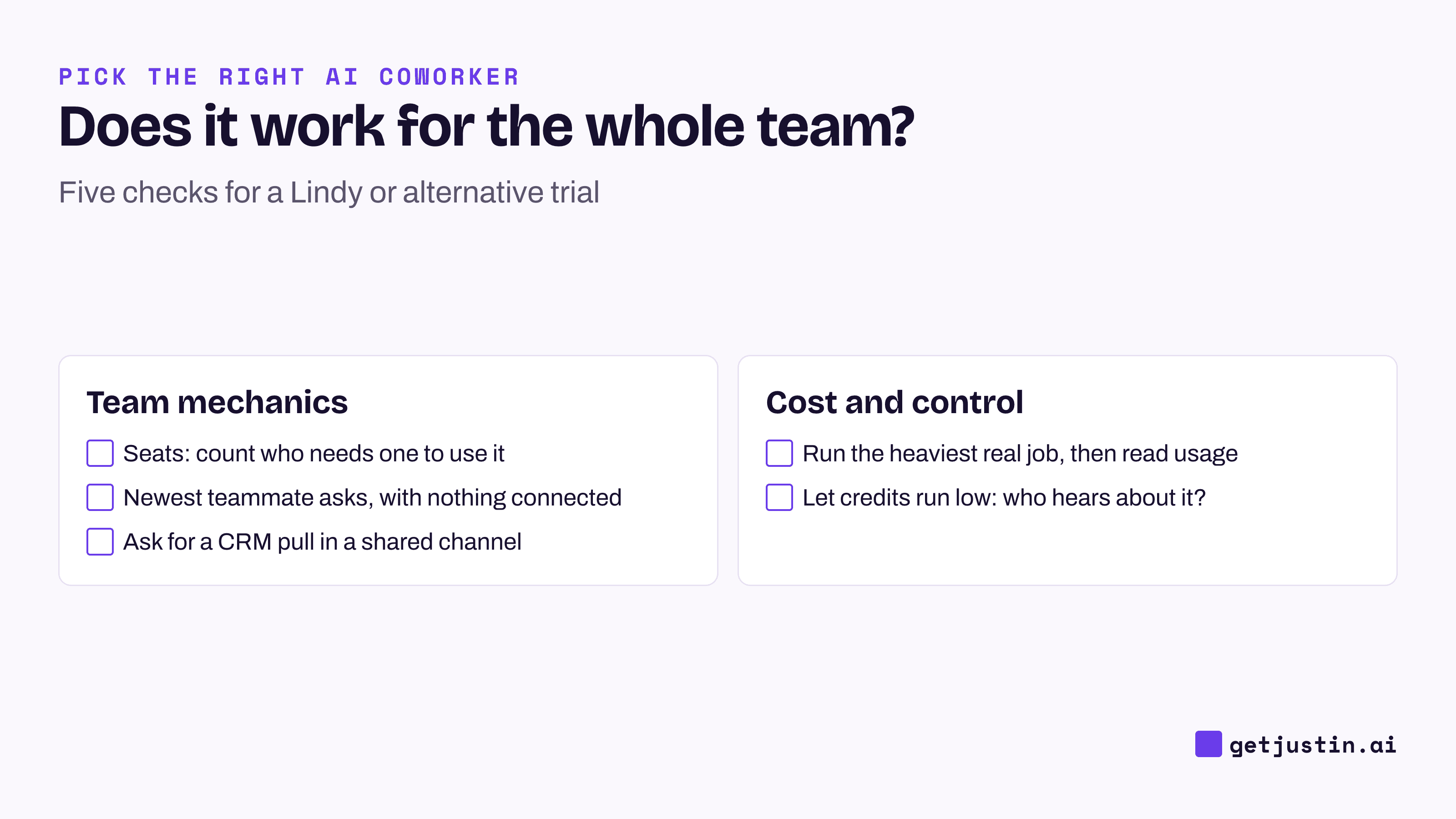
Figure: Five checks that show whether an AI coworker works for the team or only for whoever set it up.
How to choose
Choose Lindy if most of the value is personal (inbox, calendar, meeting notes, texts) or your review needs a SOC 2 Type II report today.
Choose Viktor or Dash if you want a team-priced Slack coworker with Microsoft Teams support.
Choose Tasklet, Zapier or n8n if the work starts from triggers rather than requests.
Choose Justin if the channel is the unit of work: one team price, tools one person connects available to everyone, shared team memory, and it asks before it writes to your connected tools; approve once, or for that kind of action.
FAQ
What are the best Lindy alternatives for Slack?
For team work in Slack channels, the main Lindy alternatives are Viktor, Dash, Claude Tag and Justin, as of September 24, 2026. For trigger-based automation, Tasklet, Zapier and n8n fit better. For one person’s search and drafts, Slackbot is already in many Slack plans.
How much does Lindy cost?
As of September 24, 2026, Lindy charges $29.99 per user per month for Plus, $99.99 for Pro and $199.99 for Max, with Enterprise by quote. Each seat’s credits go into a shared pool. When credits run out, Lindy pauses credit-using actions rather than charging more.
Does Lindy work in Slack channels?
Yes. You @-mention Lindy in a channel it’s been invited to, and it replies in the thread. Per its setup docs, in shared channels it’s limited to web and Slack search, images and a connected Notion; email, calendar and its other tools work in DMs and your own threads.
Does Lindy ask before it sends or writes?
Yes, in shared Slack threads, if you set it to. Each integration is set to always allow, require approval or never write, and an approval card lets you approve one action or always allow it from then on. Lindy’s docs say these guardrails apply only in shared Slack threads, not in DMs, the web app or text messages.
Is Lindy cheaper than a team-priced AI coworker?
For a few people, Lindy Plus can cost less than a team plan. For a whole team using it, per-user pricing usually adds up faster. Compare the seat math for your real headcount, and remember each Lindy seat includes a personal assistant.
Doing this with Justin
Justin, the AI coworker for Slack, is the alternative we make, so run the checklist on it. The trial covers the whole team for 14 days or 1,000 credits, whichever comes first, with no card. Connect HubSpot once; by default the whole team can use it. Then invite Justin to a channel and have your newest teammate @-mention it and ask for a pipeline pull, with nothing connected on their side. When Justin asks before it writes to HubSpot, approve just that action, or that kind of action from then on; each approval records who gave it and when. Credits are pooled across the team, with no seats.