

Short answer: Viktor is a strong Slack-native AI coworker, and most teams compare Viktor alternatives over credit predictability, the entry price for a small team, and how its outputs hold up. Dash is the closest like-for-like, Claude Tag suits teams already paying for Claude, Zapier or n8n suit fixed steps, and Justin suits small teams that want a lower entry price and live pages that refresh when reopened. If you need Microsoft Teams, SOC 2 and a very large integration catalog today, Viktor is often still the right pick.
This page is about Viktor the Slack AI coworker (viktor.com), not the engineering app platform of the same name.
What Viktor does well
Viktor is one of the most complete Slack-native AI coworkers on the market. It sits at 4.8 out of 5 across 35 G2 reviews, according to eesel’s review as of September 2026.
Its pricing page lists the strengths. It works in Slack and Microsoft Teams, and every plan includes an integration catalog of more than 3,200 apps, scheduled automations, and reports, dashboards and apps. It lists SOC 2. Pricing is per workspace, not per seat, and Viktor says credits track what the model providers charge, with no markup. Unused credits roll over for a month.
Viktor’s own comparison page adds two things buyers ask about, as of September 24, 2026: it says you approve sensitive actions before they run, configured per workflow, and that you can pick the model (Claude, GPT or Gemini) per task (Viktor).
Why teams look for Viktor alternatives
The reasons are mostly about cost shape, not capability.
Credit predictability. Because credits follow model usage, the same job can cost a different amount each run, and a busy week can use far more than a quiet one. The plan price is a floor, not a forecast, which is why the meter test below prices your heaviest job first.
The entry price for a small team. Viktor’s Team plan starts at $50 a month for 20,000 credits, after $100 of trial credit (Viktor). For a team that needs a few requests a day, a cheaper entry, or a tool already in a plan you pay for, can make more sense.
Live outputs. Viktor builds reports and dashboards. Two practical questions: does a dashboard refresh when someone reopens it, and does each number show where it came from and when it was read? Check both in any trial, including ours.
Viktor AI pricing, worked out for a 10-person team
Entry prices are easy to compare; bills aren’t. The table shows what each credit-based option charges before any usage, at published prices as of September 24, 2026.
Example: a 10-person team, entry plan only, per month.
Option | How it’s priced | Entry price for 10 people | Unused credits |
|---|---|---|---|
Viktor | Per workspace, credits | $50 (Viktor) | Roll over one month |
Dash | Per workspace, credits | $50 (Dash) | Roll over |
Lindy | Per user, credits pooled | $299.90 on Plus (Lindy) | Don’t roll over |
Justin (ours) | No seats, credits | $20 on Basic; $50 on Pro, where the pricing page lists scheduled tasks (Justin) | Monthly plan credits reset |
Two honest notes on the table. A credit doesn’t buy the same amount of work at each vendor, so don’t compare credit counts across rows. And Viktor includes scheduled automations on its entry plan, where Justin’s pricing page lists scheduled tasks on Pro and Max.
The Viktor alternatives, and where each one wins
Dash (Process Street). The closest like-for-like: $50 a month per workspace for 20,000 credits, credits that roll over, and Slack, Microsoft Teams and the web. By Dash’s own description, writes pause for approval by default (Dash). It lists SOC 2 Type II and ISO/IEC 27001. It is credit-metered too, so run the same meter test.
Claude Tag. A shared Claude any channel member can tag, included with Claude Team or Enterprise. It wins if your company already pays for Claude.
Lindy. Builder-style agents priced per user from $29.99 a month, with credits pooled across the workspace. It suits people who like designing their own agents, but per-user pricing climbs with headcount.
Zapier or n8n. When the steps are the same every time, an automation platform is cheaper and more predictable than any AI coworker.
Justin (ours). An AI coworker for Slack, with a web app for setup and live pages, from $20 a month for the whole team. Its live pages show when their data was last updated and refresh when reopened, and you can ask where any number came from. It asks before it writes to your connected tools; approve once, or for that kind of action. Watch out: it’s in early access, has no Microsoft Teams support, and monthly plan credits reset with no carry-over.
The meter test: price your heaviest job before you commit
A credit-metered AI coworker charges for the model’s work, and a failed run can cost more than a good one. At WorkMagic, our CS ops lead runs about twenty scheduled AI jobs for the customer success team. When the ops lead measured 1,578 of their runs, the runs that lost their data connector took the longest: about 328 seconds each, against 118 for a healthy run, while the model hunted for the missing tool and wrote up what went wrong.
Those jobs also split work by model: a strong model for triage and decisions, a cheaper one for prose, and a short pass for one-line summaries with a plain fallback if it times out. Every model call runs on a flat subscription, never a pay-per-call key, so a runaway job can’t produce a surprise bill. On a metered plan, ask what you can cap.
The diagram below turns that into a test for any credit-based tool, ours included: run your common jobs and your heaviest one three times each, break one on purpose, then price a normal month in dollars and check which spend caps exist.
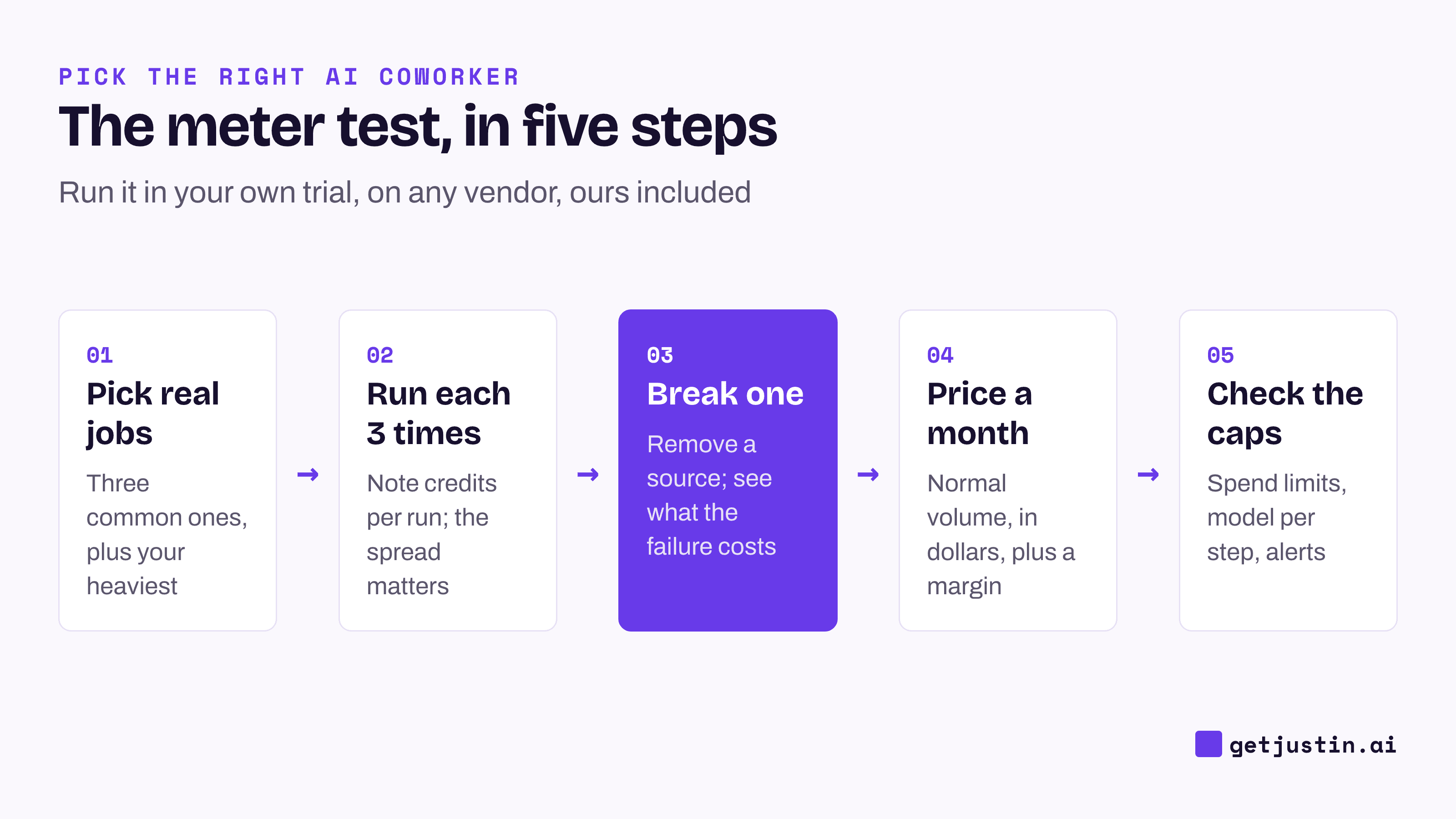
Figure: Price a credit-based AI coworker on your own jobs, including a failed run, before you pick a plan.
How to choose
Choose Viktor if you need Microsoft Teams and SOC 2 today, want scheduled automations on the entry plan, or rely on a long tail of integrations.
Choose Dash if you want the same shape with ISO 27001 listed and writes that pause for approval by default.
Choose Lindy if your team likes building agents and headcount is small.
Choose Zapier or n8n if the work runs the same way every time.
Choose Justin if a small team wants a lower entry price, live pages that show when their data was last updated, and a coworker that asks before it writes to your connected tools, and can do without Microsoft Teams.
FAQ
How much does Viktor AI cost?
As of September 2026, Viktor’s Team plan starts at $50 a month per workspace for 20,000 credits, after $100 of free trial credit, and larger credit bundles cost more. Credits follow model usage, so the real bill depends on your jobs. Price your heaviest real job during the trial before choosing a tier.
Do Viktor credits roll over?
Unused monthly credits roll over for one month, and trial credits don’t expire, according to Viktor’s pricing page as of September 2026. Dash’s credits also roll over. Lindy’s don’t, and Justin’s monthly plan credits reset with no carry-over.
Viktor vs Dash: what’s the difference?
Both start at $50 a month per workspace, meter work in credits, roll credits over and work in Slack and Microsoft Teams. Dash lists ISO/IEC 27001 alongside SOC 2 Type II and says writes pause for approval by default. Viktor lists SOC 2 and a slightly larger integration catalog, and says approvals are configured per workflow.
Is Viktor priced per seat?
No. Viktor prices per workspace, so the whole team shares one pool of credits. That favors larger teams with moderate usage; a small team with heavy usage can spend more than a per-seat tool would cost.
Is there a Viktor alternative that isn’t credit-based?
Slackbot comes with Slack Business+ at a per-user price, with plan limits rather than credits. Automation platforms like Zapier and n8n price by task or execution, which stays predictable when the steps are fixed. Every channel coworker on this page, ours included, meters work in credits.
Doing this with Justin
Justin, the AI coworker for Slack, is one of the alternatives above, so run the meter test on it. The free trial covers the whole team for 14 days or 1,000 credits, whichever comes first, with no card. Invite Justin to a channel, @-mention it, and run your three most common jobs and your heaviest one a few times each. Heavier work, such as long \ultra sessions, uses more credits. Ask for your weekly numbers as a live page: it shows when its data was last updated and re-reads it each time you open it, and you can ask where any number came from. Plans start at $20 a month for the whole team.