

Short answer: The best AI coworker for small teams is the one whose price doesn’t climb with every hire, that works in the channel your team already uses, and that asks before it changes anything. For most teams under 50, that narrows the field to Claude Tag or ChatGPT’s workspace agents if you already pay for those seats, or a team-priced coworker such as Viktor, Dash or Justin if you don’t. Then decide on approvals, memory and who owns the standing jobs.
We haven’t run these tools through one lab test; the checks below are ones you run in your own trial.
What does a small team need from an AI coworker?
A small team needs an AI coworker it can afford as it grows, that everyone can use in the same channel, and that doesn’t quietly become one person’s side project. Enterprise buying guides lead with certifications; a 12-person team has different problems.
Price per team, not per head. On a seat plan every hire adds a license; at 30 people that’s thirty licenses against one team plan.
Shared context in the channel. If each person uses their own AI in a private window, a correction made by one person helps nobody else. Look for memory the whole team shares.
A stop before writes. Small teams rarely have an ops person reviewing logs. The approval has to happen in the thread, at the moment it matters, with a name and a time on it.
An owner and a backup for every standing job. This one is easy to miss. At WorkMagic, our CS ops lead measured their own automation layer before taking on a new mandate and found roughly twelve unattended runs for every hands-on session in July. The same report also named the risk: the routines had no backup owner, and “the predictable failure mode is the automation layer, because it degrades quietly and nobody notices for weeks.”
Must-happen steps that don’t rely on the model’s memory. When something needed to happen on every run, the ops lead stopped relying on a line in the AI’s instructions, because “the model follows it only about half the time,” and used a fixed hook instead. Ask each vendor which of your must-happen steps are settings and which are requests to the model. These were the ops lead’s own setups, not any product on this page.
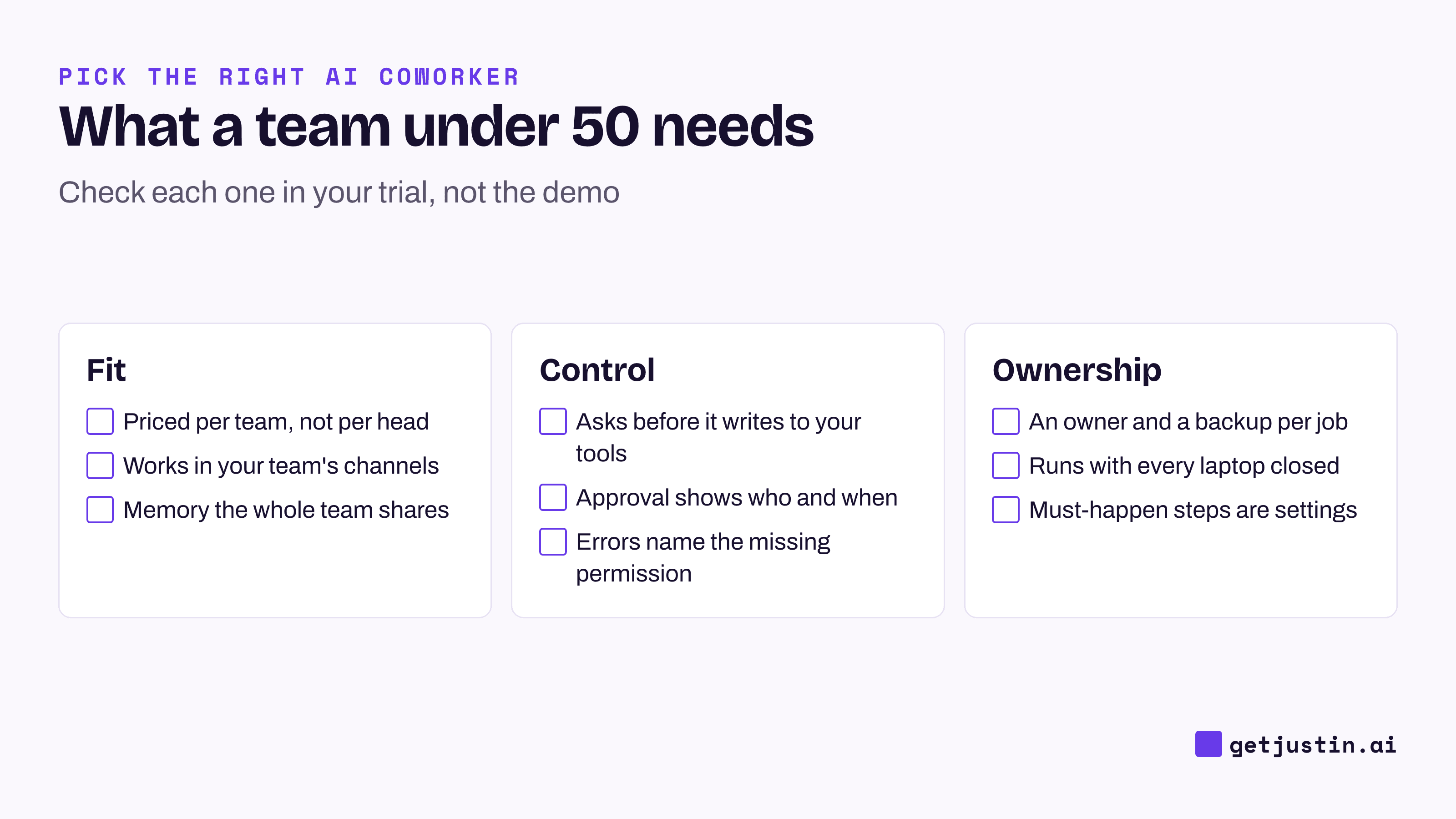
Figure: Nine checks for a team under 50, most of them learned from something that went wrong.
The options for a small team at a glance
Six options cover most small teams in Slack; here the question is fit for a team under 50.
Option | What it is | Best for a small team if | Watch out for |
|---|---|---|---|
Slackbot (Slack Business+) | Slack’s built-in personal AI agent | You want search and recaps, with no new vendor | One person at a time; plan limits apply (Slack) |
ChatGPT workspace agents | Agents built in ChatGPT and deployed to channels | You already pay for ChatGPT Business | Generally available; seats plus credits (OpenAI) |
Claude Tag | A shared Claude anyone in a channel can tag | You’re on Claude Team and do code or data work in Slack | Public beta; an admin sets up an account for Claude in each tool (Claude) |
Viktor | Slack-native AI coworker, also on Microsoft Teams | You need Teams support or a large integration catalog | Credit-metered; heavier use moves you up its plan ladder (Viktor) |
Dash (Process Street) | Slack-native AI coworker, also on Microsoft Teams | You want one flat plan with no seats and Teams support | Credit-metered after the $100 starter credit (Dash) |
Justin (ours) | AI coworker for Slack, with a web app for setup and live pages | You want shared team memory, a check before it writes to your tools, and one team price with no seats | Early access; no Microsoft Teams; scheduled tasks start on Pro; credits reset monthly (Justin) |
Zapier and n8n aren’t on this list because they run fixed steps you design in advance; for work that runs the same way every time, they’re cheaper and more predictable than any AI coworker.
AI coworker pricing for a small team: 10 and 30 people
For a small team, the pricing model matters more than the sticker price. Seat-priced options grow with headcount, while team-priced options stay flat and meter usage instead. The chart below uses each vendor’s entry list price as of September 24, 2026, billed yearly where that’s offered, and assumes every person gets a seat on seat plans.
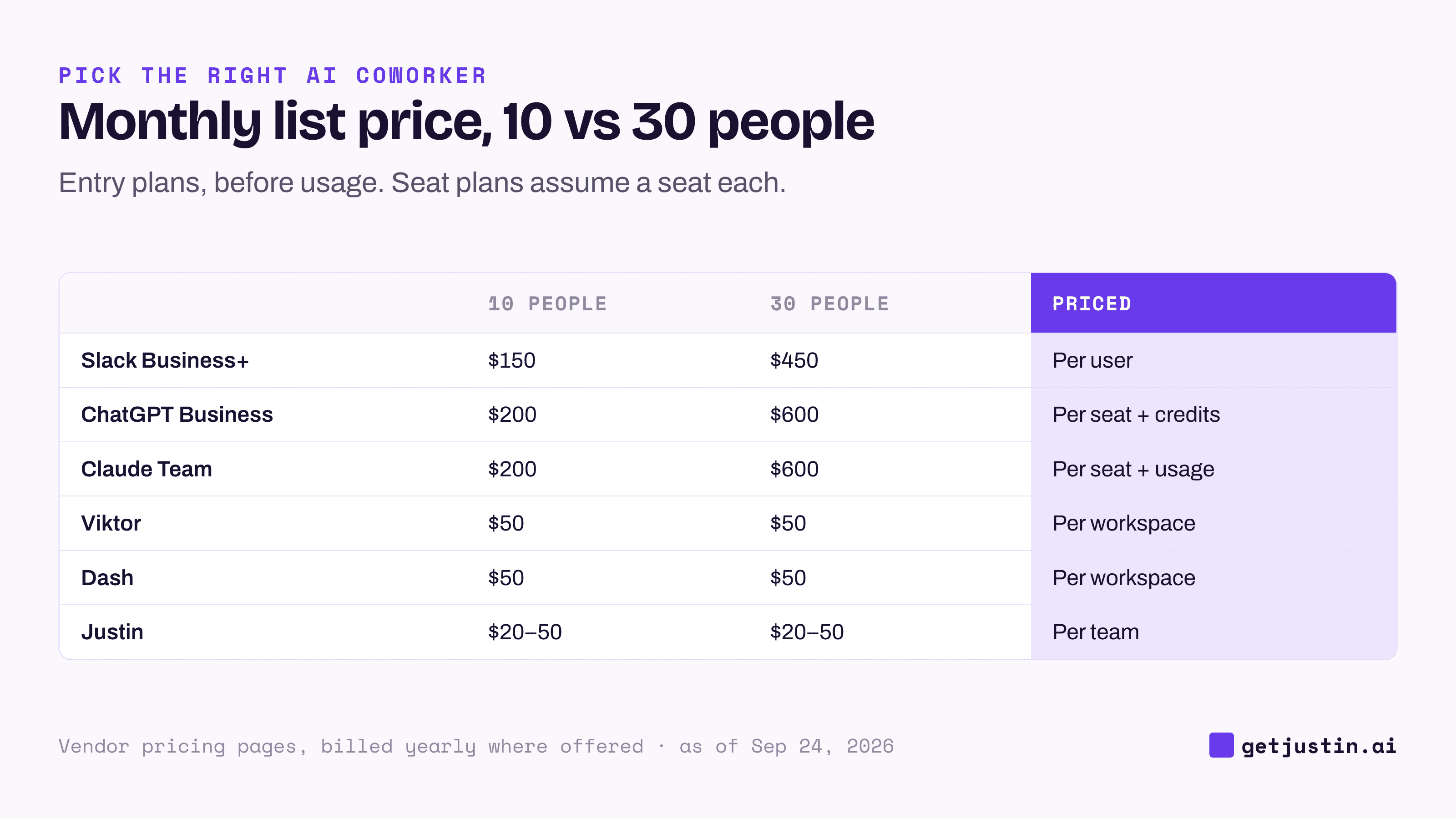
Figure: Seat plans triple from 10 to 30 people; team plans stay flat until usage grows.
Option | How it’s priced | 10 people | 30 people |
|---|---|---|---|
Slack Business+ (Slackbot) | $15 per active user | $150/mo | $450/mo |
ChatGPT Business | $20 per seat billed yearly ($25 monthly), plus agent credits (OpenAI) | $200/mo | $600/mo |
Claude Team (Claude Tag) | $20 per seat, plus a usage balance for channel work | $200/mo | $600/mo |
Viktor | Per workspace, from $50 | $50/mo | $50/mo |
Dash | Per workspace, $50 | $50/mo | $50/mo |
Justin | Per team: $20 Basic; $50 Pro, where the pricing page lists scheduled tasks | $20–50/mo | $20–50/mo |
Three things the table can’t show:
Seats buy more than the coworker. Slack Business+ is Slack’s whole paid plan, and ChatGPT and Claude seats give each person their own assistant for research and writing. If everyone will use that daily, seat pricing may be the better deal.
Not everyone needs a seat for Claude Tag. Anyone in a channel can tag Claude in, and the cost of that channel work comes out of a usage balance the company funds, so you may need fewer Claude seats than people. Check Claude’s pricing page for any Team plan seat minimum before you size it.
Flat plans meter usage. Viktor, Dash and Justin all use credits, and a credit buys different work at each vendor. Viktor and Dash roll unused credits over; Justin’s reset monthly. Price your heaviest real job during the trial, not the plan.
How to choose an AI agent for small business teams
Start from what you already pay for, then decide on approvals and memory.
Choose Slackbot if you’re on Business+ and people mainly want to search and summarize for themselves.
Choose ChatGPT workspace agents if the team is on ChatGPT Business and your jobs are well defined.
Choose Claude Tag if you’re on Claude Team and much of your channel work is code or data; see Justin vs Claude.
Choose Viktor or Dash if part of the company is on Microsoft Teams, or your security review needs a certification report today.
Choose Justin if a small team wants one AI coworker in its channels, with shared team memory, a check before it writes to your connected tools, and one price for the whole team.
Whichever you pick, name one owner and one backup for every standing job before you switch it on.
FAQ
What is the best AI agent for small business teams?
There isn’t one winner. If you already pay for ChatGPT Business or Claude Team, try their channel agents first, since they add little cost. If you don’t, a team-priced AI coworker such as Viktor, Dash or Justin usually costs less for a team of 10 to 50.
How much does an AI coworker cost for a small team?
Example: at list prices as of September 2026, ten people on a $20 seat plan pay $200 a month and thirty pay $600, before usage. Team-priced coworkers start at $20 to $50 a month for everyone, then meter usage through credits.
Is per-seat or per-team pricing better for a small team?
At list price, per-team plans usually cost less for a team of ten or more, because the plan doesn’t grow with each hire. Per-seat pricing can still win if every person will use their own assistant daily. Price your heaviest real job under both before deciding.
Do small teams need an AI coworker if they already have ChatGPT?
Not always. ChatGPT is strong for each person’s own drafting and research. A team AI coworker earns its place on shared, recurring work in a channel: weekly reports, CRM updates and follow-ups that should ask before they change anything.
Who should own the AI coworker in a small team?
One person should own each standing job, and one other person should know how to fix it. Unattended jobs tend to fail quietly, so the backup matters more than it seems in week one.
Doing this with Justin
Justin, the AI coworker for Slack, is one of the six options above. Every plan covers the whole team with pooled credits and no seats. Basic is $20 a month, and the pricing page lists scheduled tasks on Pro ($50) and Max. The trial covers everyone for 14 days or 1,000 credits, whichever comes first, with no card. Invite Justin to one channel, @-mention it with a real recurring job, and ask for the result as a live page, which shows when its data was last updated; ask where any number came from. Have it plan a change in a connected tool and check that it asks before it writes. Then give a second teammate the same job and see whether they can run it alone.