

Short answer: In the Justin vs ChatGPT choice, ChatGPT is the stronger tool for one person’s deep work, and its workspace agents can now take requests in Slack channels too. Justin is built for a small team working together in channels: one account for the team, shared team memory, a check before it writes to your connected tools, and no seats. If your company already pays for ChatGPT Business, try a workspace agent first; if it doesn’t, price both for the whole team.
We haven’t run the two side by side; the trial plan near the end is one you run on your own work.
ChatGPT in Slack vs a team AI coworker at a glance
The answer depends on which ChatGPT you mean: the personal ChatGPT app in your Slack sidebar, or a workspace agent deployed to a channel.
ChatGPT app in Slack | ChatGPT workspace agent in Slack | Justin (ours) | |
|---|---|---|---|
What it is | One-on-one ChatGPT in your Slack sidebar | An agent built in ChatGPT, then deployed to channels | An AI coworker the team invites to channels |
Who uses it | Each person with a paid ChatGPT plan | Anyone in a channel it’s deployed to | Anyone in a channel it’s invited to |
First setup | Install, sign in to ChatGPT | Someone builds the agent; an admin installs the Slack app | Add to Slack, invite, @-mention |
Memory | Your own ChatGPT account | Per agent, across runs | Shared team memory |
Before a write | Some Slack actions for you, if an admin enables them | Write actions default to “Always ask” | Asks before it writes to connected tools; approve once or for that kind of action |
Output | Replies and drafts | Replies and files in Slack | Thread replies, plus live pages that refresh |
Price, as of Sept 2026 | A paid ChatGPT plan per person | ChatGPT Business seats ($20/user/mo billed yearly, $25 monthly), plus credits for agents | From $20/mo for the whole team, no seats |
Status | Generally available | Generally available (Business, Enterprise, Edu) | Early access |
Sources: OpenAI on ChatGPT in Slack, OpenAI on the Agents app in Slack, VentureBeat’s launch coverage, ChatGPT Business pricing, Justin pricing.
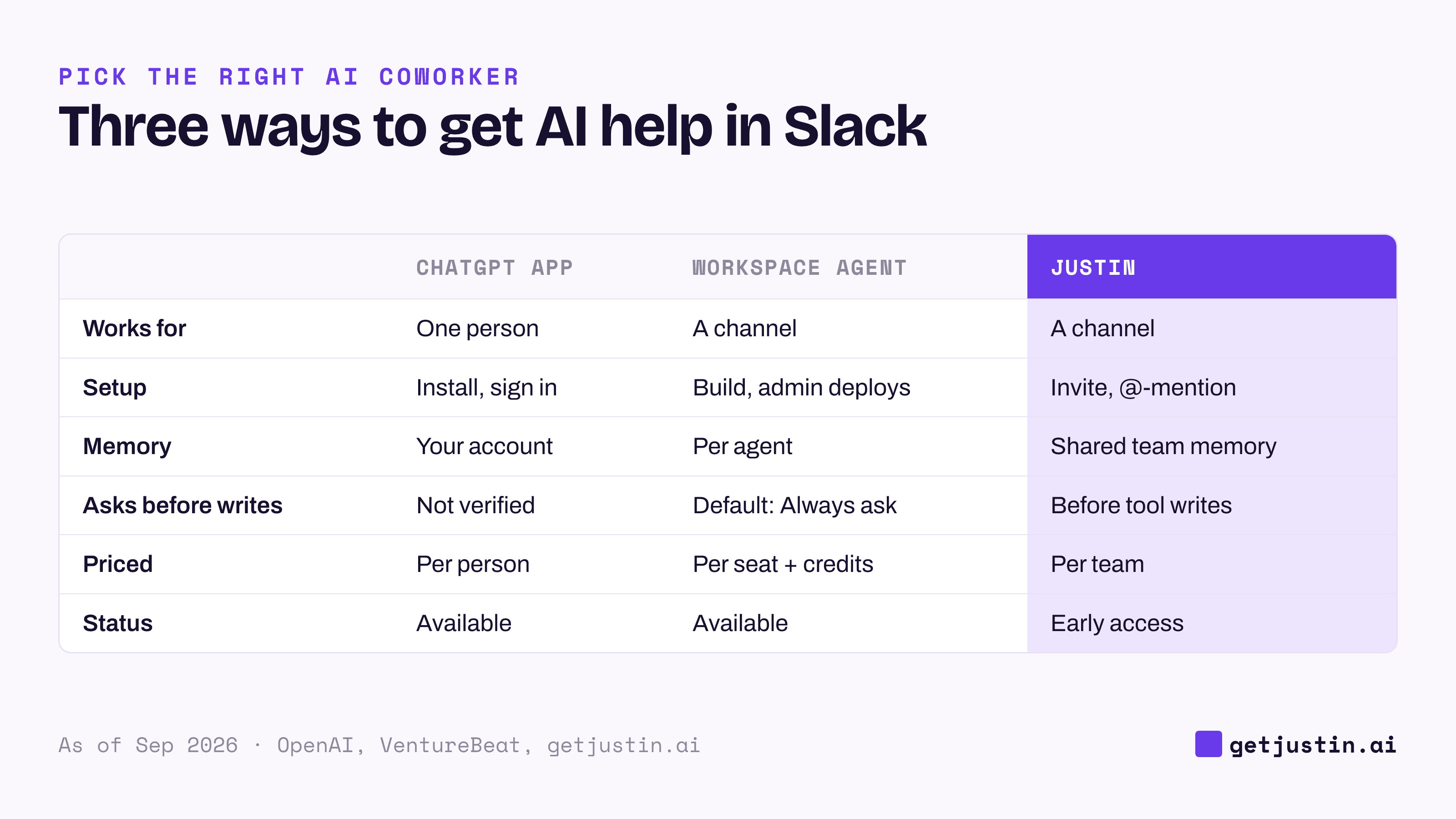
Figure: The personal ChatGPT app and workspace agents compare to a team AI coworker very differently.
Which ChatGPT in Slack are you comparing?
Since April 2026, “ChatGPT in Slack” covers two products, and only one is built for a channel.
The ChatGPT app in Slack gives each person a private conversation with ChatGPT in the sidebar. It searches what that person can already see, summarizes threads and drafts replies, and it needs a paid ChatGPT plan: Plus, Pro, Business, Enterprise or Edu, per OpenAI’s help center. It’s a personal assistant with a Slack window, not a shared coworker.
ChatGPT workspace agents are the closer comparison. OpenAI launched them on April 22, 2026, as a research preview, and as of September 2026 they’re generally available in ChatGPT Business, Enterprise and Edu (OpenAI). Someone builds an agent in ChatGPT, and an admin installs a separate app so it can be deployed to Slack channels. Per VentureBeat’s launch coverage, agents keep memory across runs, can run on a schedule, and default write actions such as sending email or editing a spreadsheet to “Always ask”.
Where each one wins
ChatGPT wins on individual deep work and on cost when your company already pays for it. Justin fits small teams working together in channels.
Where ChatGPT wins
One person’s research and writing. Standard ChatGPT Business seats include Deep Research, ChatGPT Agent and Codex, per OpenAI’s pricing page. For a strategy memo, a long analysis or code, a personal ChatGPT is the better tool.
Already paid for. On ChatGPT Business or Enterprise, workspace agents need no new vendor and no second security review. Standard Business seats are $20 per user a month billed yearly, or $25 monthly, as of September 24, 2026 (OpenAI).
Admin control. Admins decide who can build, run and publish agents and which tools each can reach. Agents can use each person’s own login or one shared connection.
A job defined in advance. An agent built around one process, such as month-end close, carries its instructions and tools with it, which suits a well-understood job.
Where Justin fits
No seats. Every Justin plan covers the whole team with pooled credits: Basic $20/mo, Pro $50/mo, Max $200/mo; the pricing page lists scheduled tasks on Pro and Max (Justin pricing).
Nothing to build first. Invite Justin to a channel and @-mention it. It can read the thread and look back when asked, and a standing job starts as one plain-language request.
Shared team memory. It remembers what your team tells it; ask it to remember a correction, and it keeps it for the team. A workspace agent’s memory belongs to the agent instead. See how AI memory works at work.
Live pages. A report can come back as a live page that shows when its data was last updated and refreshes at the same link; ask where any number came from.
Approvals. Justin asks before it writes to your connected tools; approve once, or for that kind of action, and approvals are recorded. Workspace agents default writes to “Always ask” too, so compare the two in your trial.
Watch out for: Justin is in early access, doesn’t support Microsoft Teams, and monthly plan credits reset with no carry-over.
Whichever you pick, don’t make one person the router
The bigger risk in either setup is that every AI request flows through the one person who knows how to ask. At WorkMagic, our CS ops lead runs AI coworkers for the customer success team, and in a single fortnight eight colleagues across data science and CS routed their AI requests through the ops lead. These were the ops lead’s own AI setups, not either product on this page.
So the AI plan the ops lead wrote for leadership treats its own author as the constraint: every item names a different owner, and running the knowledge base is kept apart from writing it. The ops lead’s phrase: “orchestration is not authorship.”
A personal ChatGPT makes the most fluent user the router, a workspace agent moves the queue to whoever builds agents, and a channel coworker moves it to whoever owns each standing job. One test covers all three: can a teammate who has never used the tool get a real job done in the channel, unaided?
How to choose, and how to use both
Teams that use both split the work by who it’s for: each person keeps ChatGPT for their own drafting and research, and the channel coworker takes shared, recurring jobs that touch other tools. Don’t run the same weekly job in both.
Choose the ChatGPT app in Slack if the work is one person’s drafting, search and summaries, and people already have paid ChatGPT plans.
Choose a ChatGPT workspace agent if you’re on Business or Enterprise, the job is well defined, and your admins want every agent under one OpenAI policy.
Choose Justin if a small team wants one AI coworker in its channels, with shared team memory, a check before it writes to your connected tools and live pages, priced per team.
To settle it, run one real job through both for a week. The checklist below keeps the comparison fair; for more, add the five trial tests for Slack agents, drawn from real failures.
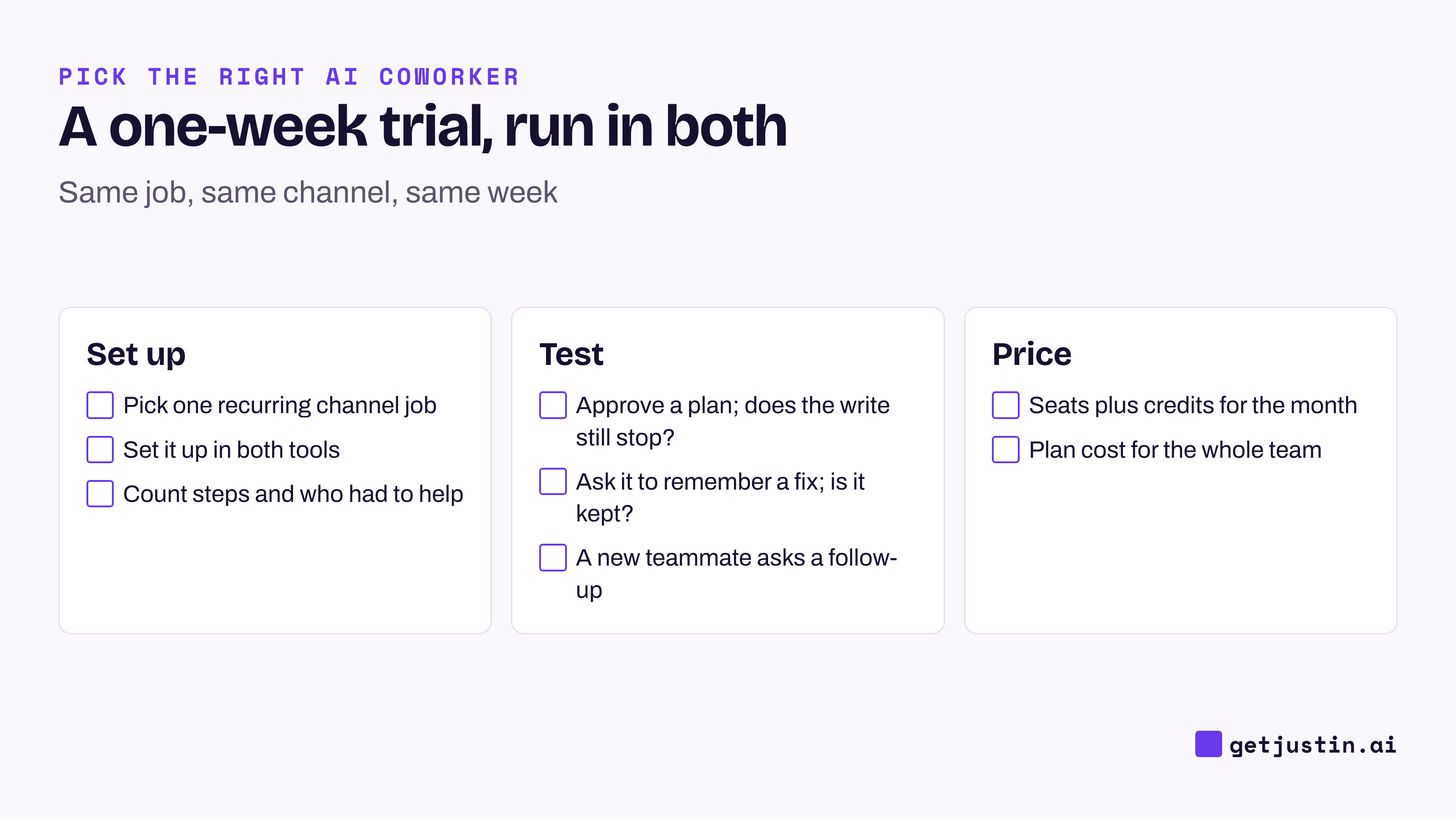
Figure: Run the same recurring job in both tools for a week, then compare what it took and what it cost.
FAQ
ChatGPT in Slack vs an AI coworker: what’s the difference?
The ChatGPT app in Slack is a personal assistant: one person, one private conversation. An AI coworker is shared: the channel hands it work, it remembers what the team tells it, and it asks before changing other tools. ChatGPT workspace agents sit in between, built for a job and deployed to channels.
Is ChatGPT in Slack free?
No. The ChatGPT app in Slack needs a paid ChatGPT plan (Plus, Pro, Business, Enterprise or Edu) as of September 2026. Workspace agents are generally available in ChatGPT Business, Enterprise and Edu as of September 2026, and use credits on top of seats.
Does ChatGPT ask before it acts in Slack?
Workspace agents default write actions such as sending email or editing a spreadsheet to “Always ask”, per launch coverage. Justin asks before it writes to your connected tools; approve once, or for that kind of action. Whatever you choose, check approval behavior in your own trial.
Which costs less for a 10-person team?
Example: as of September 24, 2026, ChatGPT Business at $20 per user per month billed yearly ($25 monthly) is $200 a month before agent credits, and it includes a personal ChatGPT for everyone (OpenAI). Justin starts at $20 a month for the whole team, and $50 on Pro, where the pricing page lists scheduled tasks. Credits buy different amounts of work at each vendor, so price your heaviest real job.
Doing this with Justin
Justin, the AI coworker for Slack, is the other side of this comparison. Its trial covers the whole team for 14 days or 1,000 credits, whichever comes first, with no card. Invite Justin to the channel where your recurring job lives and @-mention it with the request in plain language. Ask for the result as a live page; it shows when its data was last updated, and you can ask where any number came from. Have it plan a change in a connected tool and watch how it asks before the write: approve once, or for that kind of action. At the end of the week, price the month on Basic or Pro against your ChatGPT seat count.