

Short answer: In the Justin vs Claude choice, Claude is the stronger pick for one person’s research, writing and code (Cowork and Claude Code), and Claude Tag is a capable shared agent for Slack if you’re already on a Claude Team or Enterprise plan. Justin is built for small teams that want shared team memory, an AI that asks before it writes to their connected tools, and one price for the whole team with no seats. The two team options differ most on how memory is shared, where writes get approved and what you pay before the first request.
We haven’t run the two through a side-by-side lab test; the questions at the end are ones you answer in your own trial.
Claude Tag, Cowork and a team coworker at a glance
Claude now shows up at work in three forms, and only Claude Tag works in your Slack channels.
Claude Tag | Cowork | Justin (ours) | |
|---|---|---|---|
What it is | Claude in Slack channels, shared by the team | Claude for your own tasks and files | An AI coworker the team invites to channels |
Visible to | The whole channel | Only you | The whole channel |
Whose access | Accounts an admin sets up for Claude, per channel | Your own connectors | Connectors the team authorizes, shared by default |
Memory | Public-channel memory shared across the workspace; private channels keep their own | Your own | Shared team memory; what you say in a DM stays private |
Before a write | Admins scope channel tools and spend up front; “Allow with review” covers personal connectors only, in limited availability | Not verified | Asks before it writes to your connected tools; approve once, or for that kind of action |
Scheduled work | Routines, channel watches, repository events | Scheduled tasks | Scheduled tasks, which the pricing page lists on Pro and Max |
Output | Replies, files, charts, hosted pages, pull requests | Research and drafts | Thread replies and live pages |
Price, as of Sept 2026 | Team plan seats ($20 billed yearly, $25 monthly), plus a usage balance for channel work | Part of Claude plans, including Team | From $20/mo for the whole team, no seats |
Status | Public beta | Available | Early access |
Sources: Claude Tag overview, How Claude Tag works, Claude pricing, Justin pricing.
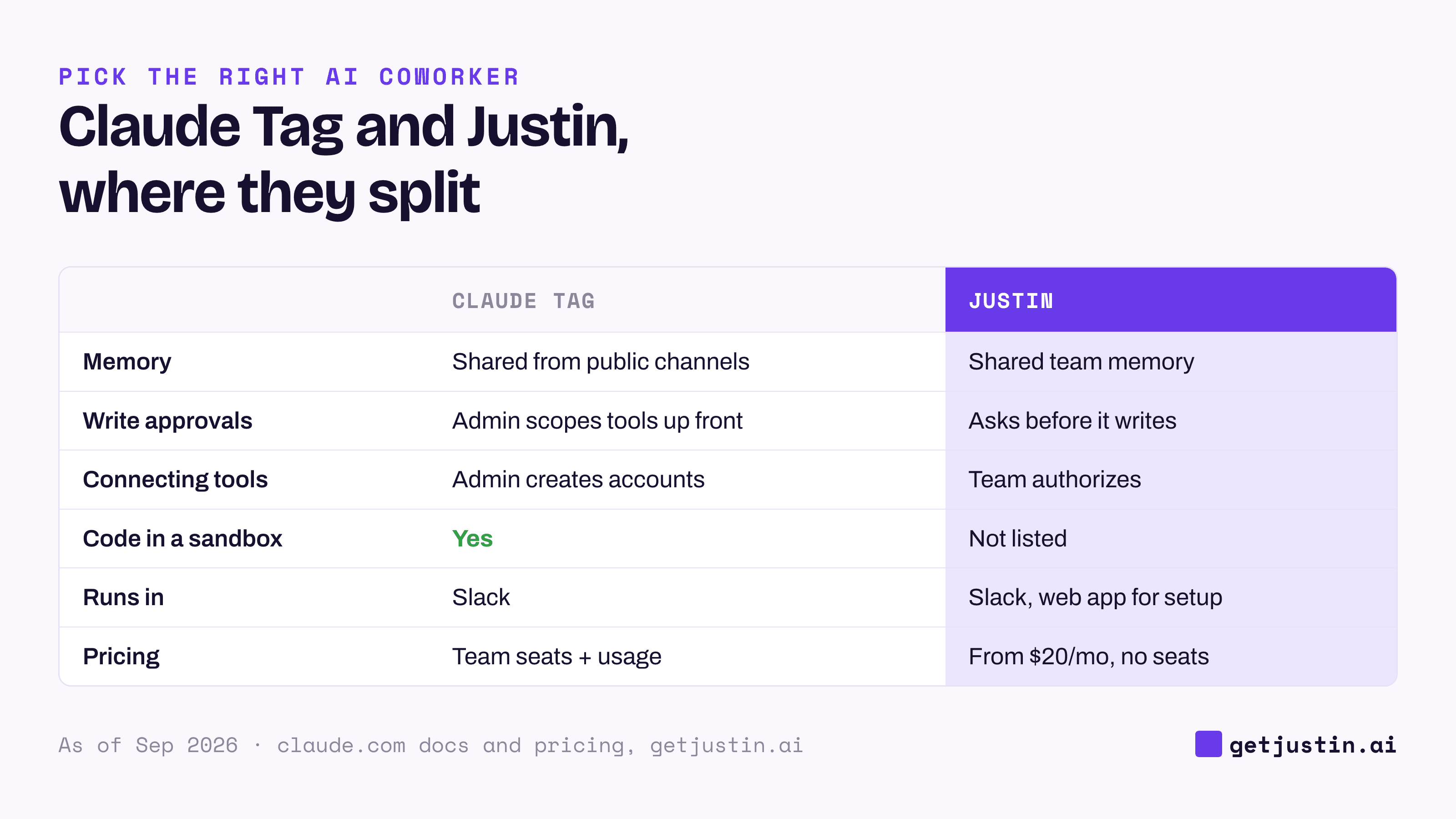
Figure: Claude Tag and Justin are both shared coworkers in Slack; they split on how memory is shared, how writes get approved, and price.
Which Claude should you compare against?
Compare against Claude Tag for team work, and treat Cowork and Claude Code as personal tools. Anthropic’s docs make the same split: shared channel work goes to Claude Tag, while one person’s files and tasks go to Cowork or Claude Code (Anthropic).
The older Claude in Slack app, a personal assistant tied to each person’s account, switched over to Claude Tag on August 3, 2026, for Team and Enterprise customers (Claude Help Center). Claude Tag isn’t available on the individual Free, Pro or Max plans.
Where Claude is the better choice
Claude wins on individual depth, on code, and on price if your company already pays for Claude Team.
Personal research, drafting and code. For a long analysis, a board memo or a codebase, Cowork and Claude Code are the better tools.
Engineering channels. Each Claude Tag thread gets its own cloud sandbox where Claude can run code, clone repositories and open draft pull requests. If bugs get reported in Slack, that’s a real advantage.
Already in your plan. Adding Claude Tag to Slack has no per-seat charge; channel work draws from a usage balance with spend limits per organization and per channel, and alerts at 75% and 95% (Claude Help Center).
A clean agent identity. Claude Tag works through service accounts an admin provisions for it, and everyone in a channel gets the same access, so actions trace back to the agent rather than to whoever asked.
Knowledge that travels. A decision recorded in one public channel is available in another, which helps when teams need each other’s context.
Where Claude Tag and a team coworker differ
The two shared options overlap more than you might expect: both take requests in threads, run scheduled work and publish pages they keep current. Four differences decide most choices.
1. How memory is shared. Per Anthropic’s docs, as of September 2026, Claude Tag keeps what it learns in public channels in a workspace-level memory that every channel draws on, while private channels keep their own. Justin keeps a shared team memory: it remembers what your team tells it, and what you say to it in a DM stays private to you. Whichever you pick, if you run a channel per client, test what carries over between channels before anyone types a client’s numbers.
2. Where writes get approved. Claude Tag puts control up front: an admin scopes which tools each channel can use and sets spend limits, and a live checklist shows what it’s doing. As of September 2026, channel tools don’t get a per-action approval step; an “Allow with review” option covers personal connectors only, in limited availability. Justin puts the check at the moment of the write: it asks before it writes to your connected tools, and you approve once, or for that kind of action. At WorkMagic, our CS ops lead’s rule is “Approving a plan is not approval to write it”; the write test for Slack agents comes from the incident behind it, and you can run it on both.
3. What you pay before the first request. Claude Tag needs a Claude Team or Enterprise plan, and as of September 24, 2026, Team seats cost $20 per seat per month billed yearly, or $25 monthly (Claude pricing). Justin needs no seats: Basic is $20 a month and Pro $50 for the whole team. Credits and usage balances buy different amounts of work, so price your heaviest job, not the plan.
4. Connecting tools. For Claude Tag, an Owner creates an account for Claude in each service and enters its credential, per scope. In tools that bill per user, that account may be one more seat. With Justin, someone on the team authorizes a connector from a catalog of thousands of apps, and it’s shared with the team by default, narrowable per connector.
Whose name is on the work?
Decide whose name each job goes out under before you pick a tool, because the tools answer that question differently. Our CS ops lead at WorkMagic settles it job by job with a bot-or-own-name rule.
Claude’s products split this by surface. In a Claude Tag channel, work is attributed to the agent’s own accounts; in a Claude Tag DM or in Cowork, it runs on your account and is attributed to you. Turn it into a trial test for any tool: send one message and one update through it, then check whose name each landed under and who could see it.
How to choose
Most teams on Claude will use more than one of these, so choose per job, not per vendor.
Choose Cowork or Claude Code for one person’s research, writing and code.
Choose Claude Tag if you’re on Claude Team or Enterprise, want Claude’s own sandbox for code and data in channels, and like one agent identity with workspace-wide memory.
Choose Justin if a small team wants shared team memory, an approval step before it writes to your connected tools, and a team price that doesn’t depend on Claude seats. It works in Slack, with a web app for setup and live pages.
The questions below, in order, settle most cases.
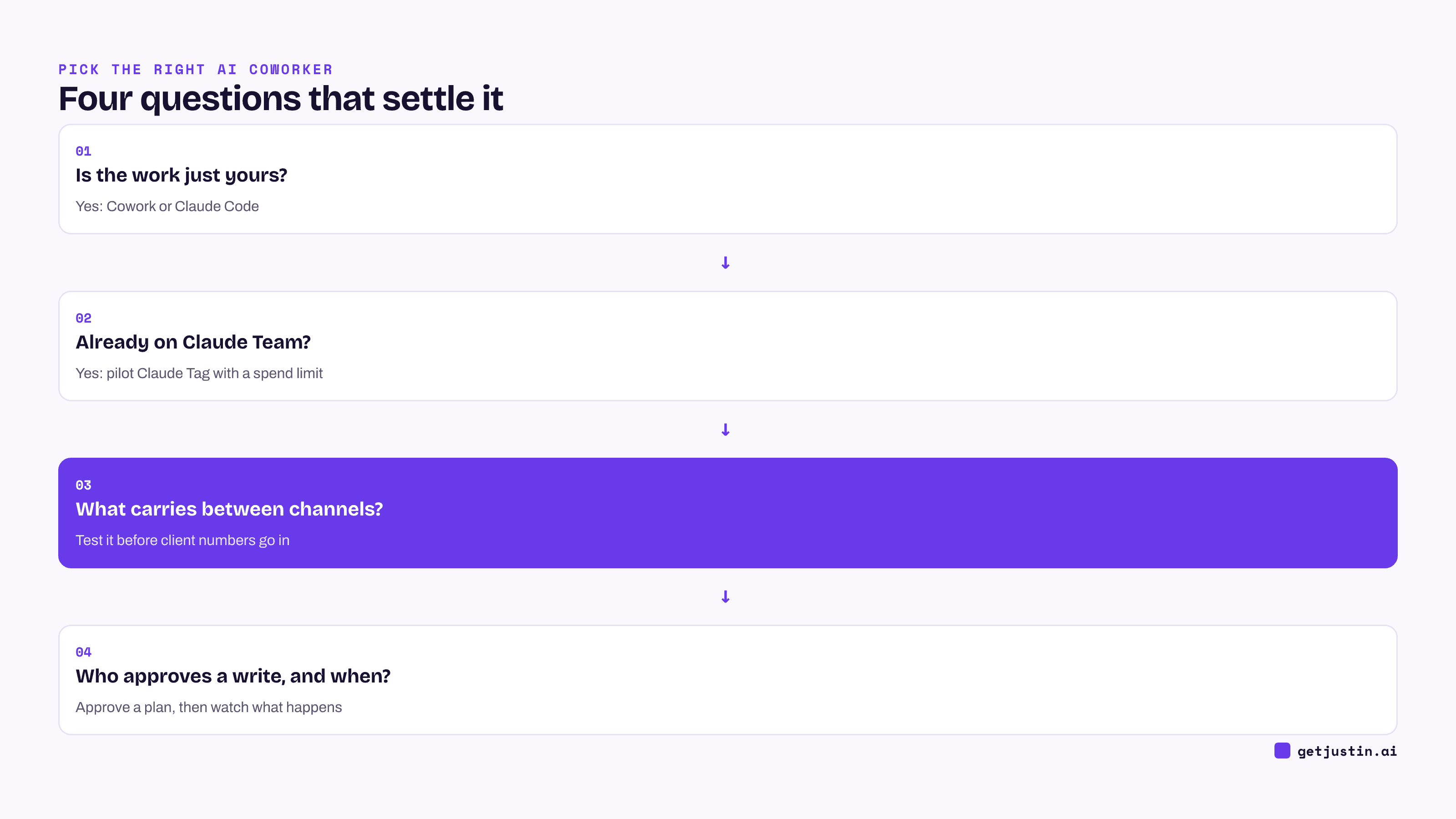
Figure: Four questions, asked in order, settle most Claude-versus-team-coworker choices.
FAQ
Claude Tag vs Justin: which is cheaper for a small team?
It depends on whether you already pay for Claude. Example: as of September 2026, ten Claude Team standard seats at $20 billed yearly cost $200 a month, plus the usage balance for channel work, though those seats also give everyone Claude for their own work. Justin starts at $20 a month for the whole team, or $50 on Pro, where the pricing page lists scheduled tasks, with no seats.
Claude in Slack vs Claude Tag: what changed?
The Claude in Slack app was a personal assistant tied to each person’s Claude account. On August 3, 2026, Team and Enterprise customers were switched to Claude Tag, a shared Claude that anyone in a channel can hand work to. Channel work is billed to the organization, and DMs run on the sender’s own account.
Claude Tag vs Justin: how does memory carry between channels?
Per Anthropic’s docs, as of September 2026, Claude Tag shares public-channel memory across the workspace, while private channels keep their own. Justin keeps a shared team memory: it remembers what your team tells it, and your DMs with it stay private to you. With either, if you run a channel per client, test what carries over before anyone shares a client’s numbers.
Can I use Claude and Justin together?
Yes. A common split is Cowork or Claude Code for each person’s own work and one shared coworker in the channels. Pick either Claude Tag or Justin for channel work, so the team isn’t correcting two agents on the same jobs.
Doing this with Justin
Justin, the AI coworker for Slack, is one side of this comparison. Its trial covers the whole team for 14 days or 1,000 credits, whichever comes first, with no card. Invite Justin to one client channel and one internal channel, tell it a harmless made-up fact in one, and see what it knows in the other, so you know how its shared team memory behaves before real client numbers go in. Have it plan a HubSpot update, approve the plan, and check that it asks before it writes to HubSpot; every approval is recorded with who gave it and when. Then connect one tool yourself and see how long it takes before a teammate can use it.