

Short answer: Slackbot is now a capable personal AI agent: it searches Slack and connected apps, acts through MCP, runs repeat tasks and asks before it edits shared work, all included on Business+. Teams look at Slackbot alternatives when the work belongs to a channel rather than one person, when each member’s plan-based Slackbot limits run short, or when per-seat pricing costs more than a team plan. Shared AI coworkers such as Claude Tag, Viktor, Dash and Justin cover that case; Zapier and n8n cover fixed automations.
What does Slackbot do now?
Slackbot is no longer the reminder bot most comparison pages still describe. Slack’s March 2026 update added skills, deep research, meeting notes, a desktop app, memory of your preferences and an MCP client that reaches thousands of apps (VentureBeat, 2026).
On its feature page, Slack says Slackbot searches Slack, connected apps and the web, builds repeatable tasks from a plain request, shares skills across a team, and gets human approval before agentic actions. Its help center adds a concrete case: before Slackbot edits a shared canvas, you click Confirm (Slack Help).
What you get depends on your plan:
Slack plan | Price per user, as of Sept 2026 | Slackbot access |
|---|---|---|
Free and Pro | $0; Pro $7.25 billed yearly | A limited preview; once it’s used, upgrade or turn on Flex Credits |
Business+ | $15 billed yearly, $18 monthly | Full Slackbot, with per-member limits |
Enterprise+ | By quote | Full Slackbot, with higher limits than Business+ |
Sources: Slack pricing and Slackbot limits. The limits page also covers the cap on automatic task runs; Slack changes these figures over time, so check the current ones for your plan before you decide. Flex Credits need a connected Salesforce org, plus a Slack admin and a Salesforce admin to switch them on.
For one person’s search, recaps, drafts and a daily task, that is a strong offer with no new vendor, security review or bill.
Where do teams outgrow Slackbot?
Teams outgrow Slackbot when the work stops being one person’s. Slack calls it a “personal AI agent” on its own pricing page, and the design follows that label.
The answers are built for one member. Slack’s help center says Slackbot answers draw only on what that member can view in Slack. That’s right for personal work, and wrong when five people need the same correction remembered, because each is teaching their own Slackbot. Slack’s feature page also shows people tagging Slackbot into a channel to build together, so check in a trial how a plain question asked in a channel is handled on your plan. How shared memory differs from personal memory is covered in how AI memory works at work.
The allowance is per member. Slack sets per-member Slackbot limits that vary by plan (Slack help). On Business+, the one person who runs reporting can use up their share quickly, and it can’t be pooled with a colleague who barely uses it. Enterprise+ raises the limits, at an enterprise price.
Scheduled work is capped. Slack limits how often Slackbot’s automatic tasks run, which is fine for a morning digest. Check the current limit in a trial before you rely on it for an hourly spend check or a team with ten standing reports.
The bill scales with headcount. Business+ is priced per seat for everyone in the workspace, so on Pro, getting full Slackbot means upgrading every seat, not just the three people who want an AI agent.
It’s a Slack product. If part of the company works in Microsoft Teams, Slackbot won’t reach them.
The diagram below sorts common requests by who the work is for and how often it runs.
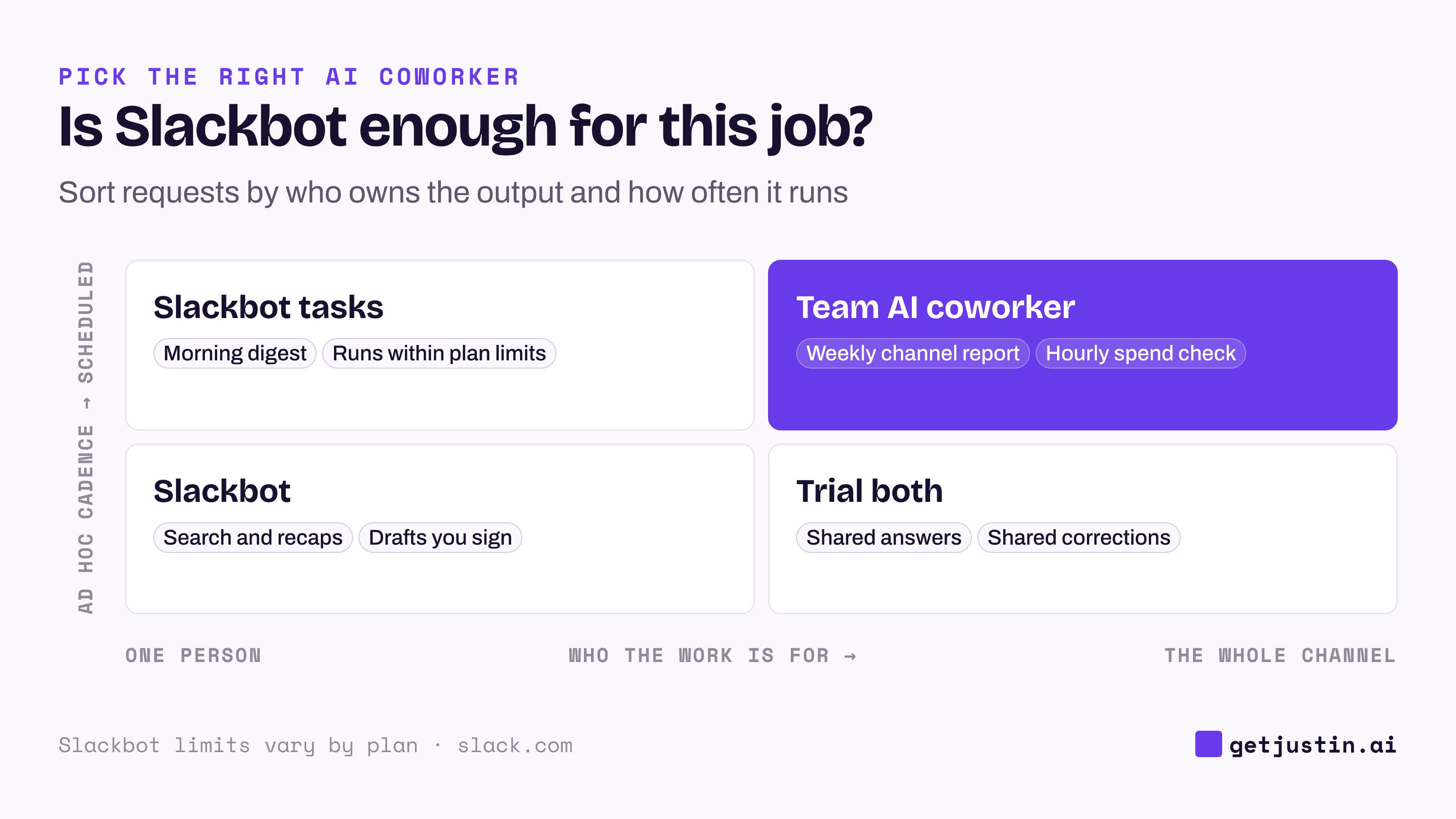
Figure: Slackbot fits one person’s work; shared, scheduled work is where alternatives earn their price.
Slackbot alternatives compared
Most Slackbot alternatives fall into three groups: another personal assistant, a shared AI coworker for the channel, or an automation platform.
Option | Where it beats Slackbot | Where Slackbot wins | Price, as of Sept 2026 |
|---|---|---|---|
ChatGPT in Slack | Individual drafting and research with ChatGPT | Already in your Slack plan; no second vendor | Per ChatGPT seat (OpenAI) |
Claude Tag | A shared Claude the whole channel can tag | Included in Slack; no Claude plan needed | Claude Team or Enterprise, per seat (Anthropic) |
Viktor | Team coworker, large tool catalog, Microsoft Teams too | Included with Business+; no new vendor review | From $50/mo per workspace (Viktor) |
Dash (Process Street) | Team coworker; by Dash’s account, writes pause for approval by default; Microsoft Teams too | Included with Business+ | $50/mo per workspace, 20K credits (Dash) |
Zapier or n8n | Fixed, high-volume automations that run the same way every time | Handles requests that change each time | A separate usage-based plan |
Justin (ours) | Shared team memory, pooled team credits, live pages that show when their data was last updated | Generally available, while Justin is in early access; no new vendor | From $20/mo, no seats (Justin) |
For the one-person case, see Justin vs ChatGPT in Slack; for fixed automations, AI agents vs Zapier and n8n.
Cost: per seat vs per workspace
Seat pricing and workspace pricing only look comparable on a spreadsheet. Business+ buys all of Slack’s paid plan, not just Slackbot, while a workspace-priced agent is a bill on top of your Slack plan.
Example: a 12-person marketing team at Acme is on Slack Pro.
Path | Monthly cost | What changes |
|---|---|---|
Stay on Pro | $87 (12 × $7.25) | Slackbot preview only |
Upgrade to Business+ | $180 (12 × $15) | Full Slackbot with per-member limits, plus the other Business+ features |
Stay on Pro, add a workspace-priced agent | $87 + $20 to $50 | One shared AI coworker for the team; Slackbot stays on preview |
The cheaper line depends on whether you wanted the rest of Business+ anyway. Credits buy different amounts of work at each vendor, so run your heaviest real job in a trial and read the meter.
Slackbot AI vs a team coworker: whose name is on the output?
The cleaner question behind Slackbot AI vs a team coworker is who the output belongs to. At WorkMagic, our CS ops lead runs automated output under two identities on purpose. Routine nudges and digests go out as the bot. The weekly analysis the ops lead forwards to product and engineering goes out under the lead’s own name, so the lead can forward it personally.
Both are correct, for different work. A personal agent like Slackbot suits the second kind: drafts, research and summaries you’ll put your name to. A shared AI coworker suits the first kind: reports, checks and answers the channel owns, where anyone can reply under the result and the next person inherits the context.
Before switching, sort a week of requests into those two piles. If most are yours, keep Slackbot. If most belong to the channel, trial an alternative with the five tests for Slack AI agents, starting with the memory test.
How to choose: Slackbot or an alternative
Choose Slackbot if you’re on Business+ or Enterprise+, most requests are personal, and a new vendor would mean a security review you don’t want.
Choose ChatGPT in Slack if the team already pays for ChatGPT and the work is individual drafting.
Choose Claude Tag if you’re on Claude Team or Enterprise and want a shared agent the channel can tag, with public-channel memory shared across the workspace (per Anthropic’s docs, as of September 2026).
Choose Viktor or Dash if part of the company works in Microsoft Teams.
Choose Zapier or n8n if the steps are the same every time.
Choose Justin if a small team wants one shared AI coworker across its channels that asks before it writes to your connected tools, and no per-seat bill.
FAQ
What are the best Slackbot alternatives?
For shared work in channels, Claude Tag, Viktor, Dash and Justin are the main Slack AI agent alternatives, as of September 2026. For personal drafting, ChatGPT in Slack is the usual pick. For fixed automations, Zapier or n8n is cheaper and more predictable.
Is Slackbot free?
Slackbot is included on Slack’s Free and Pro plans only as a limited preview, as of September 2026. Business+ includes it with per-member limits and Enterprise+ with higher ones; Slack lists the current figures on its limits page. Beyond those allowances, Flex Credits are available if you connect a Salesforce org.
Can Slackbot run scheduled tasks?
Yes. Slackbot can run a task on a schedule, a set number of times or until a date. Slack caps how often automatic tasks run (Slack help), which suits a daily digest; check the current limit in a trial before relying on it for hourly checks.
Does Slackbot ask before taking actions?
Slack says every agentic action gets human approval and an audit trail. Its help center gives the example of clicking Confirm before Slackbot edits a shared canvas. Test the actions you care about most during a trial.
Can I use Slackbot and another AI agent together?
Yes. Slackbot stays useful for each person’s search and drafts, while a shared AI coworker handles channel-level reports and requests. Check that two agents aren’t both posting the same scheduled summary.
Doing this with Justin
Justin, the AI coworker for Slack, is the alternative we make, so here is a fair way to test it next to Slackbot. The trial covers the whole team for 14 days or 1,000 credits, whichever comes first, with no card. Invite Justin to one team channel and @-mention it with a request you’d normally give Slackbot. Ask it to remember a correction, then have a teammate ask the same thing in that channel. Then ask for a weekly report in one sentence and have Justin read the schedule and destination back before it sets it up; the pricing page lists scheduled tasks on Pro and Max. Credits are pooled across the team, not allotted per member.