

Short answer: Slackforce Surfaces lets Slackbot build a dashboard, deck or report from a prompt and pin it in a channel, which makes it the natural pick for teams whose numbers live in Salesforce. A Slackforce Surfaces alternative makes sense when your data is spread across other tools, you want pages that show when their data was last updated, or you want scheduled delivery rather than a pinned board. As of September 24, 2026, Slack’s help center says Surfaces are static files that don’t pull in new data yet, and Salesforce says live data starts rolling out in October, so check timestamps before you treat one as live.
Slack first shipped Surfaces on July 29, 2026 and relaunched them as Slackforce Surfaces on September 11, 2026.
What Slackforce Surfaces does
Slackforce Surfaces turns a Slack conversation into a working page built from your data. You describe what you need to Slackbot, and it chooses the format: a dashboard, deck, report, poll, calculator or microsite, per Slack’s launch post. You pin the result to a channel, and the source data is shown so people can check it.
Salesforce’s page fills in the rest. Surfaces draw on Salesforce, Slack history and connected tools, and each viewer’s existing permissions decide what data they see. The team can filter, comment on and act on a Surface together, and ask Slackbot follow-up questions. It’s available on Enterprise+, Business+, Pro, Legacy and Free workspaces with Slackbot turned on, and live data starts rolling out in October.
Where Slack Surfaces fit, and where they don’t
Surfaces fit best when Salesforce is the system of record. A sales or service team gets pipeline and case dashboards in its own channel, under the permissions it already has, with no new vendor to review.
The fit gets weaker in four places:
Freshness. Slack’s help center says Surfaces are static files that don’t pull in new data yet; you rebuild one from the same prompt to refresh it (Slack help). Salesforce says live data starts rolling out in October.
Data outside Salesforce. Surfaces read what’s connected to Slack. If your numbers sit in GA4, ad platforms, Shopify or a warehouse, check each connection before you promise a dashboard.
Who can change it. Slack’s help center says you change a Surface by sending Slackbot a follow-up, and anyone who can view it can comment; it doesn’t say whether teammates other than the creator can edit. Surfaces can’t be shared in Slack Connect conversations yet, so a client-facing board needs another route.
Metric definitions. A dashboard built from a prompt still has to calculate things, and that’s where the costliest errors hide (see the checks below).
Live dashboards in Slack without Salesforce
If your numbers live outside Salesforce, you still need a live dashboard in Slack. The options below differ on data source, freshness and who can change the page; Surfaces is one path, not the only one.
Slackforce Surfaces alternatives, compared
The alternatives differ on three things: where the data comes from, how fresh it is, and who can change the page.
Option | Data it reads | How fresh | How you change it | Best for |
|---|---|---|---|---|
Slackforce Surfaces | Salesforce, Slack history, connected tools, under each viewer’s permissions | Static for now; live data rolling out from October 2026 | Ask Slackbot in a follow-up; others comment | Salesforce-centered teams already on Slack |
AI coworker live page (Justin, ours) | Thousands of apps, or your own MCP server | Refreshed when reopened; shows when its data was last updated; ask where any number came from | Ask in the channel; the link stays the same | Teams whose data is spread across tools |
Viktor dashboards and apps | Its integration catalog | Refresh interval not published; test in a trial | Ask Viktor | Teams that also work in Microsoft Teams |
Tableau app for Slack | Tableau Cloud or Server | Alerts and snapshots in Slack; full dashboard opens in Tableau | In Tableau, by the workbook’s owner | Companies with a BI team and governed data |
Geckoboard | 90+ integrations | Scheduled snapshot images, daily or by the hour | In Geckoboard’s editor | A KPI board on a wall screen plus a daily post |
AI coworker live pages. Justin builds a live page in reply to a request in the thread; the page shows when its data was last updated, and you can ask where any number came from (Justin docs). You change it by asking in the channel, and a public link is available for people outside the team. It loses to Surfaces on Salesforce depth, on being built into Slack, and on maturity: it’s in early access. Justin pages refresh when reopened, but once Surfaces’ live data rollout reaches your workspace, refresh alone may not separate the two.
Viktor. Its plans include reports, dashboards and apps, and it works in Slack and Microsoft Teams (Viktor). It wins if part of the company is on Teams.
Tableau app for Slack. Sends alerts when data crosses a threshold, shares snapshots and previews Tableau links in Slack, but dashboards aren’t interactive inside Slack (Tableau). It wins where a data team owns the definitions and governance matters more than speed.
Geckoboard. Posts scheduled dashboard snapshots to Slack channels, from daily to specific hours, on the Core plan and above (Geckoboard). It wins for a fixed set of KPIs that everyone should see at the same time.
Five checks before you pin a dashboard in Slack
A dashboard in a channel gets trusted fast, so check it before you pin it. Two of these checks come from our own team’s mistakes.
At WorkMagic, our CS ops lead once calculated cost per new customer for a weekly recap the obvious way: spend divided by new-customer orders. A CSM asked whether that was the dashboard’s number or a homemade one, and it was homemade. The platform counted new customers on one storefront while the recap had summed every storefront, so two correct calculations came out about ten times apart. The ops lead’s rule since: “A metric is a definition, not a formula you reinvent.”
Our CS ops lead has also seen the opposite failure: a dashboard built, demoed, then unused. The answer was to keep a report alongside it. In the ops lead’s words, “the dashboard is the forward-looking scoreboard”, and the report is the layer that says what needs attention this week.
Definitions. Does each metric match the source system’s own definition and scope?
Freshness. Can you see when each number was read?
Sources. Can a viewer tell which tool each number came from?
Edit rights. Who can change the dashboard, and how?
Rhythm. What brings people back to it each week?
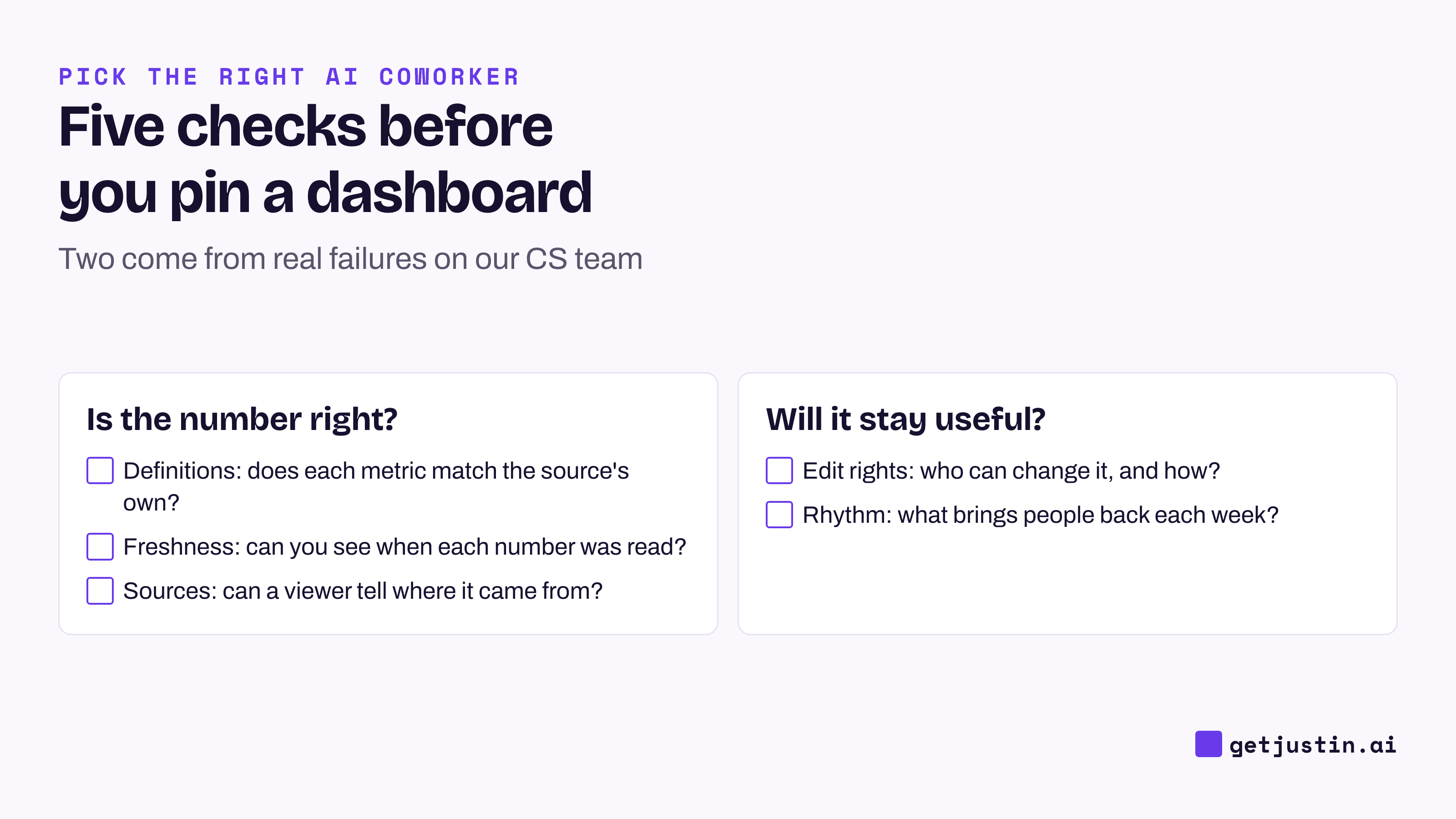
Figure: Check definitions, freshness, sources, edit rights and rhythm before a channel starts trusting a dashboard.
How to choose between them
Start from where your data lives and how people use the numbers. The diagram below maps the four common cases.
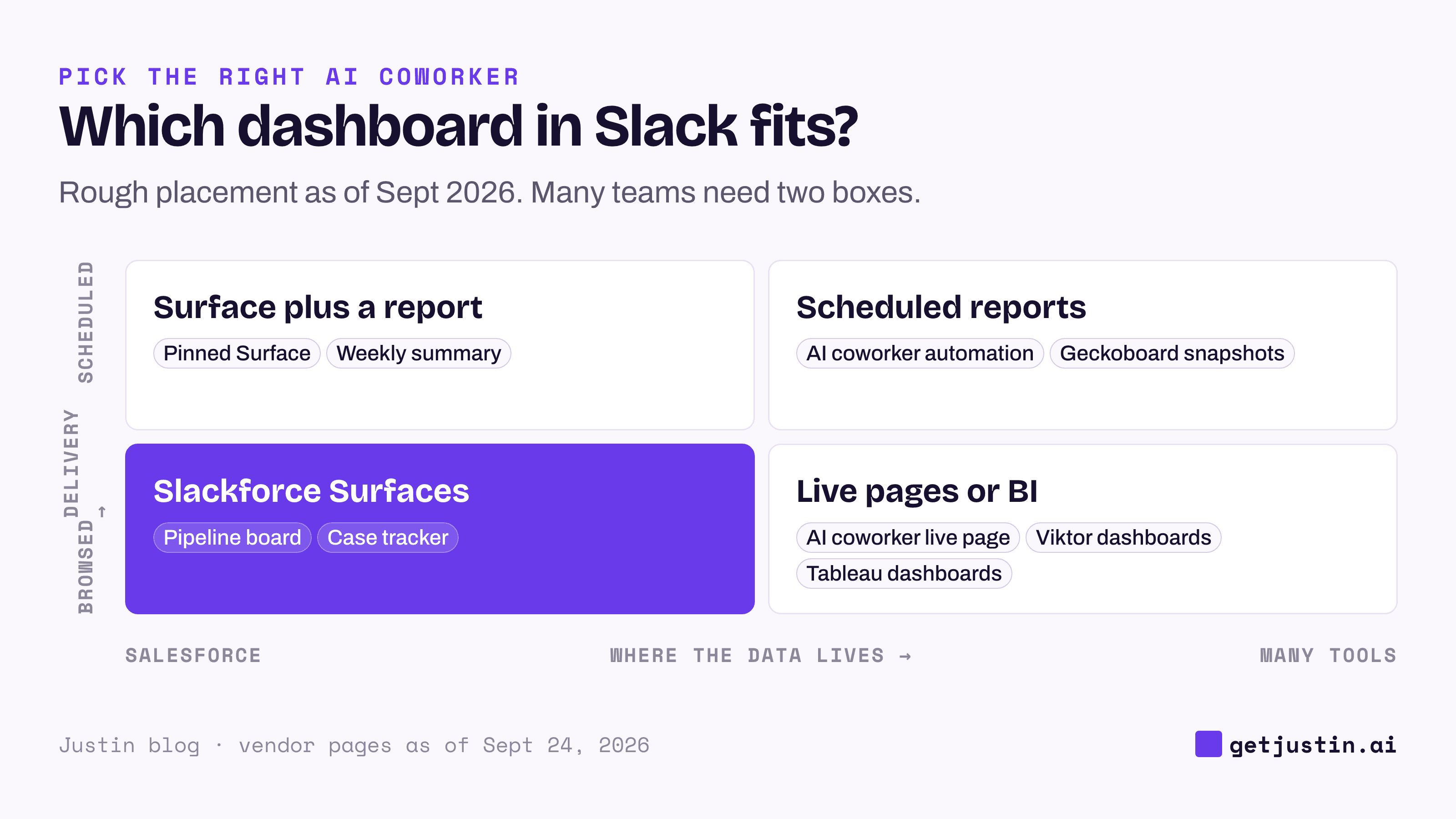
Figure: Surfaces fit Salesforce data people open when needed; spread-out data or scheduled delivery points elsewhere.
Choose Slackforce Surfaces if Salesforce holds most of your numbers and your team wants a pinned board in Slack with no new vendor.
Choose the Tableau app for Slack if a data team owns governed dashboards and Slack only needs the alerts.
Choose Geckoboard for a fixed KPI set on a screen and a daily snapshot.
Choose Viktor if you need dashboards across Slack and Microsoft Teams.
Choose Justin if your team’s data sits in several tools, such as Google Analytics, HubSpot and Shopify, and you want live pages that show when their data was last updated, plus reports that post to the channel on a schedule; the pricing page lists scheduled tasks on Pro and Max.
FAQ
What is Slackforce Surfaces?
Slackforce Surfaces is a Slack feature, first shipped July 29, 2026 and relaunched as Slackforce Surfaces on September 11, 2026, that lets Slackbot build dashboards, decks, reports and other interactive pages from a plain-language request. It draws on Salesforce data, Slack history and connected tools, and a Surface sits pinned in a channel where the team filters it, comments and acts on it.
Is Slackforce Surfaces free?
Salesforce says Surfaces are available on Enterprise+, Business+, Pro, Legacy and Free workspaces with Slackbot enabled, as of September 24, 2026. Slack’s help center lists Surfaces on all plans, with Slackbot access and limits varying by plan; neither Slack nor Salesforce publishes a separate Surfaces price. What you can build depends on what’s connected to Slack and on each viewer’s permissions.
Do Slack Surfaces update in real time?
Not yet. As of September 24, 2026, Slack’s help center says Surfaces are static files that don’t pull in new data; you create a new one from the same prompt to get the latest numbers. Salesforce says live data starts rolling out in October 2026. Whatever tool you use, look for the date each number was read.
Can Slack Surfaces use data outside Salesforce?
Salesforce says Surfaces draw on Salesforce data, Slack history and connected tools. If your numbers sit in GA4, ad platforms, Shopify or a warehouse, check each Slack connection before you promise a dashboard.
How do I get live dashboards in Slack without Salesforce?
There are three routes: an AI coworker that builds a live page from your connected tools, a KPI tool like Geckoboard that posts scheduled snapshots, or a BI tool like Tableau that sends alerts and previews. Pick by where your data lives and whether people need to change the dashboard themselves.
Is a Slackforce Surfaces alternative worth it if we already use Salesforce?
Often not, if Salesforce is where your numbers live and your team is on Slack. An alternative earns its place when the data sits in other tools, when you need scheduled delivery or a public link, or when part of the company works in Microsoft Teams.
Doing this with Justin
Justin, the AI coworker for Slack, builds live pages from the tools you connect. Invite Justin to a channel, @-mention it, and ask for the dashboard you want, for example “weekly signups from Google Analytics and new deals from HubSpot, as a live page.” The page is linked at the end of its reply. It shows when its data was last updated, reopening it refreshes the numbers, and you can ask where any number came from. Ask in the channel to change it; the link stays the same. Then set it to run on a schedule, posting to the channel every Monday.