

Short answer: This AI glossary for business teams defines the 40 terms that come up when a team adopts AI, in one sentence each. The terms are grouped by the four layers every AI coworker is built from (the model, what it knows, what it can do, and who approves it), plus the pricing words that decide the bill.
How to use this AI glossary for business teams
Place each unfamiliar term in a layer first, because the layer tells you what to ask: how good it is, what it can see, what it can touch, or who says yes. The guide to how AI coworkers work explains the layers themselves.
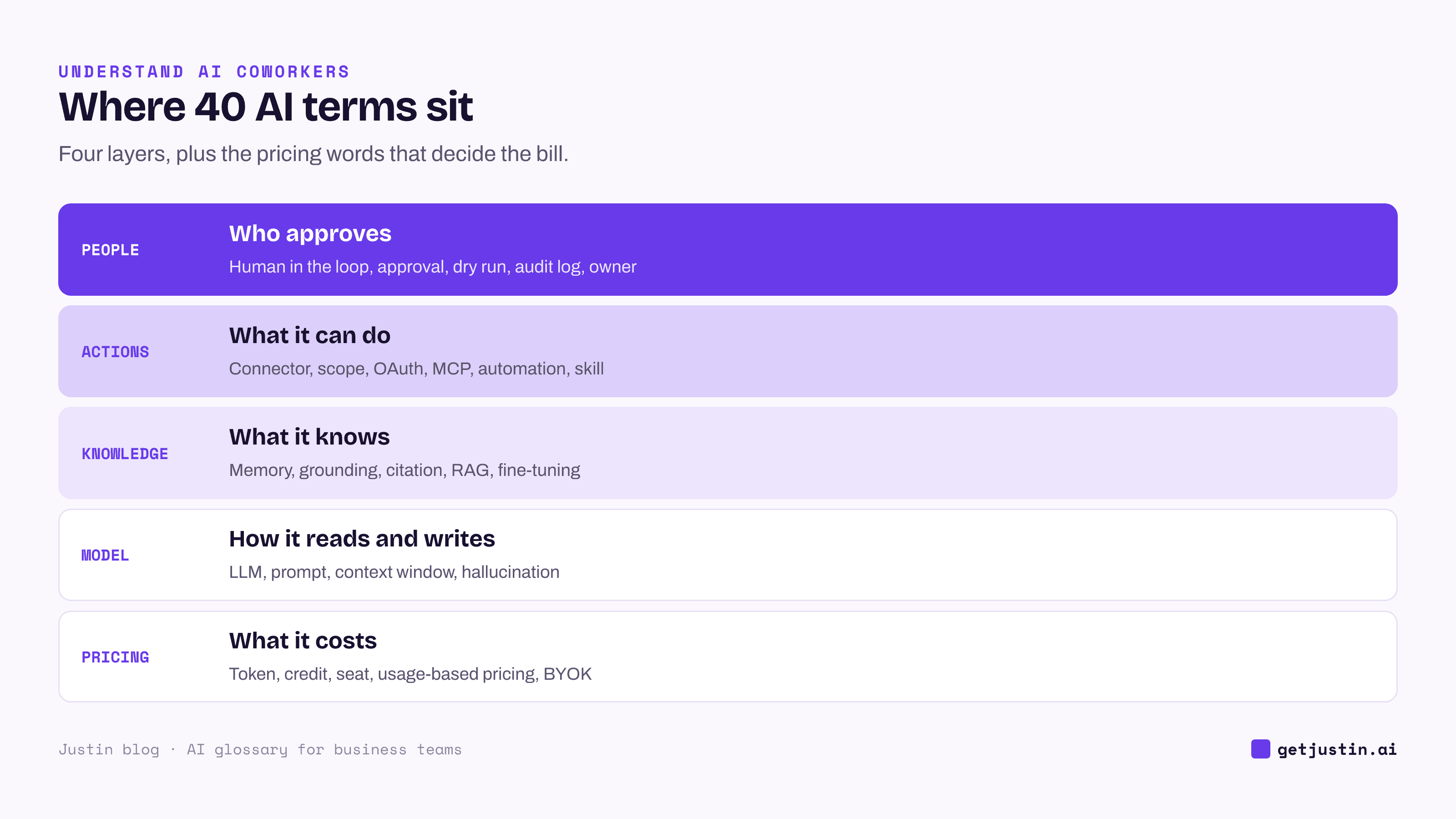
Figure: Every term in this glossary lives in one layer, and the layer tells you what to ask.
First, five names for the kind of tool:
Chatbot: an AI that answers one person in a chat window and acts nowhere else.
Copilot: an AI assistant built into one app, such as a spreadsheet or an inbox, that helps its user.
AI agent: an AI that works toward a goal in steps, choosing a tool, checking the result, then deciding what comes next.
Agentic AI: the umbrella term for AI that plans and carries out multi-step work instead of only answering.
AI coworker: an AI agent a whole team shares in a group channel, with the team’s context, its connected tools, and approvals before it changes anything.
The comparison of AI agents, chatbots, copilots and AI coworkers shows when each fits.
Model terms: how the AI reads and writes
Model terms describe the engine, which matters less to results than most buyers expect.
Large language model (LLM): software trained on vast amounts of text to predict the next words, so it can read, reason and draft.
Prompt: your request to the model, plus anything pasted or attached with it.
System prompt: standing instructions, set once by the vendor or your admin, that the model reads before every request.
Context window: the most text a model can consider at once, including files and its own reply.
Hallucination: a confident answer that is false, such as an invented figure or a source that doesn’t exist.
Reasoning model: a model or mode that works through a problem in steps before answering, slower and costlier but better at analysis.
Open-weight model: a model whose trained parameters are published so anyone can run it, unlike a proprietary model reached only through its maker.
Knowledge terms: what the AI knows about your team
Knowledge terms describe what the AI draws on beyond its training, which is where answers about your business come from.
Training data: the text a model learned from before release, which stops at a cutoff date and knows nothing about your accounts.
Memory: what an AI keeps from your team’s work between conversations, ideally scoped so a client’s context stays in that client’s channel.
Grounding: tying an answer to specific material, such as a file or a record, rather than general knowledge.
Citation: the link an answer gives for a claim, so a person can check the source.
RAG (retrieval-augmented generation): finding the passages most relevant to a question first, then writing the answer from them.
Vector database: a store that files documents by meaning, so a search for “refund policy” also finds “returns rules.”
Fine-tuning: retraining a model on your own examples to change its style or habits.
Citations matter because summaries drift: how RAG finds the right document shows an AI summary cited perfectly and still wrong, and how AI memory works at work covers scoping.
Action terms: connectors, MCP and automations
Action terms describe what an AI can do in your other tools, and each one is a permission question.
Tool call: one action an AI runs in another system, such as reading a sheet.
API: the door a software product opens so other software can read or change its data.
Connector: an authorized link between an AI and one tool, such as HubSpot or GA4; also called an integration.
OAuth: the “Sign in with” step that grants an AI access to a tool without sharing your password.
Scope: one permission inside a connector, such as “read contacts” or “send email.”
MCP (Model Context Protocol): an open standard, introduced by Anthropic in 2024 and now under the Linux Foundation (2025), that gives AI tools one common way to connect to software.
MCP server: the small program that exposes one tool or internal system over MCP.
Automation: a standing request that runs on a schedule, an event (its trigger) or on demand, and delivers the result somewhere.
Skill: saved instructions for one recurring job, such as the Monday report, that the AI follows each time.
The plain-language MCP guide covers when a team needs its own server.
People and governance terms: who approves what
Governance terms describe who stays in charge once an AI can act.
Human in the loop: a design where a person reviews the AI’s work before it takes effect.
Approval: a person’s explicit yes to one specific action, logged with who gave it and when.
Dry run: a run that shows what the AI would change, without changing anything.
Audit log: the record of what the AI did, who asked and who approved.
Guardrail: a rule the system enforces whatever the prompt says, such as “never delete records.”
Prompt injection: instructions hidden in a web page, email or file that try to make an AI act against its user.
Owner: the named person who hears when an automation fails and decides when to retire it.
Pricing terms: tokens, credits and seats
Pricing terms tell you what grows the bill, and the three main units don’t convert into each other.
Token: the chunk of text a model reads and writes, often a short word or part of a longer one, and the unit providers price by.
Credit: a vendor’s own billing unit that bundles tokens, tool calls and other costs, so it buys different work on different products.
Seat: one licensed person, charged whether or not they use the tool that month.
Usage-based pricing: paying for what is consumed instead of a flat fee per person.
BYOK (bring your own key): connecting a tool to your own model-provider account, which adds a second, separately metered bill.
Our CS ops lead runs every model call through the team’s existing subscription rather than a separately billed API key, so there is one bill to watch.
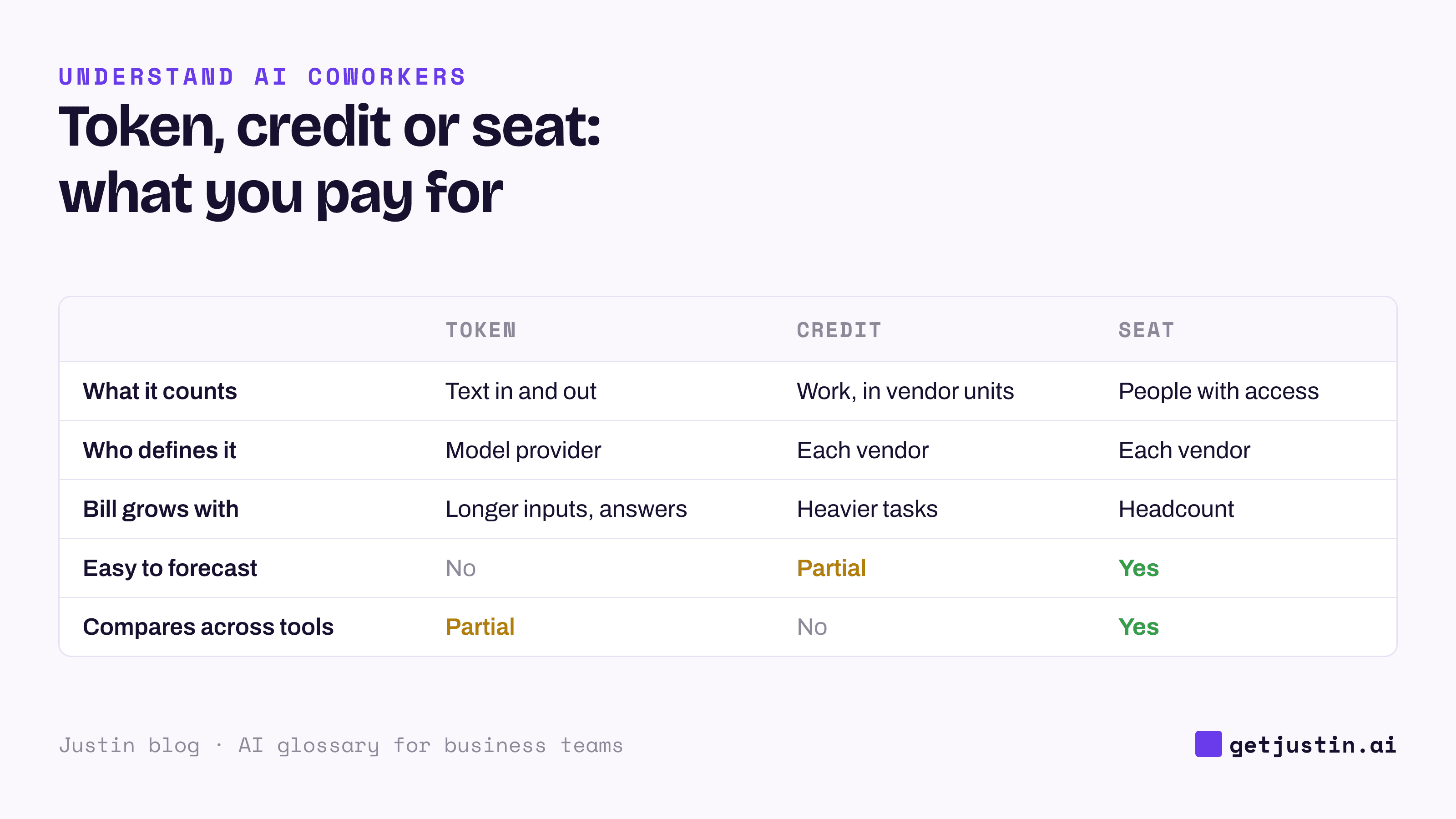
Figure: Credit counts don’t compare across products, so price a week of your real work on each plan.
Which AI terms do teams mix up most?
Most confusion in AI terminology for teams comes from pairs that sound alike but lead to different decisions.
Often confused | The difference | Why it matters |
|---|---|---|
Training data vs memory | Training data is fixed before release; memory is what the AI learns from your team | Only memory knows your accounts, so ask how it is scoped |
RAG vs fine-tuning | RAG looks things up when asked; fine-tuning retrains the model | Retrieval sees an edited document the same day |
Broken connector vs missing scope | One fails at everything; the other fails at one kind of action | On our CS team, a “broken” connector was a permission never granted, which reconnecting can’t fix |
Plan approval vs write approval | Agreeing to a plan vs saying yes to each change | “Approving a plan is not approval to write it,” says our CS ops lead |
FAQ
What AI terms should a business team learn first?
Start with five: AI agent, connector, scope, approval and credit. They cover what the tool is, what it can reach, what it may do, who says yes, and what it costs.
What does MCP stand for in AI?
MCP stands for Model Context Protocol, an open standard that gives AI tools one common way to connect to other software. A tool that supports MCP can reach your internal systems as well as off-the-shelf apps.
Is a token the same as a word?
Not exactly. A token is a chunk of text, often a short word and sometimes part of a longer one, and punctuation counts too. Providers price by the token, so longer inputs and answers cost more.
Do we need fine-tuning to teach an AI about our business?
Usually not. Business knowledge changes too often to retrain on, so connecting the AI to your documents and tools gets further. Fine-tuning helps when thousands of outputs must follow one fixed style.
Doing this with Justin
Justin, the AI coworker for Slack, maps onto most of this glossary. It keeps a shared team memory of what your team tells it, and what you tell it in a DM isn’t visible to the rest of your team. It reaches thousands of apps, or your own systems through a custom MCP server, and nothing is connected until someone on the team authorizes it. Reading doesn’t need approval; it asks in the channel before it writes to your connected tools, you approve once or for that kind of action, and every approval is recorded with who and when. There are no seats: credits are pooled across the team, monthly plan credits reset with no carry-over, and long \ultra reasoning sessions use more.
Related reading
Open-weight vs proprietary AI models: what a business team should care about
An AI usage policy for agents that take action (template)