

Short answer: Competitor monitoring automation works when it watches a short list of pages tied to decisions, posts only when a change crosses a threshold you set, and says so loudly when a check fails. Each alert should be a dated fact with a link and an owner, not the AI’s opinion of what a competitor is planning.
Most competitor channels die the same way. Every banner swap and blog post triggers a message, people mute the channel, and the one change that mattered goes unread. The fix is fewer, stricter alerts, plus a monitor you can trust when it’s quiet.
What should competitor monitoring automation watch?
Watch the pages that feed a decision you make, not everything a competitor publishes. For most teams that is the handful of pages in the template below, for the three to five competitors your lost customers actually pick. Each row has a rule for when it’s worth a message and a person who acts on it; the thresholds are examples to tune.
Watch item | Where | Check | Post when (example threshold) | Owner |
|---|---|---|---|---|
Pricing page | The competitor’s site | Daily | A plan’s price, name or main limit changes | Pricing or marketing lead |
New ads | Weekly | A new offer or angle appears in ad copy | Paid lead | |
Reviews | G2, app stores, Amazon | Weekly | Three or more new reviews raise the same theme | Product marketing |
Changelog | Release notes, help center | Weekly | A launch in your core use case | Product marketing |
Homepage headline | The competitor’s site | Weekly | The main promise changes | Brand lead |
News | Google Alerts emails, press pages | Daily | Funding, acquisition, a major partnership | Leadership |
Job posts | Careers page | Monthly | A new team or a new region | Leadership |
For the ad row, competitor ad research covers what to look for. For reviews, AI customer review analysis covers how to count themes so one loud reviewer doesn’t set off an alert.
How to track competitor pricing changes without the noise
Compare the facts on the page, not the page itself. Page-change tools flag every rotating testimonial, cookie banner and A/B test, which is where false alerts come from. An AI coworker can instead read the pricing page each run, pull out a small record, and compare that record with the last one.
The record is short: plan names, monthly and annual prices, billing period, and the one or two limits customers compare (seats, orders, credits). Store each run as a row in a sheet. The diagram below shows the loop.
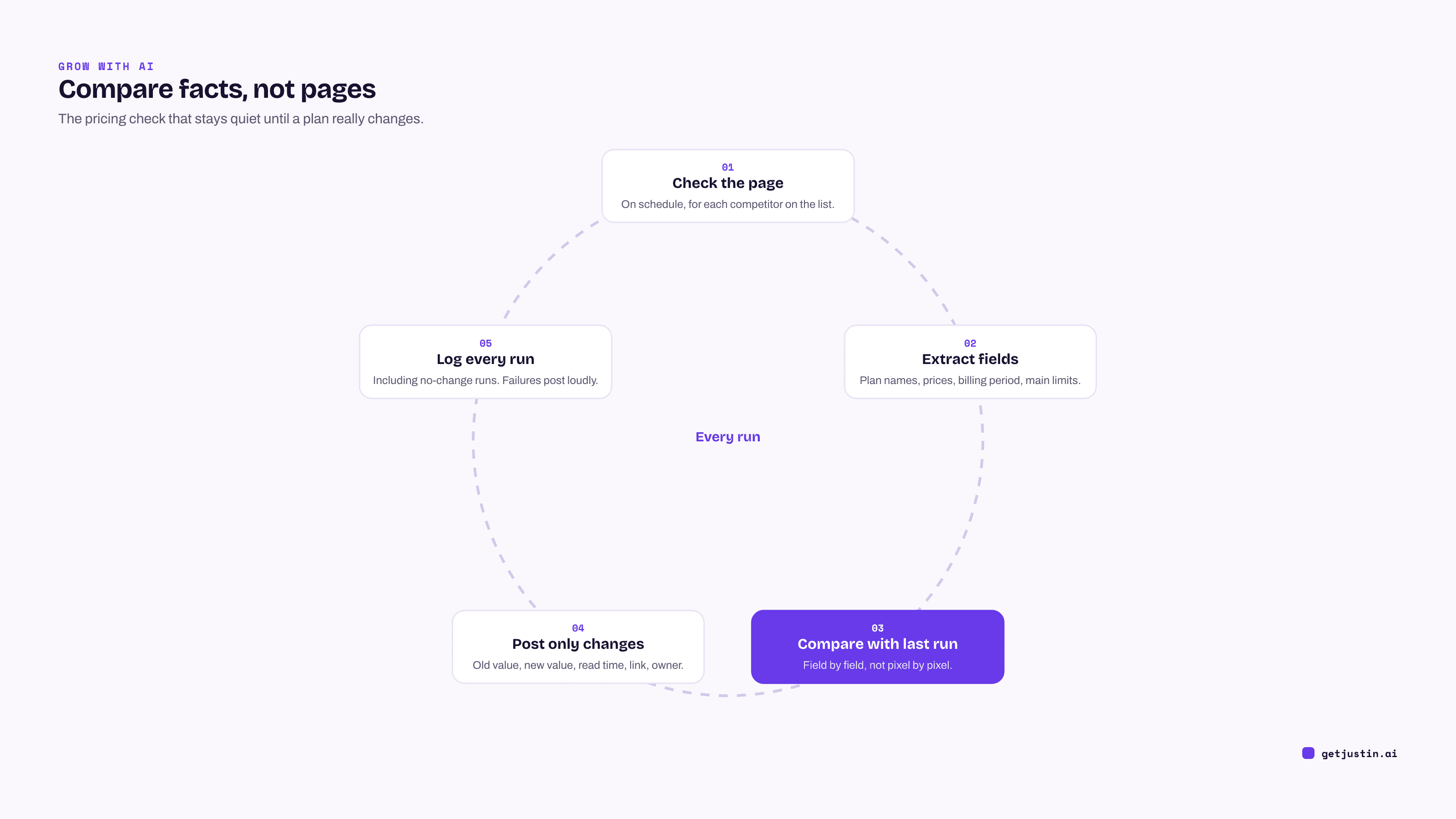
Figure: Comparing extracted fields, not page pixels, is what keeps pricing alerts quiet and accurate.
Two details make the loop trustworthy. Log every run, including the ones with no change, so you can prove the check happened. And post the old value next to the new one, with the read time and a link, so nobody has to re-check the page before reacting.
Post facts, not verdicts
An alert should state what changed, when it was read and where; interpretation belongs in the thread, with people. Our own account notes went facts-only after an AI label called a struggling account “Healthy” (the story is in AI customer review analysis).
Competitor alerts work the same way. “Rival B raised its Pro plan from $49 to $59 a month, as of Sep 22” is useful to everyone. “Rival B is moving upmarket” is a guess wearing a fact’s clothes. A competitive intelligence Slack channel stays credible when the AI reports and people interpret, as in the example below.
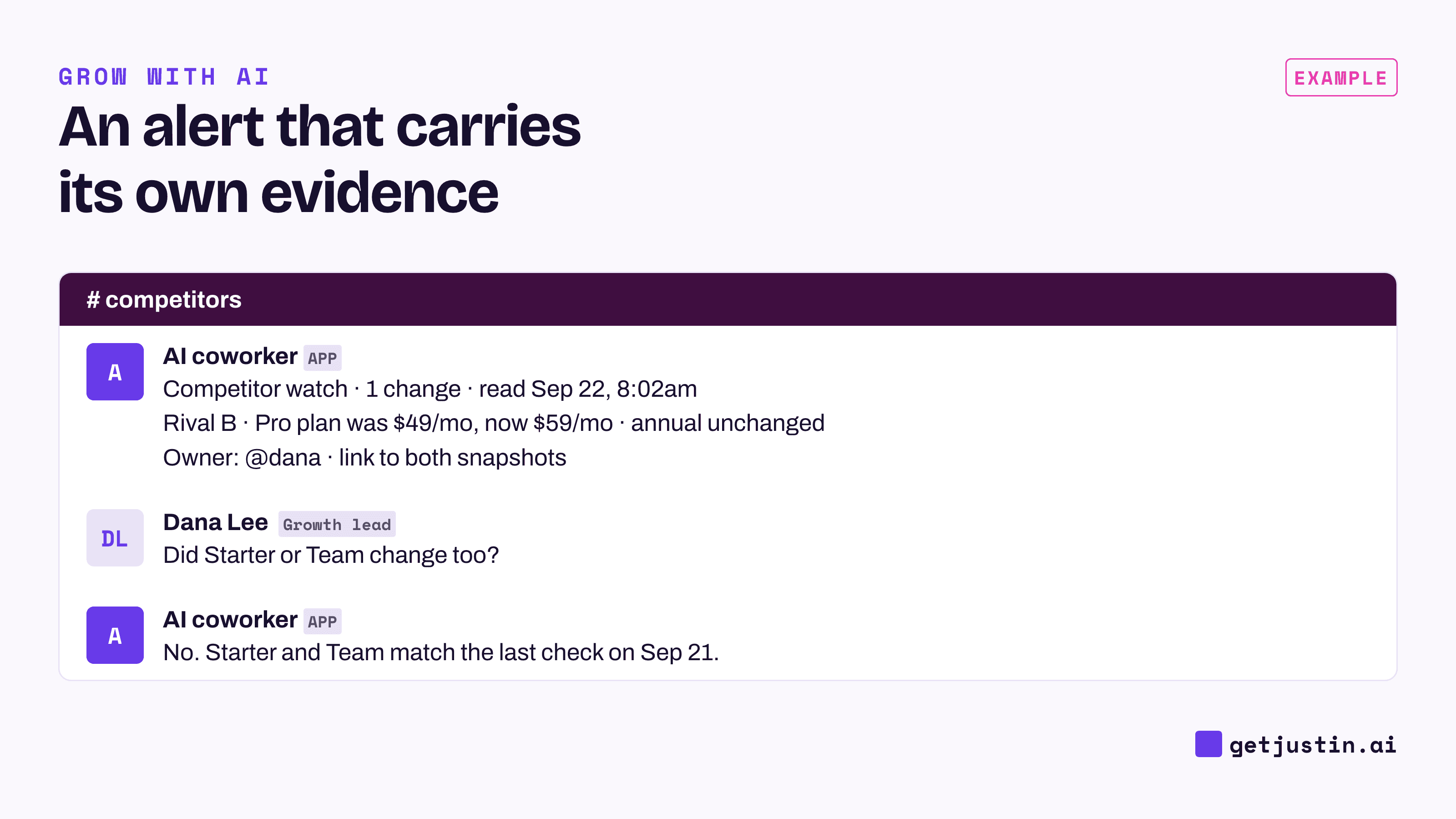
Figure: The alert carries the fact, the old value and the source; the discussion happens under it.
Silent on a normal day, loud when a check breaks
A monitor that says nothing is only useful if silence reliably means “nothing changed.” That makes failure handling the most important part of the setup, and it’s the part most templates skip.
On our team, a sizable share of scheduled runs once went out without the data connection they needed, and those lost runs looked normal in the task list; the full count is in anomaly alerts for marketing metrics. Another job’s source returned nothing for 30 days, and the daily report kept publishing, just without that section. Neither failure crashed anything. Both would have looked like a quiet week.
So every monitor gets four rules:
A failed check posts. Name the competitor, the page and what went wrong: blocked, login wall, page moved.
Implausible results count as failures. Zero plans on a pricing page, or zero ads for a brand that always advertises, is an error, not “no change.”
Run it once by hand. The first run is where missing permissions show up, so do it while someone is watching.
Name an owner for the monitor itself. Unattended jobs with no backup owner can fail quietly for weeks.
The same thresholds-and-owners thinking applies to your own marketing numbers.
FAQ
What is competitor monitoring automation?
Competitor monitoring automation is a scheduled check of competitors’ pricing pages, ads, reviews, changelogs and news that posts to your team when something meaningful changes. Good setups watch a short list tied to decisions, compare extracted facts rather than whole pages, and report failed checks.
How do I get competitor updates in Slack for free?
Slack’s RSS app subscribes a channel to any feed, such as a competitor’s blog or changelog, and is available on all plans (Slack Help Center). Google Alerts emails you new news results for a name. Pricing pages rarely have feeds, so they need a scheduled check.
How often should you check competitor pricing?
Daily if you compete on price or sell online, weekly otherwise. Checking more often rarely helps, because pricing changes are infrequent and the decision they feed takes longer than a day.
Should competitor alerts include AI summaries?
Include the extracted fact, the old value, the read time and the link. Leave out the AI’s guess about strategy. If people want an interpretation, they can ask in the thread, where it’s clearly a discussion and not a finding.
Doing this with Justin
Justin, the AI coworker for Slack, can run the whole check as an automation, because it can read web pages. Connect Google Sheets for the run log and invite Justin to #competitors, then ask: “Every weekday at 8am New York time, read these five pricing pages, log each plan’s price in the sheet, compare with the last run and post only changes, with the old value, the new value and the link.” Name your own time zone, and ask Justin to read the schedule back before it sets it up. Adding rows is a write, so run the check once in the channel and approve that kind of action from then on. On a normal day it stays silent, and a run is marked failed if any destination you chose fails. Reply under any alert and it picks up from that report.