

Short answer: HubSpot marketing reporting with AI works when you ask pipeline questions, not lead questions: which campaigns produced deals and closed-won revenue, and how fast. Connect HubSpot once, ask in plain words, and require every answer to say which records it counted and which it left out. Check the first answers against HubSpot’s own campaign screen, because most wrong answers come from associations and labels, not math.
Lead counts are the easy report and the wrong one for a CEO. In HubSpot, the path from campaign to closed-won runs through associations: campaign, then contact, then deal. An AI coworker can walk that path in seconds, and fall off it without telling you.
What does HubSpot track between a campaign and closed-won?
HubSpot connects a campaign to revenue only through the records associated with it. A campaign holds assets such as emails, landing pages, forms and ads. A contact who interacts with those assets counts as influenced. A deal counts toward campaign revenue only when it’s associated with at least one influenced contact (HubSpot, as of September 2026).
The diagram below shows that chain and where each link breaks.
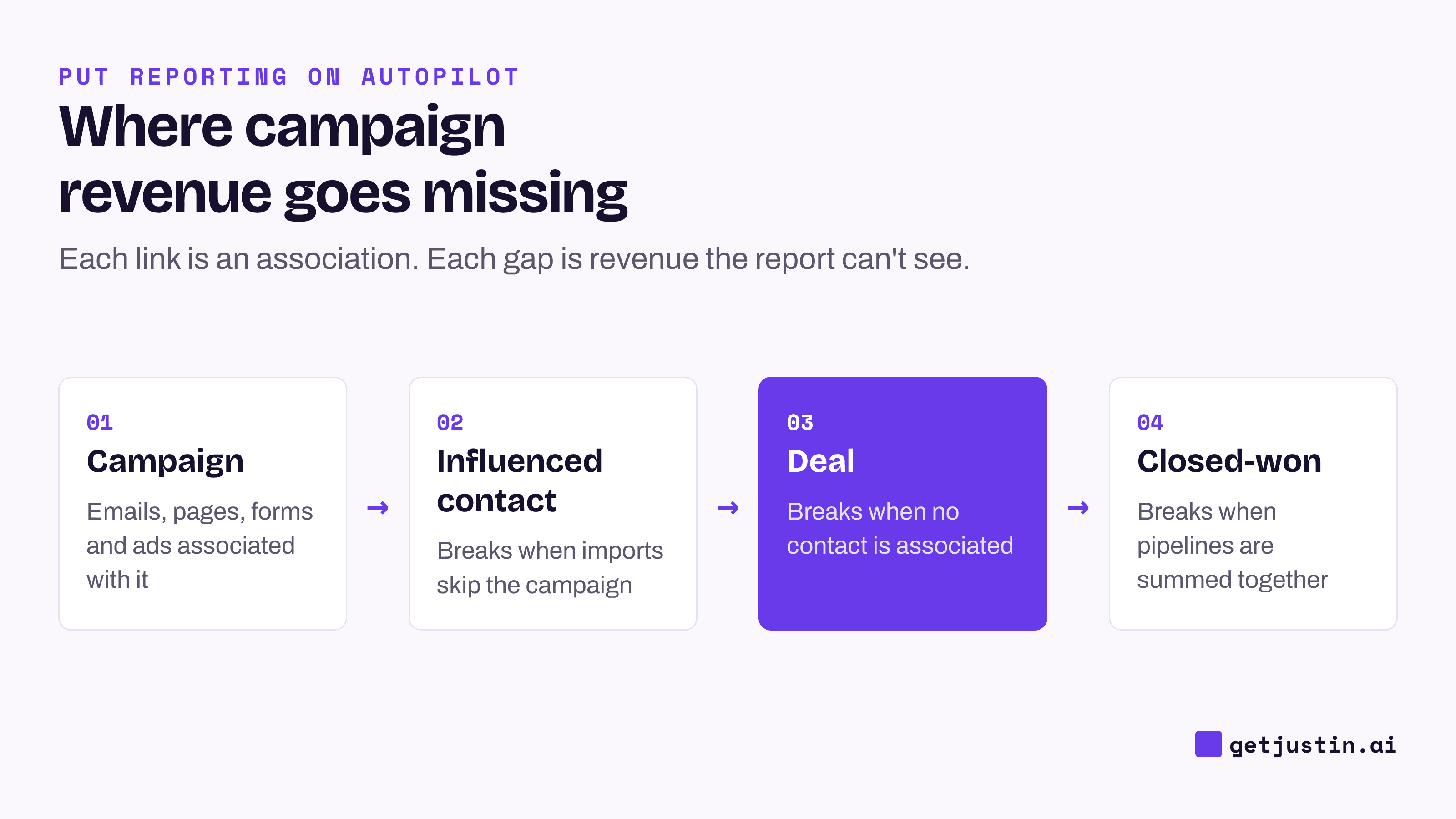
Figure: Every link is an association, and every missing association is revenue the report can’t see.
Your tier sets what you see. As of September 2026, HubSpot lists deal-create and revenue attribution reports as Marketing Hub Enterprise only (HubSpot), while a campaign’s own Revenue report needs Professional (HubSpot). Its “Create report with AI” builds single-object reports, so a question spanning campaigns, contacts and deals needs the report builder or an AI coworker that reads across objects (HubSpot).
Which touch deserves the credit is a model choice, and the models disagree. This guide sticks to “did the campaign touch someone on the deal” and leaves the weighting to your attribution tool.
Five pipeline questions to ask HubSpot
Ask questions that end at a deal, and name the pipeline, the date field and the campaign as they appear on your screen. Let the AI work out, and verify, how HubSpot stores them.
Question | What a good answer shows | Watch for |
|---|---|---|
Which campaigns last quarter touched deals that closed won, and for how much? | Campaign, deal count, amount, and a link to each deal | Deals with no associated contact are invisible |
Which campaigns created deals this month, by pipeline? | New deals per campaign, split by pipeline | Pipelines summed together |
How long from first campaign touch to closed-won, by campaign? | Median days, with the deal count behind it | Three deals is an anecdote, not a speed |
Which campaigns brought contacts but no deals in 90 days? | Contacts added, deals created, the date range | Long sales cycles make new campaigns look empty |
Which closed-won deals this quarter touched no campaign? | The deal list, with owner and source | This list is your data-gap report |
Run the last question first. It measures what the data can’t see, and if a third of closed-won revenue has no campaign, fix that before trusting any campaign ranking.
Ask each answer to end with an “excluded” line: records dropped, and why. The example below shows the shape.
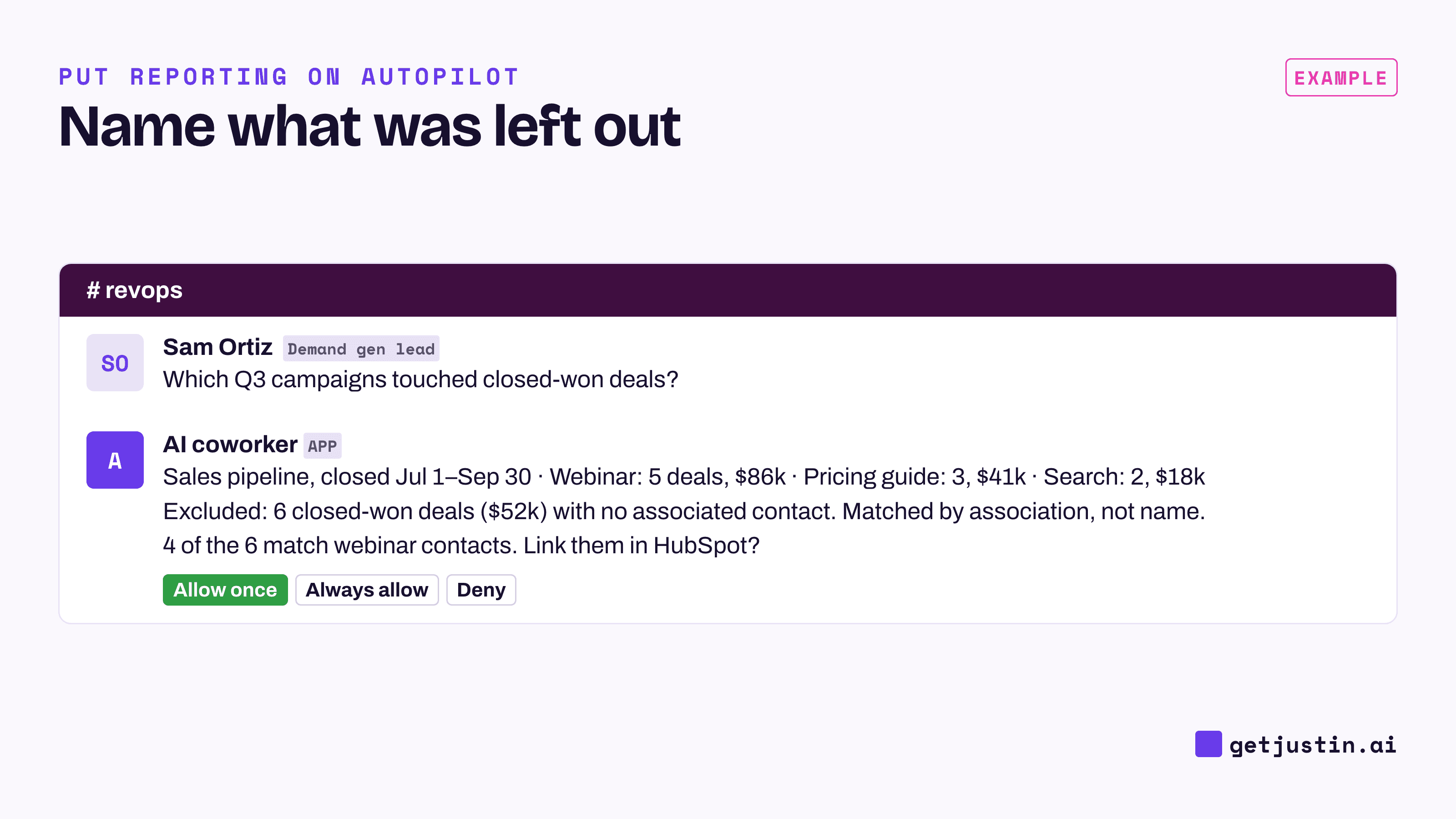
Figure: A trustworthy answer ends with what it left out, and any fix to HubSpot waits for approval.
How do you check an AI’s HubSpot numbers?
Check an AI’s HubSpot numbers against HubSpot’s own campaign screen before you share them. Pick two campaigns, open each one’s performance view, and compare deals and revenue. If every row is off by the same few percent, suspect a filter, such as close date against create date. The weekly report guide has the full two-Monday check.
Then ask how it found the deals. On our CS team, a skill we built showed zero open tickets for an account whose CSM knew of four. It searched ticket titles for the account’s name, and two of the four were titled things like “UX wording change for clarity.” The fix was to start from the account’s own record and follow its links. The rule became “no name searches, ever.”
HubSpot has the same trap: a campaign called “Q3 Webinar” won’t appear in a deal named “Acme renewal.” If the AI matched by name, discard the answer and ask it to follow associations.
Common HubSpot data gaps, and what AI can and can’t fix
Most wrong HubSpot campaign reporting comes from a handful of gaps. An AI coworker can find them, because finding is a read. Fixing is a write to your CRM, so it waits for a named person’s approval, the model behind an AI marketing analyst that asks before it writes.
Gap | Symptom in the report | Fix |
|---|---|---|
Deal with no associated contact | Closed-won revenue missing from every campaign | Associate the buyer; list these deals weekly |
Event list imported without a campaign | Contacts show up with no campaign touch | Add imports to the campaign when you upload them |
Pipelines summed together | Totals include pipelines marketing doesn’t own | Filter on a named list of pipelines |
Dropdown label differs from its stored value | A filter returns nothing | Ask for label and stored value side by side |
Lifecycle stage read as history | Last quarter’s counts change after the fact (HubSpot) | Use each stage’s “date entered” property |
Asset added to the campaign late | Early results sit outside the campaign totals | Associate assets when the campaign launches |
Two of these are easy to miss because nothing errors. When someone relabels a dropdown option, the screen shows the new label while the stored value keeps the old one, so a filter written from the screen label finds nothing. A deals view with no pipeline filter quietly pulls in pipelines marketing doesn’t own, such as a self-serve pipeline.
Include lists go stale too. A sync or report that accepts a fixed list of deal types will skip any type added later, often with nothing more than a log line. That’s why every answer needs the “excluded” line, and a person who reads it.
FAQ
Can HubSpot’s AI build campaign reports?
Yes, within limits. As of September 2026, “Create report with AI” builds a report from a plain-language prompt on Professional and Enterprise hubs, once an admin turns AI on. It builds single-object reports only, so campaign-to-deal questions need the report builder or another AI tool.
Why doesn’t HubSpot campaign revenue match our closed-won total?
HubSpot counts a deal toward a campaign only when the deal is associated with a contact the campaign influenced. Deals with no associated contact, contacts imported without a campaign, and assets added late all fall outside. List closed-won deals with no campaign touch to see the gap.
Do I need Marketing Hub Enterprise for a HubSpot pipeline attribution report?
For HubSpot’s native deal-create and revenue attribution reports, yes: its docs list them as Enterprise only as of September 2026. Professional includes contact-create attribution. Check your own account, since packaging changes.
How do I get a weekly HubSpot pipeline report in Slack?
Pick two of the five questions above and schedule them as a weekly report, with the “excluded” line kept in. The one-sentence weekly report setup covers the schedule, and the automated monthly CEO report shows how pipeline numbers roll up for leadership.
Doing this with Justin
Justin, the AI coworker for Slack, connects to HubSpot through its connector catalog; authorize it once in app.getjustin.ai/connectors and it’s available to your team. @-mention Justin in #revops with one of the five questions, and ask it to list what it excluded. Reading doesn’t need approval within the scopes you grant. Before it associates a contact, edits a deal or changes any other HubSpot record, it asks first; approve just that action, or that kind of action from then on. To make it weekly, ask for “every Monday at 9am Eastern, closed-won deals with no campaign touch, in #revops”, and ask Justin to read the terms back before it starts.